

External Display Browser: XeOS
Marian-Daniel Filipovici · Productivity
Independent analytics for this App Store listing. AppTracker is not affiliated with Marian-Daniel Filipovici.
Chart standing · US
What changed · US
Listing changes AppTracker has observed for this app in this storefront — new versions, price moves, rating shifts, and store copy.
- Version 2.7 brings virtual displays! Add up to 4 virtual displays with different window configurations and seamlessly switch between them using shortcuts or the status bar icons. - You can now enable your iPhone as a second display alongside your external display, allowing you to fully take advantage of the available screen real estate and pin useful apps like a music player or note-taking app. This experience is best on iPad, which fully supports 2-display configurations. The iPhone experience is more limited, but still useful. - Added a clearer and more secure Permissions & Storage section in Settings, including easier access to site data controls. - Improved support for Netflix, WhatsApp Web, iCloud apps, Microsoft Office Online, and many, many more web apps!
Price & rating history · US
Reconstructed from the listing changes AppTracker has observed in this storefront. A field is charted once it has changed more than once, and each line starts at the value it moved from.
Average rating · ★ 4.50 now · 11 changes on record
Screenshots


About
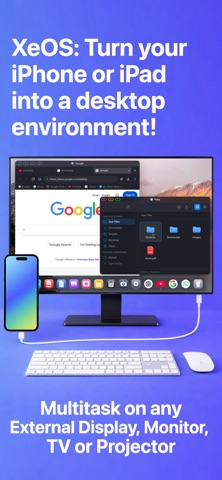
Browse the web on a second screen, watch videos full-screen, work or study on your external monitor, TV, or projector powered only by your iPhone/iPad. Browse at full resolution, remove black bars, open PDFs and files in tabs, join calls with camera and microphone support, and enjoy a better iPhone/iPad extended display experience. • Full-resolution browsing on your external display from iPhone/iPad • Remove black bars for a cleaner full-screen view • Open PDFs and files in browser tabs • Download files directly from the browser • Watch YouTube and online video in full screen • Camera and microphone support for calls and meetings • Mouse and keyboard support for a desktop-like setup • Multitask with floating tabs - resize and reposition them anywhere on the screen • Use the on-screen trackpad when you don't have a mouse with you • Use the on-screen keyboard when you don't have a keyboard with you • More flexible iPhone/iPad external monitor to use anywhere • Enjoy a better iPhone/iPad to external monitor experience • Use iPhone/iPad extend display for work, travel, and entertainment • Privacy-focused by design, with no server account or remote processing; your browsing session, files, and activity stay on your device • Integrated ad-blocker disables many known intrusive trackers and ads • Built on Safari and iOS security standards, with proper system permissions IMPORTANT: This app works only with iPhone/iPads supporting video output when connecting via cable or adapter! Most iPhone/iPads support it, except the Air and E models, but check your iPhone/iPad's compatibility! The app works with some iPads but we advise you to use the free trial to test it with your model first! If wired connection doesn't work for your model try the wireless mode via AirPlay. The app's onboarding guides your through connecting all peripherals and your external monitor. If you encounter any issues or need help please contact support in the app. IMPORTANT: Note that the app has a few minor limitations. Due to browser engine security restrictions, users may be unable to interact with remote iframes in certain situations. When this happens, the app provides a button to temporarily switch to the phone layout, allowing you to complete the required action. Afterward, you can return to the fullscreen, black-bar-free experience. By using this app, you agree to Apple's Terms of Use (EULA): https://www.apple.com/legal/internet-services/itunes/dev/stdeula/
What's new · 2.7.11
- Version 2.7 brings virtual displays! Add up to 4 virtual displays with different window configurations and seamlessly switch between them using shortcuts or the status bar icons. - You can now enable your iPhone as a second display alongside your external display, allowing you to fully take advantage of the available screen real estate and pin useful apps like a music player or note-taking app. This experience is best on iPad, which fully supports 2-display configurations. The iPhone experience is more limited, but still useful. - Added a clearer and more secure Permissions & Storage section in Settings, including easier access to site data controls. - Improved support for Netflix, WhatsApp Web, iCloud apps, Microsoft Office Online, and many, many more web apps!
Details