

MP3 Converter: Audio Extractor
成威 占 · Music
Independent analytics for this App Store listing. AppTracker is not affiliated with 成威 占.
Chart standing · US
What changed · US
Listing changes AppTracker has observed for this app in this storefront — new versions, price moves, rating shifts, and store copy.
This update improves performance and stability across audio trimming, video-to-audio extraction, and format conversion, with additional bug fixes for a smoother editing and export experience.
Ratings breakdown · US
The star breakdown behind this app's rating in this storefront.
In-app purchases · US
What this app sells inside itself, grouped by kind and priced for this storefront.
Screenshots



About
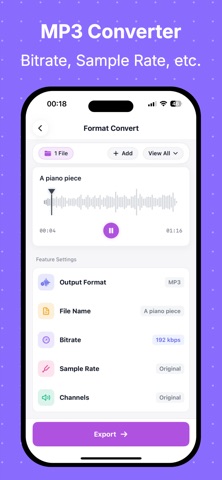
Video to audio, audio extraction, and MP3 conversion made more efficient. MP3 Converter: Audio Extractor streamlines the full workflow from import to edit to export. After selecting a file, you can trim, merge, change speed, adjust pitch, reduce noise, and export in just a few steps. Great for content creation, recording cleanup, and audio asset processing. Key Features - Video to Audio: Quickly extract audio tracks from video and export to common audio formats. - Audio Format Conversion: Convert between popular formats for different upload platforms. - Audio Trimming: Precisely cut clips and keep only the parts you need. - Audio Merging: Combine multiple files into one track for narrations or compilations. - Audio Enhancement: Volume, EQ, speed, pitch, fade in, and fade out. - Smart Processing: Noise reduction and voice-related processing to improve usability. - Flexible Import Options: Local files, Photos, recording, Wi-Fi transfer, and more. Why Choose Us - Clear workflow: Fewer steps from file selection to export. - Local-first: Core editing is processed on device. - Better control: Adjust key export settings before saving for quality and file size balance. - Broad use cases: Short videos, podcasts, course recordings, and meeting audio. Who It's For - Content creators: Short videos, podcasts, voice-over, and BGM asset editing. - Students and teachers: Lecture recording edits, key segment extraction, assignment audio export. - Professionals: Meeting recording cleanup, training audio extraction, and archiving. - Social media and operations teams: Multi-platform format adaptation and secondary audio editing. - Music and audio enthusiasts: Daily trimming, merging, speed/pitch adjustment, and effects. - Everyday users: Video audio extraction and personal audio management. Subscription Information - Some advanced features (such as batch processing, selected advanced parameters, or premium audio capabilities) require a VIP subscription. - Subscriptions auto-renew, and payment is charged to your Apple ID account upon purchase confirmation. - Unless auto-renew is turned off at least 24 hours before the end of the current period, the subscription will renew automatically. - Renewal charges are applied within 24 hours before the current period ends. - You can manage or cancel subscriptions in iPhone Settings > Apple ID > Subscriptions. - Pricing, billing cycles, and trial availability are shown on the in-app purchase page. If you're looking for an all-in-one tool for video to audio + audio editing + MP3 conversion, MP3 Converter: Audio Extractor helps you finish every audio task faster. Privacy Policy: https://honeysuckle-chili-8e1.notion.site/Privacy-Policy-for-MP3-Converter-Audio-Extractor-2f483e0d4e028021a8a2eed10ea17727?pvs=74 EULA: https://www.apple.com/legal/internet-services/itunes/dev/stdeula/
What's new · 1.0.9
This update improves performance and stability across audio trimming, video-to-audio extraction, and format conversion, with additional bug fixes for a smoother editing and export experience.
Details