

Dominate - App Blocker
CARLOS MANUEL ABELLA TORRES · Productivity
Independent analytics for this App Store listing. AppTracker is not affiliated with CARLOS MANUEL ABELLA TORRES.
Chart standing · US
What changed · US
Listing changes AppTracker has observed for this app in this storefront — new versions, price moves, rating shifts, and store copy.
New Challenges
Price & rating history · US
Reconstructed from the listing changes AppTracker has observed in this storefront. A field is charted once it has changed more than once, and each line starts at the value it moved from.
Average rating · ★ 5.00 now · 3 changes on record
Screenshots




About
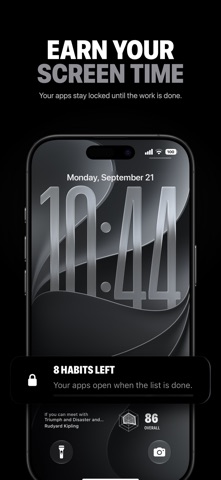
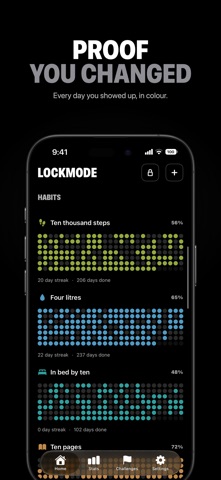
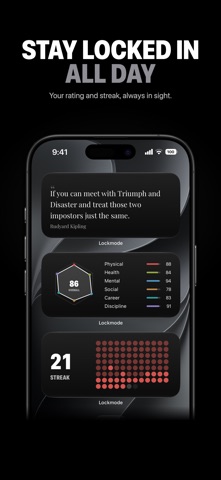
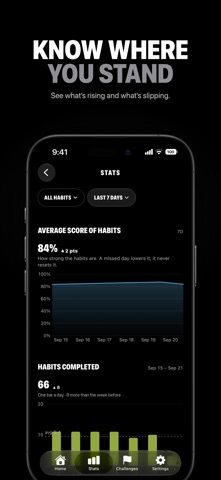
Your apps open when the day's work is done. Not before. Lockmode gives you the two things willpower does not: a list of what today is actually for, and a phone that stays shut until it is finished. THE LOCK Pick the apps, games and websites that take your day one by one, or a whole category at once. They stay shut while anything on today's list is still due, and they open the moment you tick the last thing off. There is no countdown to wait out and no timer to game. The only two ways past it are to finish, or to turn the lock off yourself one tap, in plain sight. It runs on Apple's Screen Time, so it holds when the app is closed, force-quit, or after a restart. Calls, messages and everything else keep working normally. THREE MORE WAYS TO SHUT AN APP Quick block: a saved set of apps, shut by a tap and opened by the same tap. Daily limit: thirty minutes of social media a day. Spend them whenever you like; when they are gone, those apps stay shut until midnight. Schedules: work hours, study blocks, mornings, nights. Set it once and it blocks and unblocks on its own, without you ever opening the app. Run all four at once if you want. They never fight each other an app stays shut while any one of them says it should be. HABITS THAT ASK SOMETHING OF YOU Choose which weekdays each habit is due, give it a number to hit four litres, ten pages, two sessions and a reminder at the hour you mean to do it. CHALLENGES When one habit at a time is not enough, take on a programme: 30, 75 or 90 days of a fixed standard. Its habits land on your list for the whole run, and a day only counts if you did every one of them — the run is a tally of days you earned, never a number that flatters you. A STREAK YOU CANNOT FAKE A day closes when everything due that day is done your own habits and any challenge you are carrying. A day with nothing due is stepped over. Anything less than a finished day sets the streak back to zero. SEE THE SHAPE OF YOUR LIFE Every habit belongs to one of six pillars Physical, Health, Mental, Social, Career and Discipline and each is scored from what you have actually done, not what you intended. The chart shows the thin side of your life at a glance, and it is usually the one you have been avoiding. Below it, every day you have used the app, as a calendar you can scroll back through. ON YOUR HOME SCREEN Seven widgets your streak, today's list, the state of the lock, a single habit you keep losing, the whole run as a grid, your six pillars, and a line worth reading first thing. While the lock is up it also sits on the Lock Screen and in the Dynamic Island. PRIVATE BY DESIGN There is no account to create and no server of ours holding your habits. The blocking runs on Apple's Screen Time, Device Activity and Managed Settings frameworks which is why it holds when the app is closed, and also why we never learn which apps you chose. Apple hands the app sealed tokens, not names. WHAT PEOPLE USE LOCKMODE FOR Making the morning's real work the price of unlocking the phone. Getting through a 75-day challenge without quietly dropping a day. Studying and deep work that stay deep. Building a routine that survives the third week. Lockmode does not ask you to have more willpower. It makes the shortcut unavailable. —— Lockmode is an auto-renewing subscription. Yearly — $49.99 Weekly — $9.99 Prices are in USD and may vary by region. Payment is charged to your Apple Account at confirmation of purchase. The subscription renews automatically for the same period unless it is cancelled at least 24 hours before the end of the current period. Manage or cancel anytime in Settings > Apple Account > Subscriptions. Terms of Use: https://apps-website-nu.vercel.app/overwill/terms Privacy Policy: https://apps-website-nu.vercel.app/overwill/privacy
What's new · 1.5.2
New Challenges
Details