

Local Photo Upscaler: Enhancer
David Balderston · Photo & Video
Independent analytics for this App Store listing. AppTracker is not affiliated with David Balderston.
Chart standing · US
What changed · US
Listing changes AppTracker has observed for this app in this storefront — new versions, price moves, rating shifts, and store copy.
Improved stability with large photos. Enhancing now uses less memory, and on devices with less memory, very large photos are processed at a smaller size. Photo import and recovery after interruptions are also more reliable.
Price & rating history · US
Reconstructed from the listing changes AppTracker has observed in this storefront. A field is charted once it has changed more than once, and each line starts at the value it moved from.
Average rating · ★ 3.70 now · 6 changes on record
Ratings breakdown · US
The star breakdown behind this app's rating in this storefront.
In-app purchases · US
No in-app purchases.
Screenshots



Keywords this app targets
Search terms AppTracker associates with this app — estimates, not search volume. ❝ = in the app's title; a highlighted number is its current position for that term.
Similar apps
Competitors and close alternatives, as estimated by AppTracker.
 AI Upscaling (Offline)
Linosec
2 shared topics
AI Upscaling (Offline)
Linosec
2 shared topics
 Artguru: AI Photo Enhancer
Cygnus Space (Hong Kong) Company Limited
1 shared topic · 1 shared title word
Artguru: AI Photo Enhancer
Cygnus Space (Hong Kong) Company Limited
1 shared topic · 1 shared title word
 Video Upscaler
Le Giang Nam
1 shared title word
Video Upscaler
Le Giang Nam
1 shared title word
 Upscaler: Print & T-Shirt
satoshi amasaki
1 shared topic · 1 shared title word
Upscaler: Print & T-Shirt
satoshi amasaki
1 shared topic · 1 shared title word
 PhotoApp - AI Photo Enhancer
SCALEUP YAZILIM HIZMETLERI ANONIM SIRKETI
1 shared topic · 1 shared title word
PhotoApp - AI Photo Enhancer
SCALEUP YAZILIM HIZMETLERI ANONIM SIRKETI
1 shared topic · 1 shared title word
 DeepSpark: Image Enhance
伟童 陈
1 shared topic
DeepSpark: Image Enhance
伟童 陈
1 shared topic
 Upscale Your Photo
慧 徐
1 shared title word
Upscale Your Photo
慧 徐
1 shared title word
 Photo Enhancer - EnhanceFox AI
Pixl Concerto Technology Limited
1 shared topic · 1 shared title word
Photo Enhancer - EnhanceFox AI
Pixl Concerto Technology Limited
1 shared topic · 1 shared title word
About
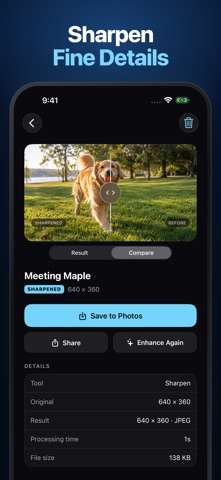
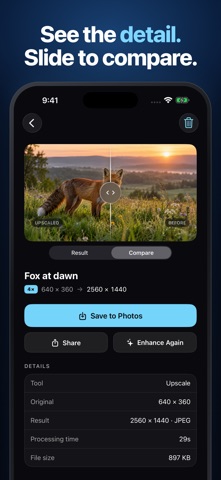
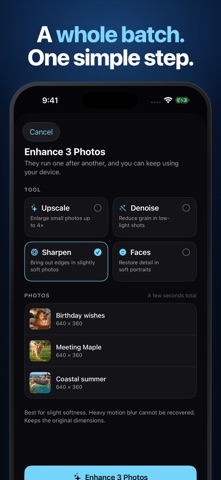
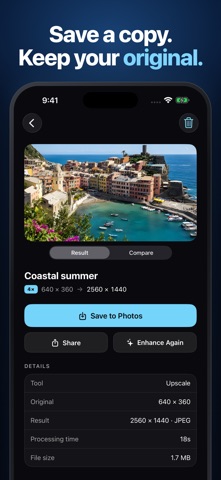
Small photos. More detail. Entirely on your iPhone and iPad. Local Photo Upscaler makes small photos bigger, reduces grain, sharpens soft edges, and restores portrait detail with AI that runs on your device. Your photos stay yours. FOUR TOOLS, ONE SIMPLE WORKFLOW - Upscale: enlarge small photos and crops up to 4x - Denoise: reduce grain in low-light shots - Sharpen: bring out edges in slightly soft photos - Faces: restore detail in soft portraits Choose a photo and the tool that fits it. Review the finished image with the before-and-after slider, then save a new copy or share it. Your original is never changed. A LIBRARY THAT KEEPS YOUR RESULTS Choose several photos and apply one tool to the batch. They process one after another, with progress shown in the app. Return to your library to compare results, save a copy, or use Enhance Again to apply another tool. PRIVATE BY DESIGN - Processing stays on your device - No photo uploads and no account - Works offline - No ads, tracking, or data collection - One-time purchase, with no subscription or in-app purchases Made for older photos, low-resolution images, small crops, saved pictures, and the moments you want to keep. Choose Upscale for small photos and crops. Output is limited to about 17 megapixels, so the enlargement depends on the starting image size. Sharpen brings out edges in slightly soft photos; it cannot recover heavy motion blur. Face restoration uses AI and may change fine facial details.
What's new · 1.1.10
Improved stability with large photos. Enhancing now uses less memory, and on devices with less memory, very large photos are processed at a smaller size. Photo import and recovery after interruptions are also more reliable.
Details