

Sticko - Sticker Marker
梦婷 刘 · Photo & Video
Independent analytics for this App Store listing. AppTracker is not affiliated with 梦婷 刘.
Chart standing · US
What changed · US
Listing changes AppTracker has observed for this app in this storefront — new versions, price moves, rating shifts, and store copy.
Thank you for using Sticko! # Autumn Series: Custom Calendar is here! - We bring a brand-new Custom Calendar feature with calendars in a variety of styles. Date, layout, text, lines and color can all be freely adjusted, so you can create your own calendars for your journal and notes. What's new in this update: • Added Custom Calendar: 18 built-in calendar styles, swipe left or right to preview each month • Full customization: Freely combine date, layout, text, lines and color, with support for lunar & solar terms, holidays, and calendars such as Photo, Habit Tracker and Moon Phase • Added Calendar Export: Export a single month, a full year, or months across years, in PNG or PDF format with multiple sizes • Added Date Links: Tap a date in an exported PDF calendar to open Apple, Google or Outlook Calendar and create a new event • Fixed known bugs and improved overall performance Recent updates: • Added Scissors Cutout: Support for both continuous drawing and point-by-point modes to freely shape and save contours • Added Smart Shape Extraction & Shape Library: One-tap contour extraction from image subjects into reusable vector paths, with support for saving, pinning, and deleting • Added Torn Paper Templates: Built-in torn paper styles with support for custom paper uploads and authentic paper texture blending • Optimized layer pasting from third-party apps to accurately recognize and preserve subject layers
Ratings breakdown · US
The star breakdown behind this app's rating in this storefront.
Screenshots




About
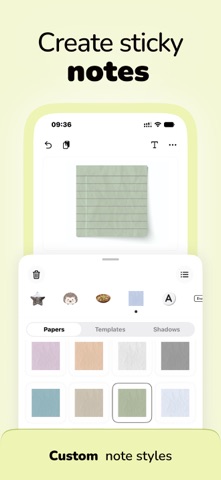
Sticko — Sticker Maker & Creative Design Tool Take your journaling, sticker creation, and social content to the next level. With Sticko, enjoy rich built-in stickers, upload your images, apply easy recolor, and batch apply sticker strokes to quickly create stickers that are uniquely yours. --------------------------------------------------------------------------- ◆ Endless Customizable Sticky Notes - Combine diverse paper textures, a variety of templates, and shadow effects - Use HSL Color Control to unlock endless combinations and styles ◆ Batch Upload Images - Batch upload images and apply One-Tap Recolor & Sticker Stroke - With Real-Time Preview, your creative workflow stays smooth and efficient ◆ Rich Built-in Stickers - Explore multiple categories including Calendars, Letters, Sticky Notes, 3D Assets, Tapes, and more - Regular updates bring even more content over time ◆ Paste from Photos - Paste people or objects directly from your photo library - Quickly apply sticker strokes to create stickers for journaling and social sharing ◆ Multiple Transparent Export Formats - Drag or save images with transparent backgrounds for digital collages and personal sticker libraries - Export as PNG, WebP, or HEIF, balancing compatibility and file size for different use cases --------------------------------------------------------------------------- Whether you’re journaling, designing stickers, or sharing on social platforms, Sticko is your go-to creative companion.
What's new · 1.3.4
Thank you for using Sticko! # Autumn Series: Custom Calendar is here! - We bring a brand-new Custom Calendar feature with calendars in a variety of styles. Date, layout, text, lines and color can all be freely adjusted, so you can create your own calendars for your journal and notes. What's new in this update: • Added Custom Calendar: 18 built-in calendar styles, swipe left or right to preview each month • Full customization: Freely combine date, layout, text, lines and color, with support for lunar & solar terms, holidays, and calendars such as Photo, Habit Tracker and Moon Phase • Added Calendar Export: Export a single month, a full year, or months across years, in PNG or PDF format with multiple sizes • Added Date Links: Tap a date in an exported PDF calendar to open Apple, Google or Outlook Calendar and create a new event • Fixed known bugs and improved overall performance Recent updates: • Added Scissors Cutout: Support for both continuous drawing and point-by-point modes to freely shape and save contours • Added Smart Shape Extraction & Shape Library: One-tap contour extraction from image subjects into reusable vector paths, with support for saving, pinning, and deleting • Added Torn Paper Templates: Built-in torn paper styles with support for custom paper uploads and authentic paper texture blending • Optimized layer pasting from third-party apps to accurately recognize and preserve subject layers
Details