

Zip File Opener: Ziplift
Vikram Singh · Utilities
Independent analytics for this App Store listing. AppTracker is not affiliated with Vikram Singh.
Chart standing · US
What changed · US
Listing changes AppTracker has observed for this app in this storefront — new versions, price moves, rating shifts, and store copy.
## What's New in This Version (3.5) • Open RAR and 7z archives, as well as ZIP. • A new step guides you through saving extracted files to the Files app. • A one-screen plan page, so you can see everything at once. • A refreshed black-and-white design for Light and Dark mode. • Performance and stability improvements.
Screenshots



About
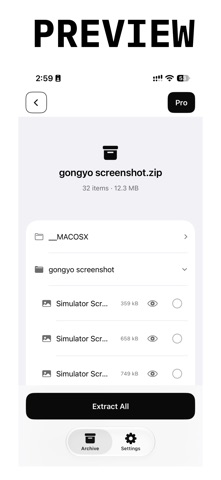
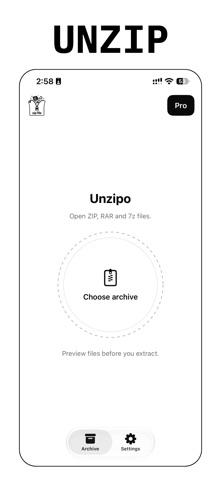
Open ZIP, RAR and 7z files on your iPhone. See what is inside, preview a file, then save only what you need to the Files app. Unzipo is a simple archive opener and file extractor. Pick an archive from Files and every folder and file inside appears in seconds. No account. No ads. BROWSE BEFORE YOU SUBSCRIBE Open any supported archive and look through it first. You see the full folder tree, file names and sizes before you decide anything. Previewing, extracting and saving are part of Unzipo Pro. WHAT UNZIPO PRO GIVES YOU • Preview a file before you extract it, using Quick Look: PDFs, photos, videos, audio, text and more • Extract everything, or tick only the files you want • Save to any folder in the Files app: On My iPhone, iCloud Drive or another location • A short guide at save time shows you how to pick the right folder SUPPORTED FORMATS • ZIP, including large ZIP64 archives • RAR (RAR4 and RAR5) • 7z (LZMA, LZMA2, PPMd, BZip2 and Deflate) Password-protected archives and multi-part archives are not supported. FOR THE FILES YOU REALLY RECEIVE Work documents, photos and videos from a friend, music albums, code projects. When you start, tell Unzipo what you open most. The welcome demo and plan screen then match your files. BUILT FOR LARGE ARCHIVES Unzipo reads an archive in small pieces instead of loading it whole. You see progress and elapsed time. Each file is checked as it is extracted. A damaged file is skipped and counted, never saved half-written. WORKS WITHOUT A CONNECTION Opening, previewing and extracting need no internet. Only subscribing and restoring a purchase do. CLEAR AND CALM A black-and-white design with Light and Dark mode. One main action on each screen. BUILT ON TRUSTED PARTS Unzipo uses Apple's Quick Look, StoreKit and Files picker, plus the open-source libarchive and liblzma libraries for RAR and 7z. UNZIPO PRO SUBSCRIPTION • Choose a weekly or a yearly plan. The price for your country is shown before you buy. • Payment is charged to your Apple ID at confirmation of purchase. • The subscription renews automatically unless cancelled at least 24 hours before the end of the current period. • Manage or cancel any time in iPhone Settings > your name > Subscriptions. • Restore Purchases and Redeem Code are on the plan screen. Terms of Use (EULA): https://www.apple.com/legal/internet-services/itunes/dev/stdeula/ Privacy Policy: https://1kbapps.com/unzipo/
What's new · 3.5
## What's New in This Version (3.5) • Open RAR and 7z archives, as well as ZIP. • A new step guides you through saving extracted files to the Files app. • A one-screen plan page, so you can see everything at once. • A refreshed black-and-white design for Light and Dark mode. • Performance and stability improvements.
Details