

Autograph Mark
MONVEL ART LLC · Productivity
Independent analytics for this App Store listing. AppTracker is not affiliated with MONVEL ART LLC.
Chart standing · US
What changed · US
Listing changes AppTracker has observed for this app in this storefront — new versions, price moves, rating shifts, and store copy.
Bug fixes and general improvements
Screenshots


About
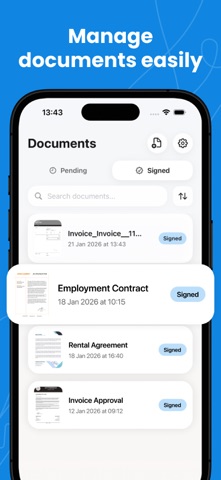
Sign Documents PDF Signature makes it easy to create, edit, and apply electronic signatures to your documents. Sign files digitally, manage them clearly, and share them when they are ready using a straightforward signing process. Document Manager Keep your files organized on the main screen: – Pending documents waiting for a signature – Signed documents ready for sharing – Import documents from device storage or cloud services – View files with thumbnails and status indicators – Search and filter by name, date, or status – Rename or delete documents when needed Document Editing Open any document to preview and edit it: – Add a signature from your profile or draw a new one – Move resize or remove signature elements – Save changes or export the signed document – Share documents through supported apps and services Signature Profile Create and manage your personal signature: – Draw your signature on a clean canvas – Undo strokes or clear the canvas instantly – Save your signature as a transparent PNG – Use your saved signature when signing documents Free and Premium (Paid) Plans • Free version includes one document signing • Paid version allows unlimited document signings Sign Documents PDF Signature helps you sign and send documents with clarity and control. Create your signature once and apply it whenever you need! Privacy Policy: https://docs.google.com/document/d/1YUkU3wN6QTZnM7zOkyHXP31QrRU1hzJ0BsHQfhXVnlk/edit?usp=sharing Term of Use: https://docs.google.com/document/d/16ZBe4mn77E6bL8Sq9b6IpnOyh-vVwnp0kl7eMoUSBAM/edit?usp=sharing
What's new · 1.0.1
Bug fixes and general improvements
Details