

AI Summary: Notes Taker, Voice
Xasanbek Abdullayev · Productivity
Independent analytics for this App Store listing. AppTracker is not affiliated with Xasanbek Abdullayev.
Chart standing · US
What changed · US
Listing changes AppTracker has observed for this app in this storefront — new versions, price moves, rating shifts, and store copy.
Screenshots change Other minor fixes
Ratings breakdown · US
The star breakdown behind this app's rating in this storefront.
In-app purchases · US
What this app sells inside itself, grouped by kind and priced for this storefront.
Screenshots



About
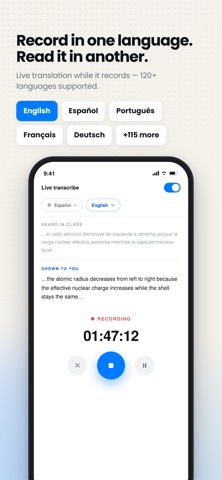
AI Note Taker captures any conversation with a single tap and turns it into clear, searchable notes. Record a meeting, lecture, or interview and get an accurate transcript with speaker labels — plus a summary you can actually use. Stay present in the room instead of scribbling notes. It works perfectly to record and summarize: • meetings and client calls • lectures and seminars • interviews and research • podcasts and webinars • quick voice memos Record and Transcribe • One-Tap Recording: Start instantly — no setup, no settings to fiddle with. • Background Recording: Keep recording with the screen locked or while you use other apps. • No Time Limits: From a two-minute memo to a three-hour seminar. • Live Transcript: Watch the words appear while you speak. • Speaker Labels: See who said what, clearly separated. • Clean Formatting: Punctuation, capitalization and paragraphs handled for you. AI Summaries and Answers • Instant Summaries: The key points in seconds, not a wall of text. • Structured Highlights: Summaries broken into readable, bullet-pointed sections. • Ask Anything: "What were the action items?" or "Who owns the budget review?" — get answers drawn straight from your recording. • Smart Search: Type a keyword to find the exact moment, then tap to jump to that point in the audio. Import and Documents • Import Audio: Bring in recordings from Files or iCloud and transcribe them. • Summarize Documents: Drop in a PDF or text file and get the same clear summary. • Playback Controls: Scrub, skip and change speed while you review. Languages • Transcribe in a wide range of languages. • Translate your live transcript as you record. • Read summaries in the language you choose. • App available in English, Spanish, French, German, Italian, Portuguese and Russian. Organize and Share • Favorites and Categories: Keep the important notes within reach. • Export to PDF or Text: Send to your team or keep for your records. • Daily Notes: Jot quick to-dos alongside your recordings. Privacy and Security • Your recordings, transcripts and summaries are stored on your device. • To create transcripts and summaries, your audio and text are sent securely to our AI processing provider for that purpose only. Your content is never sold and never used for advertising. • You are asked for consent before any AI processing, and you can clear all app data at any time. Premium Unlock unlimited summaries, audio and document import, and daily notes. Subscriptions renew automatically unless cancelled at least 24 hours before the end of the current period. Manage or cancel anytime in your App Store account settings. Terms of Use: https://www.apple.com/legal/internet-services/itunes/dev/stdeula Privacy Policy: https://docs.google.com/document/d/e/2PACX-1vTcIXi48gmsYT4t8LbOH4IHPaRObsCOd_fluPRdrpHbzKYlXuKqWqSqr3QasYfql2Uam4ZveZGIzOun/pub
What's new · 1.0.4
Screenshots change Other minor fixes
Details