

Comic Crafter, AI Manga Maker
Dedaldev Doo · Photo & Video
Independent analytics for this App Store listing. AppTracker is not affiliated with Dedaldev Doo.
Chart standing · US
What changed · US
Listing changes AppTracker has observed for this app in this storefront — new versions, price moves, rating shifts, and store copy.
Turning your photos into comics and manga just got smoother. • Stability and performance improvements • App description and screenshots now in many more languages
In-app purchases · US
What this app sells inside itself, grouped by kind and priced for this storefront.
Screenshots





About
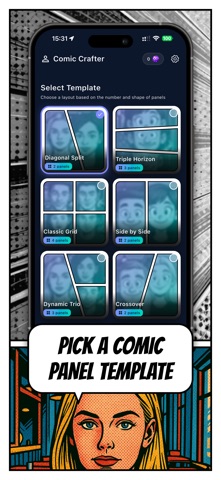
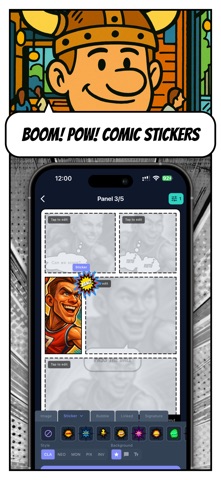
Turn your photos into a real comic book in minutes. Comic Crafter is an AI comic and manga maker: pick a panel layout, drop in your photos and selfies, choose a comic art style and finish with speech bubbles and stickers like BOOM, POW and ZAP. No drawing skills needed. Make a comic strip about your friends, a manga page starring your pet, a cartoon version of your family trip or a funny story for your group chat. You bring the photos, the app brings the comic look. Comic panel templates Start with one of around 30 comic panel layouts: • Classic grids with two, three, four or more panels • Diagonal splits for dynamic, action-packed scenes • Storyboard layouts to tell a story frame by frame • Full-page panels for one big dramatic moment • Action pages that look straight out of a comic book Add photos and selfies • Snap a selfie with the camera or pick photos from your gallery • Put a different photo in every panel • Pan, zoom and rotate each image until the framing is right • Keep the original photo or turn it into cartoon art 25 AI comic and manga styles The AI turns your photo into comic art. Try a different style in every panel or keep one look for the whole page: • Manga and Manga Colored • Chibi and Anime Action • American Comic and Vintage Comic from the 1950s • Cartoon and 90s Cartoon Hero • Pop Art, Black & White, Noir and High Contrast • Sketch in pencil and Watercolor Comic • Sepia and Negative • Pixel Art in a 16-bit look • Graffiti and Paper Cutout • Western and Ukiyo-e • Newspaper strip styles, a yellow sitcom toon style and an Arabian tales style It works like a photo to cartoon and photo to anime filter, but the result lands inside a real comic page instead of a single picture. Stickers and comic effects Give every scene some punch with classic comic sound effects: BOOM, POW, ZAP, BAM, WHAM, CRASH, SPLAT, KAPOW, BANG, OUCH and WOW. Switch the sticker style to classic, neon, mono, pixel or inverted to match your art. Speech bubbles and dialogue • Classic, yellow, dark and neon speech bubbles • Linked bubbles for back-and-forth dialogue between characters • Move the bubble tail to point at whoever is talking • Pick a font that fits the mood of your comic Sign your comic Add your author signature so everyone knows who made it. Export and share Save your comic strip or manga page in high resolution and share it with friends, post it on social media or keep it as a memory. Every comic you make is one of a kind. Who is it for? • People who want to cartoon themselves and their friends just for fun • Manga and anime fans who want to see themselves drawn in their favorite style • Parents turning family photos into a fun comic book • Creators making memes, storyboards and short comic strips • Anyone who loves comics but never learned to draw Premium and tokens Building comics is free to try. AI styles use tokens, one per panel, and token packs never expire. Remove the watermark with a one-time purchase, or go Premium to get monthly AI tokens and watermark-free exports. Payment is charged to your account at confirmation of purchase. Subscriptions renew automatically unless canceled at least 24 hours before the end of the current period. You can manage or cancel your subscription in your account settings. Download Comic Crafter, your AI comic book maker, and turn your next photo into a comic. Terms of Use: https://comic-api.dedaldev.com/terms-and-conditions Privacy Policy: https://comic-api.dedaldev.com/privacy-policy
What's new · 1.0.1
Turning your photos into comics and manga just got smoother. • Stability and performance improvements • App description and screenshots now in many more languages
Details