

Daily Planner - Day Organizer
SAMET ACAR · Productivity
Independent analytics for this App Store listing. AppTracker is not affiliated with SAMET ACAR.
Chart standing · US
What changed · US
Listing changes AppTracker has observed for this app in this storefront — new versions, price moves, rating shifts, and store copy.
• Adjust task duration in 15, 30, or 45-minute increments • New color options to personalize your tasks • The app is now available in Japanese Thanks for using Daily Planner!
Price & rating history · US
Reconstructed from the listing changes AppTracker has observed in this storefront. A field is charted once it has changed more than once, and each line starts at the value it moved from.
Average rating · ★ 3.33 now · 2 changes on record
Ratings breakdown · US
The star breakdown behind this app's rating in this storefront.
In-app purchases · US
What this app sells inside itself, grouped by kind and priced for this storefront.
Screenshots

About
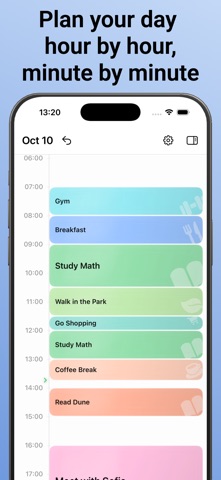
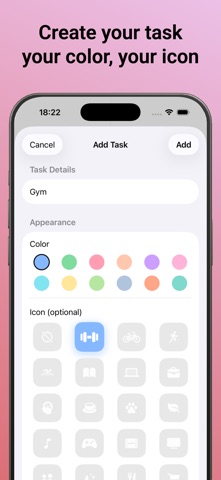
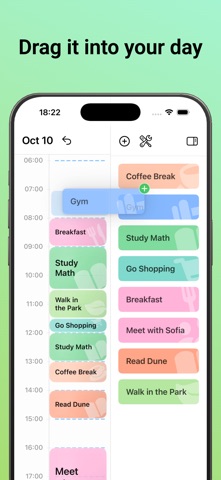
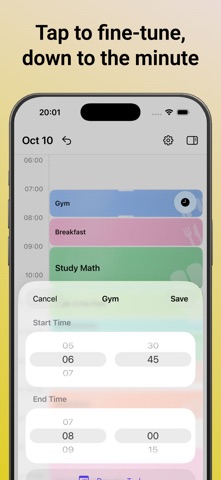
Most planners give you a list. Daily Planner gives you a full, effective day. Instead of a flat to-do list, you get a real, scrollable timeline — the same way your day actually feels. Drag tasks into place, resize them with a tap, and watch your whole day take shape, hour by hour, minute by minute. No clutter, no complexity. Just your day, laid out exactly the way you'll live it. YOUR DAY, AT A GLANCE A scrollable timeline runs from morning to night, with a live marker showing exactly where you are right now. The task happening at this moment — or the one coming up next — gently highlights itself, so you never have to guess what's next. Every task gets its own color and icon, so your whole day reads at a glance instead of a scroll. DRAG, DROP, DONE Build a list of reusable tasks once — gym, study time, coffee break, whatever your days are made of — then drag any of them onto your timeline whenever you need them. No forms, no typing the same thing twice. And if you drop a task into an hour that's already partly busy, Daily Planner automatically fits it into whatever time is actually free, so you never end up with two tasks fighting over the same minute. PLANNED DOWN TO THE MINUTE Most planners force everything into neat one-hour blocks. Real life doesn't work that way. Resize any task right on the timeline — drag its edges to stretch or shrink it in 15-minute steps, with a live time readout following your finger the whole way. Want pinpoint control instead? Open any task and set its exact start and end time with simple wheel pickers. Either way, Daily Planner quietly makes sure nothing ever overlaps. MAKE IT YOURS Give every task its own color from a palette of 12, and pair it with one of 22 icons — dumbbells for the gym, a book for reading, a coffee cup for your break, and more. Edit a task once, and every place it's scheduled across your timeline updates automatically. Your day should look like your day. COPY YESTERDAY, SAVE TODAY Some days are worth repeating. If yesterday's plan worked, copy the entire thing onto today in a single tap — no rebuilding your routine from scratch every single morning. SET IT UP YOUR WAY Choose light, dark, or system theme. Pick 12-hour or 24-hour time. Use the app in 12 languages, switching anytime right from Settings — no need to change your whole phone's language just for one app. And if you ever want a refresher, a quick "How It Works" walkthrough is always one tap away. FREE, HONEST, AND YOURS No ads. No subscriptions. No account required, no data to hand over. Daily Planner is, and always will be, completely free — not a free trial, not a free tier, just free. If you ever feel like supporting development, there's an optional tip jar tucked away in Settings. It's there only if you want it, and it will never, ever be required.
What's new · 1.4
• Adjust task duration in 15, 30, or 45-minute increments • New color options to personalize your tasks • The app is now available in Japanese Thanks for using Daily Planner!
Details