

VideoFit – Vertical Video 9:16
kohei yamane · Photo & Video
Independent analytics for this App Store listing. AppTracker is not affiliated with kohei yamane.
Chart standing · US
What changed · US
Listing changes AppTracker has observed for this app in this storefront — new versions, price moves, rating shifts, and store copy.
Added support for more languages.
Screenshots
About
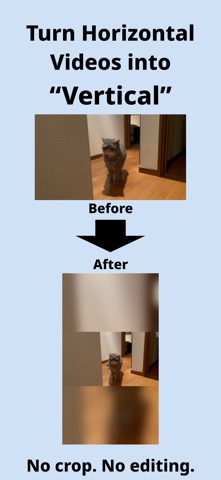
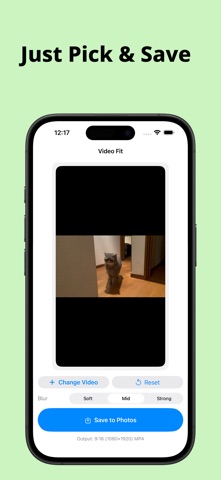
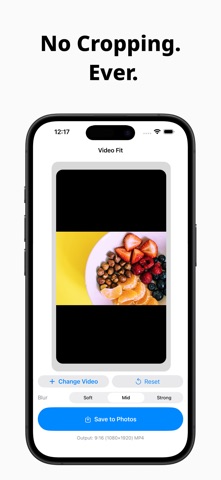
Video Fit turns landscape videos into vertical ones—without cropping, and without a complicated editor. Tried posting an old YouTube video to TikTok, Instagram Reels, or YouTube Shorts? • The sides get cut off • Faces and key subjects fall out of frame • Full-featured editors feel like overkill Video Fit keeps the whole video and adds a natural blurred background, so you get a clean 9:16 clip in moments. ■ What you can do • Turn landscape (16:9) into vertical (9:16) • Keep every bit of the original frame • Build a blurred background from the video itself • Export a vertical file that’s ready to post No timeline. No layers. No extra steps you don’t need. ■ Three simple steps Pick a video Check the preview Save You can start right away—even if you’ve never edited a video. ■ Built for short-form Video Fit is a good fit for the big vertical platforms: • TikTok • Instagram Reels • YouTube Shorts Exports are 9:16 (1080×1920) MP4, ready to upload as-is. ■ A background that looks natural Instead of blowing the clip up and chopping the edges, Video Fit uses a blurred copy of the same video behind it. • Main picture stays centered • The original frame stays intact • The vertical layout is easy to watch • Pick a blur strength that matches your style ■ Processed on your iPhone • No account to create • Conversion happens on the device • Nothing is sent to a conversion server Your video stays on your device. * The free version needs an internet connection to load and watch a rewarded ad when you save. ■ A good match if you • Want to reuse long videos as short clips • Share a piece of a stream or YouTube video in vertical form • Need landscape-to-vertical without cropping • Want the result now, not a crash course in editing Video Fit is not a video editor. It’s a simple converter: landscape in, vertical out.
What's new · 1.3
Added support for more languages.
Details