

Taska: To-Do List & Planner
CanvasLab · Productivity
Independent analytics for this App Store listing. AppTracker is not affiliated with CanvasLab.
Chart standing · US
What changed · US
Listing changes AppTracker has observed for this app in this storefront — new versions, price moves, rating shifts, and store copy.
[Improvements] - Improved performance for a faster and more reliable experience.
Price & rating history · US
Reconstructed from the listing changes AppTracker has observed in this storefront. A field is charted once it has changed more than once, and each line starts at the value it moved from.
Average rating · ★ 4.86 now · 11 changes on record
Ratings breakdown · US
The star breakdown behind this app's rating in this storefront.
In-app purchases · US
What this app sells inside itself, grouped by kind and priced for this storefront.
Screenshots




Keywords this app targets
Search terms AppTracker associates with this app — estimates, not search volume. ❝ = in the app's title; a highlighted number is its current position for that term.
Similar apps
Competitors and close alternatives, as estimated by AppTracker.
 Tiimo: To-Do List Planner
tiimo
2 shared topics · 2 shared title words
Tiimo: To-Do List Planner
tiimo
2 shared topics · 2 shared title words
 Todoist: To Do List & Calendar
Todoist Inc.
2 shared topics · 1 shared title word
Todoist: To Do List & Calendar
Todoist Inc.
2 shared topics · 1 shared title word
 Minimal Tabbed ToDo List
App Palette LLC
2 shared topics · 1 shared title word
Minimal Tabbed ToDo List
App Palette LLC
2 shared topics · 1 shared title word
 ToDo List - Task manager list
Komorebi Inc.
2 shared topics · 1 shared title word
ToDo List - Task manager list
Komorebi Inc.
2 shared topics · 1 shared title word
 2Do - Todo List, Tasks & Notes
Beehive Innovations Services
2 shared topics · 1 shared title word
2Do - Todo List, Tasks & Notes
Beehive Innovations Services
2 shared topics · 1 shared title word
 Smart Planner: Calendar, Tasks
Komorebi Inc.
1 shared topic · 1 shared title word
Smart Planner: Calendar, Tasks
Komorebi Inc.
1 shared topic · 1 shared title word
 TaskFlow Studio
Michael Surratt
TaskFlow Studio
Michael Surratt
 Today: Life Planner
Jeffrey Igot
Today: Life Planner
Jeffrey Igot
About
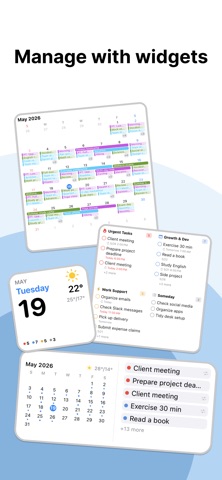
MyLog is now Taska. A new name, a new icon, and a significantly more powerful experience. Start without a plan. MyLog keeps the record. When something comes up, throw it into one of 4 boxes. Urgent on the left, not urgent on the right. Important on top, less important on the bottom. That's the Eisenhower Matrix. You're done sorting. Tap the one you want to work on. A timer starts. When you finish, it saves to your iOS Calendar automatically. Check it later and everything you did is already there. That's it. No folders. No tags. No projects. Throw tasks in, pick one, focus, and your records build themselves. [Focus Mode] One tap to start. 15, 25, 45-min presets or set your own. Live on your Lock Screen. Auto-logged to Calendar when done. [Matrix] Drag and drop across 4 boxes. Priorities shift? Just move them. No planning required. [Auto-Record] Focus sessions become calendar events. See your whole day on a timeline. [Widget] Check your tasks from the Home Screen. No need to open the app. [Sync] iCloud across iPhone and iPad. No sign-up. People who buy planners and never use them. P-types who can't stick to a schedule. People who want a record of their day but won't write a journal. Terms of Use: https://shorturl.at/IdYZh Privacy Policy: https://shorturl.at/nnHro
What's new · 27.3.3
[Improvements] - Improved performance for a faster and more reliable experience.
Details