

Unzip - Extract Zip Rar 7z Lzh
RAINBOW TREE LLC · Utilities
Independent analytics for this App Store listing. AppTracker is not affiliated with RAINBOW TREE LLC.
Chart standing · US
What changed · US
Listing changes AppTracker has observed for this app in this storefront — new versions, price moves, rating shifts, and store copy.
• Extract LZH (.lzh) files and single .bz2 files • Japanese file names in ZIPs made on Windows now come out right • Save files to Unzip from the share sheet of other apps • See the name of the file being extracted • Batch extraction asks for the password of each protected archive, and can be cancelled • Fixed: password-protected ZIPs made from a folder couldn't be extracted. A wrong password is now pointed out right away • Fixed: compressing a folder with a password left the ZIP empty • Fixed: extracting a single folder could produce nothing • Large archives (such as .tar.gz) and the duplicate finder no longer use too much memory • Split archives (.001…) extract into a new folder and never overwrite files with the same name • Items in the Trash can be restored after an app update • The private folder locks when you leave the app • Safer Wi-Fi Transfer and extraction • Cancel now stops extraction, and error messages are clearer
In-app purchases · US
What this app sells inside itself, grouped by kind and priced for this storefront.
Screenshots



About
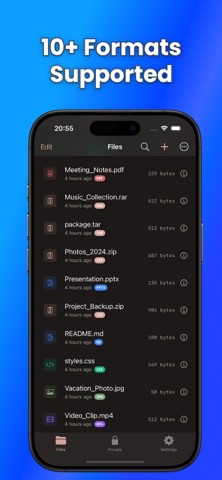
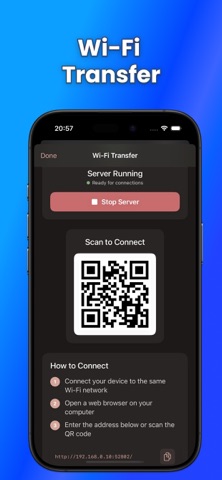
Unzip is a powerful archive extraction and file management app that makes handling compressed files effortless on your iPhone and iPad. SUPPORTED FORMATS • ZIP, RAR, 7z, TAR, GZ, BZ2, XZ, LZMA, LZ4, LZH, TBZ2 • Password-protected archives • Split archives (.001, .002...) EASY EXTRACTION & COMPRESSION • One-tap extraction for all supported formats • Batch extraction for multiple archives • Extract directly from Files, Mail, Safari, and other apps • Create ZIP archives from files and folders FILE MANAGEMENT • Full file browser for easy navigation • Create, rename, move, copy, and delete files and folders • Quick search to find files instantly • Trash with 30-day recovery PREVIEW & EDIT • Preview documents, images, videos, and audio files • Image gallery with full-screen view and grid customization • Code syntax highlighting (Swift, Python, JavaScript, and more) • Edit text files directly in the app • JSON, Markdown, and Plist viewers PRIVATE & HIDDEN FOLDER • Secure files with Face ID or Touch ID • Keep sensitive documents protected and private • Hide personal files from prying eyes ICLOUD INTEGRATION • Access iCloud Drive files seamlessly • Sync across all your devices STORAGE INSIGHTS • View storage usage at a glance • File type breakdown PRO FEATURES • Find & delete duplicate files • Wi-Fi Transfer - access files from any browser • QR Code sharing for quick file transfers • Split & join large files • Edit archives (add/remove files from ZIP) • Repair corrupted ZIP files • Convert RAR/7z to ZIP format • Ad-free experience Download Unzip today and take control of your compressed files!
What's new · 1.1.0
• Extract LZH (.lzh) files and single .bz2 files • Japanese file names in ZIPs made on Windows now come out right • Save files to Unzip from the share sheet of other apps • See the name of the file being extracted • Batch extraction asks for the password of each protected archive, and can be cancelled • Fixed: password-protected ZIPs made from a folder couldn't be extracted. A wrong password is now pointed out right away • Fixed: compressing a folder with a password left the ZIP empty • Fixed: extracting a single folder could produce nothing • Large archives (such as .tar.gz) and the duplicate finder no longer use too much memory • Split archives (.001…) extract into a new folder and never overwrite files with the same name • Items in the Trash can be restored after an app update • The private folder locks when you leave the app • Safer Wi-Fi Transfer and extraction • Cancel now stops extraction, and error messages are clearer
Details