

SchoolChamp
Andreas Falk · Education
Independent analytics for this App Store listing. AppTracker is not affiliated with Andreas Falk.
Chart standing · US
What changed · US
Listing changes AppTracker has observed for this app in this storefront — new versions, price moves, rating shifts, and store copy.
SchoolChamp is even easier to use! - Switch quickly between school years and settings with a simple tap - School year selection is now in the top toolbar menu - Overview screens now also show subject averages at a glance - Clearer indicators show which items can be moved - Additional improvements for better clarity, usability, and day-to-day convenience
In-app purchases · US
No in-app purchases.
Screenshots





Similar apps
Competitors and close alternatives, as estimated by AppTracker.


About
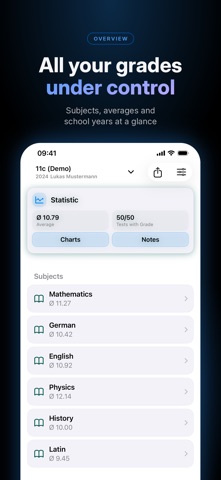
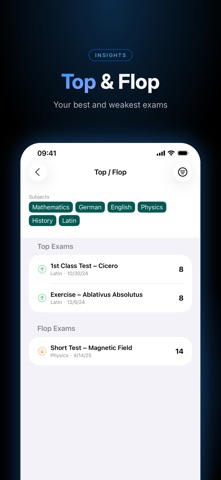
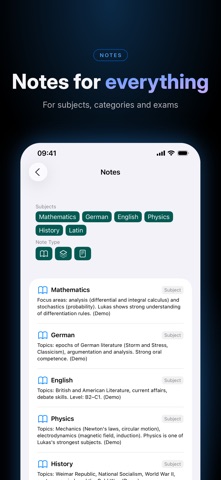
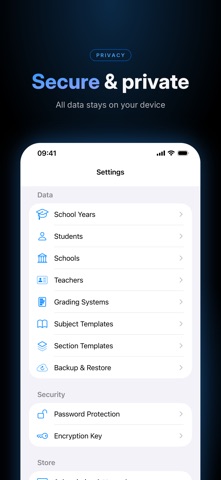
OVERVIEW SchoolChamp is the ultimate school management app, specifically designed for students who want to take control of their educational journey. Whether you're at a Gymnasium, secondary school, vocational school, or university — SchoolChamp helps you organise school years, track grades, manage subjects and monitor your performance — all in a beautiful, intuitive app. KEY FEATURES Complete School Management • Create and manage multiple school years with a simple wizard • Track grades across all subjects with weighted calculations • Organise subjects with custom sections (Written, Oral, Projects, etc.) • Set custom weights for different assessment categories • Add notes to subjects, exams and sections for extra context • Monitor your progress with real-time grade statistics and averages Flexible Grading Systems • Support for multiple international grading systems (German 1-6, Swiss, Austrian, US A-F) • Create your own grading systems to match your school • Automatic grade calculations based on weighted sections • Visual grade trends and performance insights Teacher & School Management • Store teacher contact information (email, phone) • Link teachers to subjects • Manage multiple schools and students • Keep all school contacts well organised Smart Organisation • Mark school years as favourites for quick access • Drag-and-drop to reorder subjects and sections • Subject and section templates for faster setup • Apply templates to multiple subjects at once with customisable weights • Demo data feature to quickly explore the app (fully localised) • Intuitive navigation with a clear visual hierarchy Secure Data Management • Create encrypted backups with password protection (AES-GCM encryption) • Restore backups with full data integrity • Share backups via iCloud Drive, AirDrop or the Files app Performance Tracking • Real-time grade averages for each subject • Section-specific performance breakdowns • School year statistics and overall average • Track your progress over time WHY STUDENTS LOVE SCHOOLCHAMP • Stay organised: Never lose track of your grades or subjects again • Save time: Quick setup with templates, bulk operations and guided wizards • Privacy first: All data stays on your device — no cloud, no tracking • Professional design: Beautiful, modern interface that's a pleasure to use • Reliable: Built with Apple's Core Data for rock-solid data persistence PERFECT FOR: • Gymnasium students with many subjects • Vocational students with complex grading systems • University students with weighted assessments • Parents monitoring their children's academic progress • International students with various grading systems • Anyone who wants to keep their academic performance under control DATA SECURITY & PRIVACY Your privacy matters. SchoolChamp stores all data locally on your device using Apple's secure Core Data framework. Optional backups can be encrypted with AES-GCM encryption. No data is sent to external servers, and there is no tracking or advertising. WHAT'S NEXT? We continuously improve SchoolChamp based on user feedback. Upcoming features: • Homework tracking and reminders • Timetable management SUPPORT Need help? Have suggestions? Visit us at https://dviyo.de
What's new · 1.3.1
SchoolChamp is even easier to use! - Switch quickly between school years and settings with a simple tap - School year selection is now in the top toolbar menu - Overview screens now also show subject averages at a glance - Clearer indicators show which items can be moved - Additional improvements for better clarity, usability, and day-to-day convenience
Details