

SubList: Subscription Tracker
圣罡 汤 · Finance
Independent analytics for this App Store listing. AppTracker is not affiliated with 圣罡 汤.
Chart standing · US
What changed · US
Listing changes AppTracker has observed for this app in this storefront — new versions, price moves, rating shifts, and store copy.
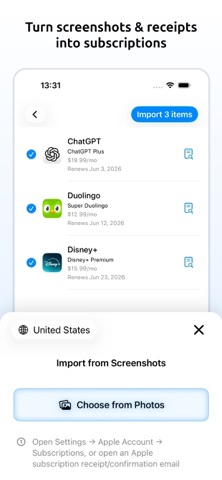
Pro automatically uses Cloud Reminders when local capacity is full. Reminders must be enabled, and notification permission and internet access are required. New - Reuse your last saved reminder lead time and time of day without changing existing schedules. - Return to your last page and selected dashboard, calendar, and category periods. Improved - Local reminders are scheduled individually. Settings shows usage and scheduling gaps; failed scheduling retries, and imminent renewals are covered. - Faster calendars, widgets, screenshot parsing, and background data maintenance. Fixed - Currency totals, rewards, charts, widgets, and shared images preserve unconverted amounts and flag incomplete totals. - Screenshot import better reads currency codes, dollar prices, nearby currency labels, and Chinese, Japanese, and Korean renewal dates. - iCloud sync preserves cleared fields, saved choices, reminder changes, and newer icons. - Calendar and Reminders exports avoid duplicates and require full access; shared reports use actual charges. - Introductory offers use the correct billing dates; price history prevents conflicting entries. - Category artwork and cards stay visible; icon and background imports are more reliable. - Unused categories and payment methods left from editing are cleaned up, and payment filters no longer repeat options. - Invalid or oversized backups are rejected, and subscription save or delete failures are clearly reported. - Older libraries retain reminder settings after upgrading, empty monthly widgets open the right calendar view, and Mac startup issues are fixed.
Ratings breakdown · US
The star breakdown behind this app's rating in this storefront.
In-app purchases · US
What this app sells inside itself, grouped by kind and priced for this storefront.
Screenshots



Keywords this app targets
Search terms AppTracker associates with this app — estimates, not search volume. ❝ = in the app's title; a highlighted number is its current position for that term.
Similar apps
Competitors and close alternatives, as estimated by AppTracker.
 SubCaddy: Subscription Tracker
DZMITRY ADZIARYKHA
2 shared topics · 3 shared title words
SubCaddy: Subscription Tracker
DZMITRY ADZIARYKHA
2 shared topics · 3 shared title words
 Costly : Subscription Tracker
YUUSUI KASHIWAGI
2 shared topics · 3 shared title words
Costly : Subscription Tracker
YUUSUI KASHIWAGI
2 shared topics · 3 shared title words
 SnapSub: Subscription Tracker
Hoang Nguyen
3 shared title words
SnapSub: Subscription Tracker
Hoang Nguyen
3 shared title words
 Subscription & Bills: Subtrack
Mohit Nandwani
2 shared topics · 1 shared title word
Subscription & Bills: Subtrack
Mohit Nandwani
2 shared topics · 1 shared title word
 Mr.Sub: Manage Subscriptions
Sanghoon Im
2 shared topics
Mr.Sub: Manage Subscriptions
Sanghoon Im
2 shared topics
 SubsTracker+
Marcel Mendes Filho
2 shared topics
SubsTracker+
Marcel Mendes Filho
2 shared topics
 Subscription Manager: Subo
Gestalt Labs
1 shared topic · 1 shared title word
Subscription Manager: Subo
Gestalt Labs
1 shared topic · 1 shared title word
 SubTracker: Subscriptions
Saroar Khandoker
SubTracker: Subscriptions
Saroar Khandoker
About
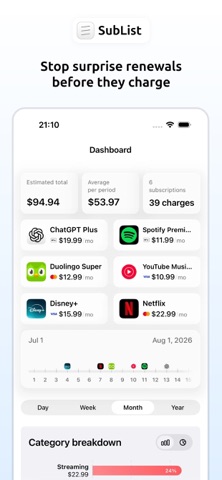
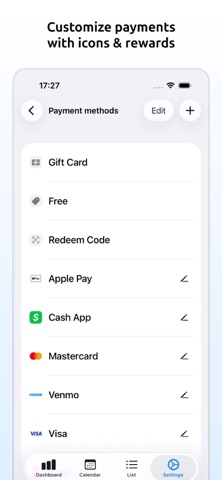
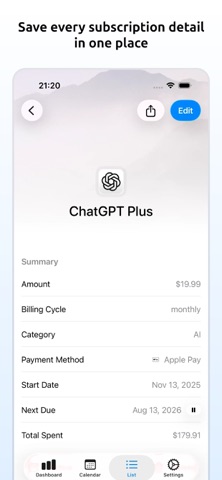
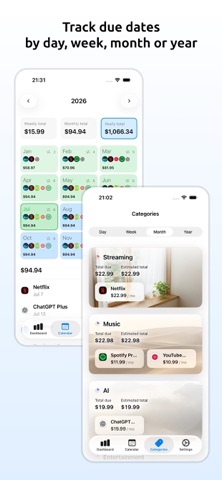
SubList helps you track subscriptions, see your monthly and yearly spending, and get reminders before payments are due. Keep streaming services, apps, cloud storage, and other recurring payments in one place on iPhone, iPad, and Mac. Track your subscriptions - Record prices, currencies, billing cycles, renewal dates, categories, notes, and website links. - Add subscriptions yourself or import them from screenshots and the App Store. Check the details before saving. Plan renewals and understand spending - Choose when to receive renewal reminders. See upcoming payments in a calendar or a list sorted by due date. - Check monthly and yearly totals, spending trends, and breakdowns by category and payment method. Sync, export, and share - Sync across your Apple devices with iCloud. - Add payment dates to Apple Calendar and Reminders. - Export CSV files or share spending reports as posters or receipts. Pro Features - Unlimited subscriptions: go beyond the free plan's 3 active subscriptions. - Cloud reminders: automatically deliver additional renewal reminders when local reminder capacity is full. - Extra controls: turn off usage analytics and hide the SubList footnote on shared reports. - Use Pro on your devices with the same App Store account. Cloud delivery: reminders must be enabled, and notification permission and internet access are required. Reminder titles and messages are uploaded for cloud delivery. Privacy - No need to sign up for any account. - Sync subscription records through iCloud with your Apple ID. - Limited purchase, app activity, crash, device identifier, and Apple Ads attribution data may be used for subscriptions, app reliability, and campaign measurement; SubList does not track you across other companies' apps or websites Terms of Use: https://www.apple.com/legal/internet-services/itunes/dev/stdeula/
What's new · 2.5.0
Pro automatically uses Cloud Reminders when local capacity is full. Reminders must be enabled, and notification permission and internet access are required. New - Reuse your last saved reminder lead time and time of day without changing existing schedules. - Return to your last page and selected dashboard, calendar, and category periods. Improved - Local reminders are scheduled individually. Settings shows usage and scheduling gaps; failed scheduling retries, and imminent renewals are covered. - Faster calendars, widgets, screenshot parsing, and background data maintenance. Fixed - Currency totals, rewards, charts, widgets, and shared images preserve unconverted amounts and flag incomplete totals. - Screenshot import better reads currency codes, dollar prices, nearby currency labels, and Chinese, Japanese, and Korean renewal dates. - iCloud sync preserves cleared fields, saved choices, reminder changes, and newer icons. - Calendar and Reminders exports avoid duplicates and require full access; shared reports use actual charges. - Introductory offers use the correct billing dates; price history prevents conflicting entries. - Category artwork and cards stay visible; icon and background imports are more reliable. - Unused categories and payment methods left from editing are cleaned up, and payment filters no longer repeat options. - Invalid or oversized backups are rejected, and subscription save or delete failures are clearly reported. - Older libraries retain reminder settings after upgrading, empty monthly widgets open the right calendar view, and Mac startup issues are fixed.
Details