

Better ST for Bose SoundTouch
骞 张 · Music
Independent analytics for this App Store listing. AppTracker is not affiliated with 骞 张.
Chart standing · US
What changed · US
Listing changes AppTracker has observed for this app in this storefront — new versions, price moves, rating shifts, and store copy.
What's New in This Update: - Fresh New Look: We've updated the app icon to perfectly match the beautiful new iOS 27 design aesthetics. - Instant Multi-Room Sync: The app now fetches data faster, ensuring your Multi-Room status is instantly accurate right after you launch the app. - Smoother Volume Control: We've completely refined the volume adjustment experience for Multi-Room groups, making it much more intuitive. - Bug Fixes: Resolved an issue that could cause unexpected volume changes when adjusting multiple devices in a Multi-Room group simultaneously.
Price & rating history · US
Reconstructed from the listing changes AppTracker has observed in this storefront. A field is charted once it has changed more than once, and each line starts at the value it moved from.
Average rating · ★ 4.61 now · 10 changes on record
Ratings breakdown · US
The star breakdown behind this app's rating in this storefront.
In-app purchases · US
What this app sells inside itself, grouped by kind and priced for this storefront.
Screenshots



Keywords this app targets
Search terms AppTracker associates with this app — estimates, not search volume. ❝ = in the app's title; a highlighted number is its current position for that term.
Similar apps
Competitors and close alternatives, as estimated by AppTracker.
 Companion for Bose SoundTouch
Christian Harms
3 shared title words
Companion for Bose SoundTouch
Christian Harms
3 shared title words
 Bose SoundTouch
Bose Corporation
1 shared topic · 3 shared title words
Bose SoundTouch
Bose Corporation
1 shared topic · 3 shared title words
 Controller Pro for SoundTouch
John Why
1 shared title word
Controller Pro for SoundTouch
John Why
1 shared title word
 StreamTouch
Trevor Clements
StreamTouch
Trevor Clements
 SoundTouch Fixer
Lionel Beauvillain
1 shared title word
SoundTouch Fixer
Lionel Beauvillain
1 shared title word
 Bosman – SoundTouch Remote
Kambrium Software GmbH
1 shared title word
Bosman – SoundTouch Remote
Kambrium Software GmbH
1 shared title word
 Bose
Bose Corporation
1 shared topic · 1 shared title word
Bose
Bose Corporation
1 shared topic · 1 shared title word
 Remote for SoundTouch
Jan Steffen Hamre
1 shared title word
Remote for SoundTouch
Jan Steffen Hamre
1 shared title word
About
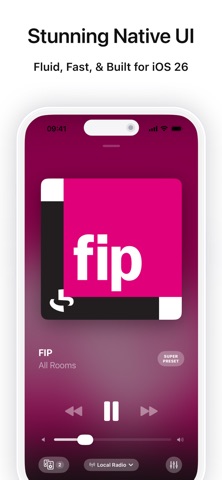
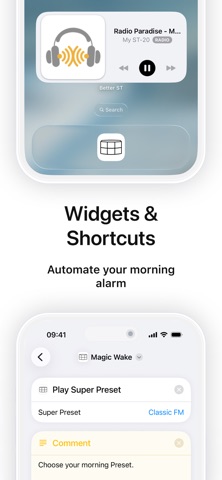
Worried about losing your internet radio when the Bose servers or TuneIn shut down? Looking for a fast, reliable, and modern control app for your SoundTouch speakers? You've found it. Better ST is designed to keep your music playing. Key Features: • Zero Friction: No accounts. No Bose servers. No tracking. BetterST launches instantly, auto-discovers your devices on the local network, and respects your privacy. Just open and play. • Hardware Preset Buttons Keep Working: Better ST Server helps restore part of the official server functionality, so you can continue using the physical preset buttons you love. Once configured, your speakers can work independently without relying on your phone. • Super Presets (Scenes): Go beyond simple stations. Create custom "Scene" buttons to trigger Party Mode—instantly syncing Multi-Room groups and setting specific volumes for every speaker (e.g., "Play Jazz on Kitchen & Living Room at 20%") with a single tap. • Liquid Glass UI: Fast, fluid, and built exclusively for iOS 26. Experience a stunning, native interface that feels right at home on your iPhone or iPad. • Instant Access: View Now Playing info and toggle Play/Pause at a glance. Best of all, launch your Super Presets directly from your Home Screen to activate your perfect scene without even opening the app. • Global Radio: Powered by Radio Browser, giving you integrated access to a massive library of thousands of global stations, filterable by country, genre, and quality. • Siri Shortcuts & Magic Wake: Want your speaker to start playing alongside your morning alarm? Leverage our powerful Shortcuts integration to create a "Magic Wake" automation, bringing your SoundTouch into your daily iOS routines. • Full Remote Control: Master your sound with precision. Manage volume, playback, device grouping (Multi-Room), and fine-tune your audio with dedicated EQ settings. • Mixtape Mode (NAS): Turn your local NAS folders into a retro music library. Curate your favorite collections into virtual tapes for true gapless playback. Technical Details & Hardware Control: Supported hardware capabilities include: • General Systems: Rename speakers, adjust bass levels, modify group settings for Video Sync, and disable the auto-off timer on most SoundTouch devices. • SoundTouch 20 / 30 / Portable: Toggle the front LED clock display. • SoundTouch 300 & Lifestyle 550/600/650: Access advanced home theater settings. Adjust individual center channel and surround speaker volumes, manage HDMI-CEC settings, enable HDMI-In, assign the source button on your remote, and toggle Speaker Selection. (Note: Availability of specific hardware settings depends on your exact SoundTouch model and current firmware version.) Disclaimer: This application is concluded between the developer and the end-user only, and not with Bose. Bose does not in any way endorse, approve of, or sponsor this application. Bose and SoundTouch are trademarks of Bose Corporation. Terms of Use (EULA): https://www.apple.com/legal/internet-services/itunes/dev/stdeula/
What's new · 2.4.1
What's New in This Update: - Fresh New Look: We've updated the app icon to perfectly match the beautiful new iOS 27 design aesthetics. - Instant Multi-Room Sync: The app now fetches data faster, ensuring your Multi-Room status is instantly accurate right after you launch the app. - Smoother Volume Control: We've completely refined the volume adjustment experience for Multi-Room groups, making it much more intuitive. - Bug Fixes: Resolved an issue that could cause unexpected volume changes when adjusting multiple devices in a Multi-Room group simultaneously.
Details