

Moza - Mosaic, Blur
Coffee Inc. · Photo & Video
Independent analytics for this App Store listing. AppTracker is not affiliated with Coffee Inc.
Chart standing · US
What changed · US
Listing changes AppTracker has observed for this app in this storefront — new versions, price moves, rating shifts, and store copy.
1.7.7 • After using Face Mosaic, tap individual faces to remove or reapply mosaic. You can undo and redo your selections, or cancel to return to your previous edits. • Text now has an automatic black or white outline that contrasts with the text color, making it easier to read over photos. The outline also appears in saved images. • On iPhone and iPad, move and pinch to zoom with two fingers while keeping your drawing tool selected, then continue editing immediately with one finger. • Toolbars and settings panels now sit outside the photo, with extra working space around its edges. Choose the Mosaic brush or rectangle in the gear menu under Settings → Mosaic. • Made the top editing buttons more compact and reduced vertical spacing on iPhone, giving you more room to edit your photos. 1.7.6 We've added custom Korean fonts. If you'd like fonts for other languages too, please let us know in a review. 1.7.4 • You can now pixelate a rectangular area in addition to using the brush. Just drag to cover the area you want in one go. 1.7.3 • Fixed a critical issue that prevented HEIC images from being edited. Thank you to everyone who reported it. • Added Face Mosaic, which automatically detects faces and mosaics them all at once. We hope you enjoy it! • Please keep sending us your feedback. 1.7.2 Cover multiple faces faster with the new Face Mosaic feature. • Tap Face Mosaic to automatically detect faces on your device and apply mosaic to all of them at once. • The result is added as a single edit, so you can revert it with one undo. • Every image editing feature, including Face Mosaic, runs entirely on your device. No feature sends your photos to a server. • Please review the entire image before saving. You can use the regular Mosaic tool to cover any faces that were missed. 1.7.1 We made the iPhone editing screen roomier and easier to use. • Tool settings now expand only when needed, leaving more room for your image. You can see the current size or setting directly in the toolbar. • Drawing tools are now organized in a single horizontally scrolling toolbar. Edge indicators help you discover hidden tools, and the selected tool automatically scrolls to the center. • Fixed an issue that made the unselected Mosaic icon difficult to see, and improved toolbar behavior when Reduce Motion or VoiceOver is enabled.
Ratings breakdown · US
The star breakdown behind this app's rating in this storefront.
In-app purchases · US
No in-app purchases.
Screenshots




Keywords this app targets
Search terms AppTracker associates with this app — estimates, not search volume. ❝ = in the app's title; a highlighted number is its current position for that term.
Similar apps
Competitors and close alternatives, as estimated by AppTracker.
 Mosaic Camera Pro - Hide Face
Tomohiko Saitoh
1 shared topic · 1 shared title word
Mosaic Camera Pro - Hide Face
Tomohiko Saitoh
1 shared topic · 1 shared title word
 Blur Background Photo Effect
Shiho Sadamizu
1 shared topic · 1 shared title word
Blur Background Photo Effect
Shiho Sadamizu
1 shared topic · 1 shared title word
 Blur Photo & Blur Background
Yu Abe
1 shared topic · 1 shared title word
Blur Photo & Blur Background
Yu Abe
1 shared topic · 1 shared title word
 Snap Markup - Annotation Tool
Raghvendra Bhargava
1 shared topic
Snap Markup - Annotation Tool
Raghvendra Bhargava
1 shared topic
 モザイクだけ
Satomi Chiba
モザイクだけ
Satomi Chiba
 Blur Video AI: Face & Mosaic
Natallia Minvaleyeva
2 shared title words
Blur Video AI: Face & Mosaic
Natallia Minvaleyeva
2 shared title words
 Blur Video & Mosaic
Yu Abe
1 shared topic · 2 shared title words
Blur Video & Mosaic
Yu Abe
1 shared topic · 2 shared title words
 MosaicMe
Arctic Surf Designs
MosaicMe
Arctic Surf Designs
About
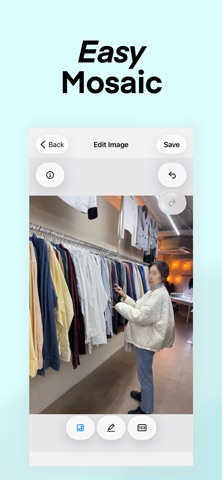
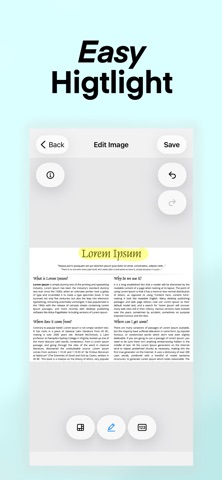
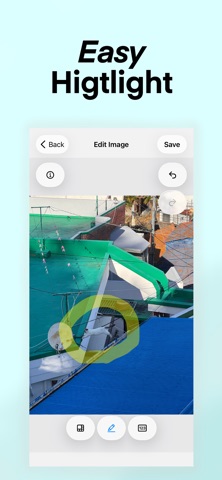
Detect faces on your device and mosaic all detected faces at once. Arrows, text, highlighter, and counters keep every edit clear. Nothing to learn. Just swipe. • Face Mosaic — Detect faces on your device and mosaic all detected faces at once • Mosaic — Instantly pixelate faces, license plates, and text with one swipe • Blur — Soften sensitive details naturally with one swipe • Highlighter — Emphasize what matters with semi-transparent yellow • Pen — Draw lines freely • Arrow — Point precisely with clean arrows • Auto Number — One tap, one number, in order (1, 2, 3...) • Rectangle — Frame areas for clear emphasis • Text — Tap the image to place text ◆ Photo Info at a Glance Check EXIF metadata with a single tap: camera model, date taken, GPS location, resolution, ISO, aperture, shutter speed, and more. ◆ Why MOZA? → Fast: Swipe, tap, done. Editing takes just seconds. → Precise: Pinch to zoom for detailed editing. → Safe: 100% on-device processing. Your photos never leave your device. → Everywhere: iPhone, iPad, and Mac. → No ads: Does anyone actually like ads? ◆ Perfect For Bug report screenshots • Step-by-step tutorials • Sharing photos with privacy • Quick feedback No login. No subscription. No ads.
What's new · 1.7.7
1.7.7 • After using Face Mosaic, tap individual faces to remove or reapply mosaic. You can undo and redo your selections, or cancel to return to your previous edits. • Text now has an automatic black or white outline that contrasts with the text color, making it easier to read over photos. The outline also appears in saved images. • On iPhone and iPad, move and pinch to zoom with two fingers while keeping your drawing tool selected, then continue editing immediately with one finger. • Toolbars and settings panels now sit outside the photo, with extra working space around its edges. Choose the Mosaic brush or rectangle in the gear menu under Settings → Mosaic. • Made the top editing buttons more compact and reduced vertical spacing on iPhone, giving you more room to edit your photos. 1.7.6 We've added custom Korean fonts. If you'd like fonts for other languages too, please let us know in a review. 1.7.4 • You can now pixelate a rectangular area in addition to using the brush. Just drag to cover the area you want in one go. 1.7.3 • Fixed a critical issue that prevented HEIC images from being edited. Thank you to everyone who reported it. • Added Face Mosaic, which automatically detects faces and mosaics them all at once. We hope you enjoy it! • Please keep sending us your feedback. 1.7.2 Cover multiple faces faster with the new Face Mosaic feature. • Tap Face Mosaic to automatically detect faces on your device and apply mosaic to all of them at once. • The result is added as a single edit, so you can revert it with one undo. • Every image editing feature, including Face Mosaic, runs entirely on your device. No feature sends your photos to a server. • Please review the entire image before saving. You can use the regular Mosaic tool to cover any faces that were missed. 1.7.1 We made the iPhone editing screen roomier and easier to use. • Tool settings now expand only when needed, leaving more room for your image. You can see the current size or setting directly in the toolbar. • Drawing tools are now organized in a single horizontally scrolling toolbar. Edge indicators help you discover hidden tools, and the selected tool automatically scrolls to the center. • Fixed an issue that made the unselected Mosaic icon difficult to see, and improved toolbar behavior when Reduce Motion or VoiceOver is enabled.
Details