

Tile Poster
kohei yamane · Utilities
Independent analytics for this App Store listing. AppTracker is not affiliated with kohei yamane.
Chart standing · US
What changed · US
Listing changes AppTracker has observed for this app in this storefront — new versions, price moves, rating shifts, and store copy.
• Live tile preview — see grid lines and orange overlap bands before you generate • First-launch tips — a short guide to overlap, guides, and Actual Size printing • Watch a rewarded ad to unlock 5×5 for the session, or generate a larger layout once • Free scale mode is now limited by page count (same fairness as the free 3×3 grid)
Price & rating history · US
Reconstructed from the listing changes AppTracker has observed in this storefront. A field is charted once it has changed more than once, and each line starts at the value it moved from.
Average rating · ★ 4.62 now · 2 changes on record
Ratings breakdown · US
The star breakdown behind this app's rating in this storefront.
Screenshots

About
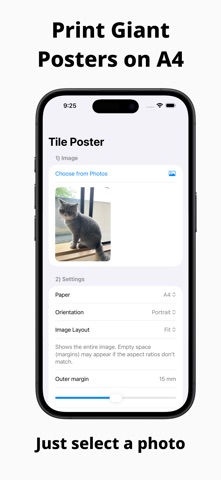
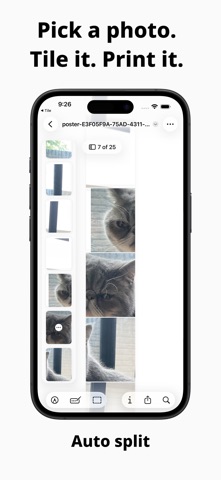
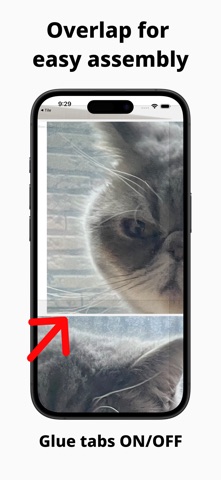
Print a large photo as a wall poster on a normal A4 or US Letter printer. Tile Poster splits your picture into pages, adds overlap and trim marks, and exports a PDF you can tape together. Your photo stays on your iPhone. Nothing is uploaded. ■Key Features •Pick an image from your Photos library •Choose a grid size (2×2 and up) •Generate multi-page PDFs for A4 / US Letter •Outer margin: add margin only around the final poster edges •Overlap: add a small overlap between tiles for easy assembly •Alignment guides: lines / dashed trim marks / shaded overlap (optional) •Tile position labels (Row/Col) (optional) •Share and print using the iOS share sheet ■How it Works 1.Select an image 2.Adjust grid, paper size, margin, and overlap 3.Generate the PDF and print it Tip: Use “Actual Size (100%)” when printing, and confirm the paper size (A4 / US Letter) in the print dialog. ■Recommended for Teachers and parents making classroom charts and wall displays Event posters and festival displays Birthdays, concerts, and fan decorations Makers and artists preparing exhibition panels Anyone with an A4 printer who wants a large poster Create large posters without a large-format printer. Just print and assemble.
What's new · 1.6
• Live tile preview — see grid lines and orange overlap bands before you generate • First-launch tips — a short guide to overlap, guides, and Actual Size printing • Watch a rewarded ad to unlock 5×5 for the session, or generate a larger layout once • Free scale mode is now limited by page count (same fairness as the free 3×3 grid)
Details