

在庫管理 Stocks - 家族で共有・買い物リスト
Takuya Takahashi · Lifestyle
Independent analytics for this App Store listing. AppTracker is not affiliated with Takuya Takahashi.
Chart standing · US
What changed · US
Listing changes AppTracker has observed for this app in this storefront — new versions, price moves, rating shifts, and store copy.
Improvements - On first setup, the app language is now chosen automatically from your iPhone's language - Camera and photo access prompts now appear in your language - Minor improvements
Screenshots


About
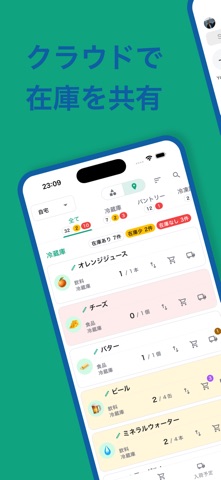
Stocks is a home inventory app the whole family can use. Share what's in your fridge, pantry and supply closet, and stop forgetting things or buying too much. New users can try any plan free for 14 days. Tap "Start as a guest" to begin right away without creating an account, and link your Apple or Google account later. Pick from about 300 product templates to set up categories, storage locations and items in one go. No tedious setup: start tracking your stock today. ◆ Sound familiar? "I thought we still had milk... we didn't." "Did I already buy toilet paper?" "Nobody knows what's in the fridge." "Is there still soy sauce at my parents' place?" With Stocks, just open the app and see everything you have at home at a glance. ◆ Key features [Low-stock alerts] Set a minimum quantity for each item. Items below it turn yellow, and out-of-stock items turn red, so you know exactly what to buy before you go shopping. [Share with your family] Family members join by scanning a management code (QR code). Everyone sees and updates the same inventory list. [Product templates] About 300 templates for food, household goods and more. Choose them from the "All" tab, and categories are set automatically. [Shopping list] Add low-stock items to your shopping list with one tap and set due dates. When you mark an item as purchased, your stock count is updated. [Incoming orders] Register items you ordered online as incoming, so you don't accidentally order them twice. [Order links] Save the URL where you order each item and open it straight from your inventory list. [Barcode search] Scan a product barcode to quickly find items you've registered. [Photos] Add photos of items and storage locations, so you can see exactly where things are kept. [Bulk quantity updates] Change quantities right in the item list and confirm them all at once. [Stock history chart] See how the stock of each item changes over time and get a feel for how fast you use it. [Multiple locations (Pro plan)] Manage your home, your parents' home, a vacation house and more in one app. It's also handy for looking after family members who live far away. [Interactive guide] A built-in tutorial helps first-time users learn the basics step by step. ◆ 6 languages Japanese, English, German, French, Chinese and Korean. Each family member can use the app in their own language. ◆ Great for - Anyone who keeps forgetting things at the store - Keeping track of what's in the fridge and cupboards - Sharing your household inventory with family - Managing more than one home - Avoiding overbuying or running out of household supplies - Managing emergency supplies and stockpiles ◆ Plans - Family: 3 members, 1 location, up to 50 items - Standard: 3 members, 1 location, unlimited items - Pro: 2 / 5 / 9 locations (10 / 25 / 45 members), unlimited items Each plan is available monthly or yearly. See prices on the plan selection screen in the app. ◆ About auto-renewable subscriptions - The free trial is available to first-time subscribers. When the free trial ends, you are automatically charged for the selected plan. - Payment is charged to your Apple Account at confirmation of purchase. - Your subscription renews automatically unless auto-renew is turned off at least 24 hours before the end of the current period. - Your account is charged for renewal within 24 hours prior to the end of the current period. - You can manage or cancel your subscription in iPhone Settings > Apple Account > Subscriptions. - Any unused portion of a free trial is forfeited when you purchase a subscription. Terms of Use (EULA): https://www.apple.com/legal/internet-services/itunes/dev/stdeula/ Privacy Policy: https://stocks-5n8.pages.dev/privacy
What's new · 1.1.7
Improvements - On first setup, the app language is now chosen automatically from your iPhone's language - Camera and photo access prompts now appear in your language - Minor improvements
Details