

Expense Tracker & Spending Log
SWAZER BILGI TEKNOLOJISI YAZILIM VE DONANIM ITHALAT IHRACAT SANAYI VE TICARET LTD STI · Finance
Independent analytics for this App Store listing. AppTracker is not affiliated with SWAZER BILGI TEKNOLOJISI YAZILIM VE DONANIM ITHALAT IHRACAT SANAYI VE TICARET LTD STI.
Chart standing · US
What changed · US
Listing changes AppTracker has observed for this app in this storefront — new versions, price moves, rating shifts, and store copy.
This update keeps your data safe with backups. BACKUPS • Export everything to a single backup file, and import it back whenever you need • The app now saves a copy of your data on your iPhone every day you use it • Find all your backups in Settings and restore any of them with a tap • A copy is kept before every import, so an import can be undone PREMIUM • Gold, silver, other metals and crypto are now part of Premium FIXES • If your data ever can't be opened, the app now offers your backups instead of closing
Ratings breakdown · US
The star breakdown behind this app's rating in this storefront.
Screenshots




About
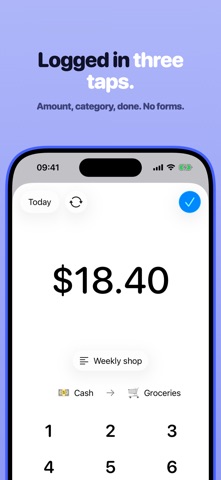
A spending log you can actually keep up with. Open it, tap the amount, pick the account — done, in about three seconds, before you have put your wallet away. No bank to connect, no account to create, no setup wizard standing between you and the first entry. WHY THIS ONE STICKS Most budgeting apps are abandoned for the same reason: logging is a chore. So this one is built around a keypad instead of a form. The number pad opens first, the account you used last is already selected, and one tap files it. A Home-screen shortcut and a Siri shortcut jump straight to a new transaction, so it is two taps from a locked phone. It is a manual tracker, deliberately. It does not read your bank feed and it does not guess what you spent. You write it down, and in return you actually know where the money went. WHAT YOU CAN DO Log expenses, income and transfers Every entry is double-entry underneath — money always leaves one place and arrives in another — so your balances stay honest without you having to think about it. Keep accounts in different currencies Give each account its own currency. A card in dollars, cash in euros, savings in pounds: amounts are converted as you go and still add up to one balance you can trust. Budget by day, week, month or year Set a limit and watch what is left, not just what is gone. See where it actually went Charts by category, by account and over time, filtered to any date range — an answer in ten seconds, not a dashboard you have to study. Make it yours Name accounts what you call them, give each one an emoji and a colour, and hide the small change if round numbers are easier to read. PREMIUM Everything above is free. One unlock adds the things that save the most typing: • Scan a receipt instead of entering it — point the camera and the merchant, date, subtotal and total are read and filled in for you • Recurring transactions — rent, salary, subscriptions and loan payments log themselves, daily through annually • Category budgets — a separate limit for each category, not just one overall figure • Transaction notes — remember the "why" behind an entry Premium is available monthly, yearly, or as a one-time purchase that never expires. Family Sharing is enabled, so a single purchase covers your family group. PRIVACY No ads, and no account to create. Your transactions are kept on your device; the only thing sent to a server is a receipt you choose to scan, so that it can be read for you. Privacy Policy: https://ymnktb.notion.site/p12y Terms of Use: https://ymnktb.notion.site/t14e
What's new · 2.0
This update keeps your data safe with backups. BACKUPS • Export everything to a single backup file, and import it back whenever you need • The app now saves a copy of your data on your iPhone every day you use it • Find all your backups in Settings and restore any of them with a tap • A copy is kept before every import, so an import can be undone PREMIUM • Gold, silver, other metals and crypto are now part of Premium FIXES • If your data ever can't be opened, the app now offers your backups instead of closing
Details