

Weekly Calendar App
Alexander Kvamme · Productivity
Independent analytics for this App Store listing. AppTracker is not affiliated with Alexander Kvamme.
Chart standing · US
What changed · US
Listing changes AppTracker has observed for this app in this storefront — new versions, price moves, rating shifts, and store copy.
- New: Home Screen widgets in small, medium and large, styled exactly like your cards - Give each widget its own day and colour: touch and hold it, then choose Edit Widget - Tap a widget to jump straight to that day - The app now opens scrolled to today
Price & rating history · US
Reconstructed from the listing changes AppTracker has observed in this storefront. A field is charted once it has changed more than once, and each line starts at the value it moved from.
Average rating · ★ 4.56 now · 3 changes on record
Ratings breakdown · US
The star breakdown behind this app's rating in this storefront.
In-app purchases · US
What this app sells inside itself, grouped by kind and priced for this storefront.
Screenshots





About
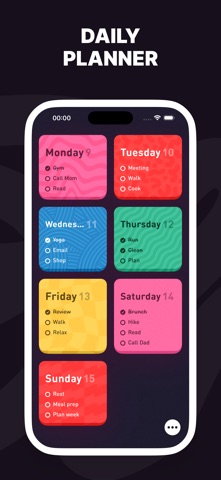
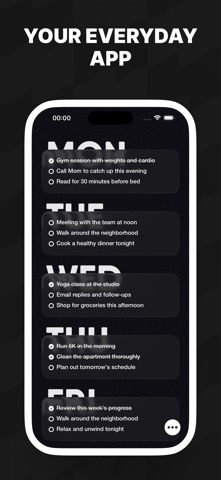
Weekly is the simplest way to plan your week. No complex features, no overwhelming options - just a beautiful weekly view that helps you stay organized. PLAN AT A GLANCE See your entire week in one view. Add tasks to any day with a single tap. Drag and drop to reschedule. It's that simple. BEAUTIFUL THEMES Choose from 10+ stunning color themes to match your style. From vibrant Berry to elegant Crystal, from playful Meadow to sophisticated Black Stallion - find the look that inspires you. FLEXIBLE LAYOUTS Switch between Grid and Rows layout to find what works best for you. Customize card styles with rounded corners, indented cards, or the unique animated Marching Ants effect. CUSTOMIZE EVERYTHING - Multiple font styles (Hard, Soft, Code) - Adjustable font sizes - Alternate app icons for every theme - Dark mode support PRIVACY FIRST Your data stays on your device. No account required. No tracking. No ads. Weekly Pro unlocks all themes, fonts, and customization options. Terms of Use (EULA): https://www.apple.com/legal/internet-services/itunes/dev/stdeula/
What's new · 1.0.29
- New: Home Screen widgets in small, medium and large, styled exactly like your cards - Give each widget its own day and colour: touch and hold it, then choose Edit Widget - Tap a widget to jump straight to that day - The app now opens scrolled to today
Details