

Image to Video | Vidifier
Top Apps LLC · Photo & Video
Independent analytics for this App Store listing. AppTracker is not affiliated with Top Apps LLC.
Chart standing · US
What changed · US
Listing changes AppTracker has observed for this app in this storefront — new versions, price moves, rating shifts, and store copy.
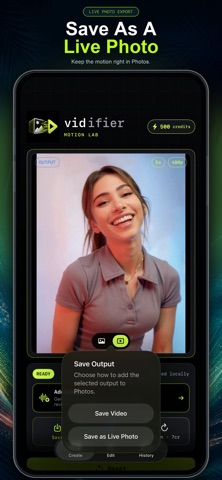
Photo editing is here! AI-based image editing allows you to upload a photo, type a prompt describing your edits, and generate a new photo that makes your edits while preserving exact details of the original. Live Photo exports are now supported too. After you generate a video, you can choose to export as a Live Photo or as a Video. Bug fixes.
Price & rating history · US
Reconstructed from the listing changes AppTracker has observed in this storefront. A field is charted once it has changed more than once, and each line starts at the value it moved from.
Average rating · ★ 5.00 now · 2 changes on record
Ratings breakdown · US
The star breakdown behind this app's rating in this storefront.
In-app purchases · US
What this app sells inside itself, grouped by kind and priced for this storefront.
Screenshots



About
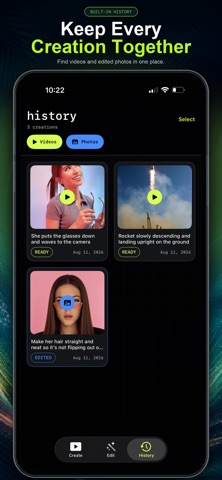
Turn any photo into motion with Vidifier, an AI image-to-video studio built for fast, creative experimentation. Start with a favorite memory, portrait, landscape, product shot, or original artwork. Describe how you want it to move, choose your settings, and let Vidifier transform the still image into a short AI-generated video. Make a sunset shimmer. Add movement to a portrait. Send clouds drifting across the sky. Give product photography a cinematic reveal. Vidifier makes image-to-video creation approachable. No editing timeline, animation experience, or keyframes required. WELCOME TO THE MOTION LAB Vidifier gives you focused creative controls without slowing down the process: • Generate videos from photos and artwork • Direct the motion using a custom prompt • Choose 3, 5, or 7-second video durations • Generate at up to 720p resolution • Use Camera Lock to help reduce unwanted camera drift • Save completed videos to your camera roll • Revisit and manage creations from your history HOW IT WORKS Choose an image from your photo library Describe the movement you want to see Select your duration and resolution Start the motion engine Save or share the finished video Your prompt can be simple or specific. Ask for subtle natural movement, a dramatic camera effect, environmental motion, or an entirely new visual direction. MADE FOR CREATIVE MOMENTS Use Vidifier to: • Bring travel photos to life • Add subtle motion to portraits • Animate landscapes, skies, water, and nature • Turn product shots into dynamic promotional content • Create distinctive videos for social media • Explore motion concepts for artwork and photography • Reimagine everyday moments from your camera roll POWERED BY AI VIDEO GENERATION Vidifier’s AI motion engine analyzes your source image and prompt to generate a new video from your creative direction. Every result is a fresh interpretation, making it easy to test different prompts, durations, and ideas. Your completed generations are organized in your history, ready to replay, save, share, or use as inspiration for another image-to-video experiment. SIMPLE BY DESIGN Vidifier is designed to keep the technology out of your way. There are no complicated editing tools or crowded timelines—just your image, your direction, and the controls needed to bring it into motion. Apple’s standard End User License Agreement applies: https://www.apple.com/legal/internet-services/itunes/dev/stdeula/ Enter the Motion Lab and turn your next image into a video with Vidifier.
What's new · 2.1.1
Photo editing is here! AI-based image editing allows you to upload a photo, type a prompt describing your edits, and generate a new photo that makes your edits while preserving exact details of the original. Live Photo exports are now supported too. After you generate a video, you can choose to export as a Live Photo or as a Video. Bug fixes.
Details