

Voice Calculator - VoiCalc
RAINBOW TREE LLC · Utilities
Independent analytics for this App Store listing. AppTracker is not affiliated with RAINBOW TREE LLC.
Chart standing · US
What changed · US
Listing changes AppTracker has observed for this app in this storefront — new versions, price moves, rating shifts, and store copy.
Thank you for using the app. In this update we went back over everything and made a number of refinements, so it feels smoother and more dependable to use — including in places you may never notice. If anything comes up, please get in touch from within the app. Your feedback is what shapes the next update.
In-app purchases · US
What this app sells inside itself, grouped by kind and priced for this storefront.
Screenshots



About
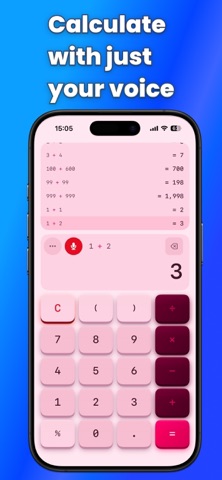
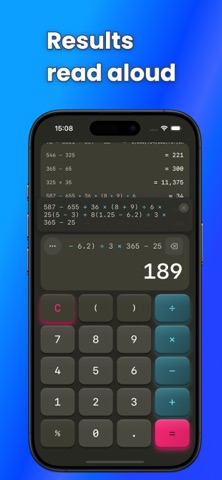
【Calculate by Voice, Hear the Results】 SoundCalc is a voice-powered calculator that speaks your answers. ■ Perfect for: ・Visually impaired users ・Hands-free calculation while cooking or driving ・Anyone who wants audio confirmation of results ・Accounting and bookkeeping professionals ■ Key Features ・Speech Recognition: Say "123 plus 456 equals" to calculate ・Speech Output: Results are read aloud automatically ・11 Languages: English, Japanese, Spanish, Chinese, Korean, French, German, Portuguese, Italian, Dutch, Russian ・Calculation History: Organize with multiple threads ・History Tap: Tap history to insert results ・21 Themes: Dark, Light, High Contrast and more ■ Business Features ・Business Keypad: Includes √ and GT keys ・Grand Total (GT): Automatically accumulates calculation results ・Equals Repeat: Tap "=" repeatedly to repeat the last operation ・Square Root: Say "square root of 9" for voice input ■ Accessibility ・VoiceOver compatible ・High contrast mode ・Haptic feedback ■ Pro Features ・Ad-free experience ・20+ premium themes ・Unlimited history ・Business keypad ・Input device selection (USB/Bluetooth microphone) Free to use. Upgrade to Pro for ad-free experience and extended features.
What's new · 1.0.9
Thank you for using the app. In this update we went back over everything and made a number of refinements, so it feels smoother and more dependable to use — including in places you may never notice. If anything comes up, please get in touch from within the app. Your feedback is what shapes the next update.
Details