
Chart standing · US
What changed · US
Listing changes AppTracker has observed for this app in this storefront — new versions, price moves, rating shifts, and store copy.
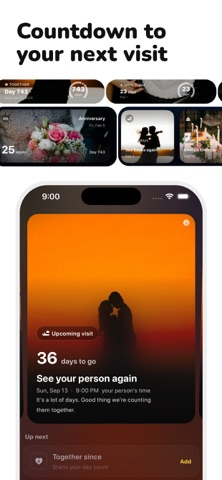
Your countdown photos can move now. Open a countdown, turn on Morphing photo, and the picture slowly warps and folds like it's underwater, then settles back to how it was. It's off unless you switch it on, and it's per card, so only the ones you pick will do it. The upgrade screen got the same treatment - a photo drifting behind everything, plus a few hearts you can flick around while you read. Also in this update: the banners dotted around the app now sit on slow-moving colour instead of flat blocks, and the whole thing runs lighter on your battery than it looks.
Ratings breakdown · US
The star breakdown behind this app's rating in this storefront.
Screenshots




About
Long Distance is made for staying close when you’re far apart. Share snaps and drawings with your partner or best friend in a single, private session. How it works: 1) Send your person one invite link (there’s a 6-letter code too if you’d rather) 2) The link opens the app with the code filled in, and they can see your name and photo before they join 3) Send photos from your camera or draw on a canvas. They’ll see it in the app and on the widget Take a quick photo, sketch something fun, or draw over a picture. Every snap and drawing lives in your shared gallery so you can look back anytime. Add the Long Distance widget to your home screen to see their latest creation at a glance. Built for couples and best friends who want a simple, focused way to stay connected. No feeds, no clutter, just you and your person. Terms of use: https://trylongdistance.com/terms Privacy policy: https://trylongdistance.com/privacy
What's new · 1.10.0
Your countdown photos can move now. Open a countdown, turn on Morphing photo, and the picture slowly warps and folds like it's underwater, then settles back to how it was. It's off unless you switch it on, and it's per card, so only the ones you pick will do it. The upgrade screen got the same treatment - a photo drifting behind everything, plus a few hearts you can flick around while you read. Also in this update: the banners dotted around the app now sit on slow-moving colour instead of flat blocks, and the whole thing runs lighter on your battery than it looks.
Details