

Log to LUT
ilkyu choi · Photo & Video
Independent analytics for this App Store listing. AppTracker is not affiliated with ilkyu choi.
Chart standing · US
What changed · US
Listing changes AppTracker has observed for this app in this storefront — new versions, price moves, rating shifts, and store copy.
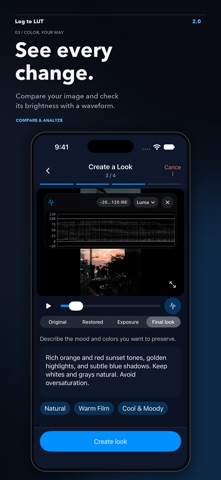
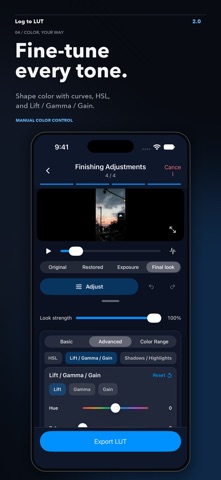
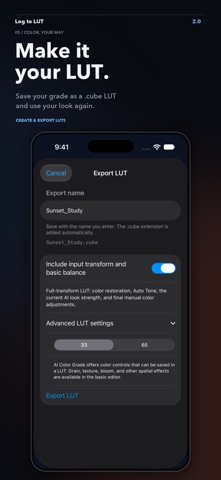
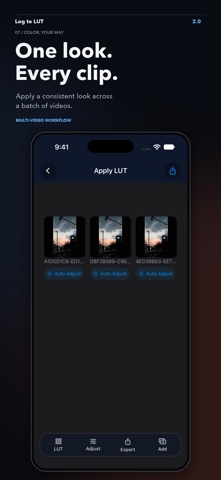
Version 2.0 introduces AI color grading and a new workflow for creating your own LUTs. • Describe the look you want in your own words, refine the result with manual color controls, and save it as a .cube LUT or an edited video. • Follow a guided workflow from shooting profile confirmation and exposure correction to look creation and final adjustments. • Restore supported Log footage with an expanded color restoration engine, including Canon Log 2/3, Sony S-Log3, Panasonic V-Log, and ARRI LogC4. • Use AI-assisted auto adjustment, or choose the existing analysis method in Settings. • Automatically adjust multiple videos in one batch, with individual results, undo controls, progress, and cancellation. • Compare the original, restored image, exposure correction, and final look with scopes and a vectorscope. • Save your AI editing session and resume interrupted look generation, including after reopening the app. • Enjoy a refreshed LUT workflow, improved preview responsiveness, and more stable exports, with higher-precision processing for ProRes source videos. AI features require a supported device and OS version with Apple Intelligence available.
In-app purchases · US
No in-app purchases.
Screenshots



Keywords this app targets
Search terms AppTracker associates with this app — estimates, not search volume. ❝ = in the app's title; a highlighted number is its current position for that term.
Similar apps
Competitors and close alternatives, as estimated by AppTracker.
 LUT Smith: Camera Looks
树伟 杨
2 shared topics · 1 shared title word
LUT Smith: Camera Looks
树伟 杨
2 shared topics · 1 shared title word
 LogGate Pro · Log to Rec.709
Matt Stevens
2 shared topics · 1 shared title word
LogGate Pro · Log to Rec.709
Matt Stevens
2 shared topics · 1 shared title word
 LUT Viewer for iOS
Adrian Berisha
2 shared topics · 1 shared title word
LUT Viewer for iOS
Adrian Berisha
2 shared topics · 1 shared title word
 CreatorGrade Pro
Michael Tobin
3 shared topics
CreatorGrade Pro
Michael Tobin
3 shared topics
 VideoGrade
Fidel Lainez
2 shared topics
VideoGrade
Fidel Lainez
2 shared topics
 FARGLO: Color Grading
Genki Takeda
1 shared topic
FARGLO: Color Grading
Genki Takeda
1 shared topic
 Chromis
Ramsey Thomas
Chromis
Ramsey Thomas
 CINEMA24 - Cinematic Multi Cam
JiYeon Noh
2 shared topics
CINEMA24 - Cinematic Multi Cam
JiYeon Noh
2 shared topics
About
Log to LUT lets you apply LUTs, grade your videos, and create your own LUTs. AI Color Grading and LUT Creation • Describe the look you want in natural language, then refine the result with manual color controls. • Follow a guided workflow through shooting profile confirmation, color restoration, exposure correction, look creation, and final adjustments. • Export your result as a .cube LUT or an edited video. • Compare the original and graded image, and inspect brightness and color with scopes and a vectorscope. • Save your AI editing session and resume interrupted work after reopening the app. Image-based AI color grading and LUT creation require iOS/iPadOS 27 or later on a supported device with Apple Intelligence available. Availability depends on the device, language, region, and system model readiness. LUT application and manual color grading remain available without AI. Color-grade compatible Log/HDR and standard video directly on iPhone and iPad. Log to LUT lets you import videos from Photos or Files, apply .cube LUTs and detailed grading adjustments, preview the result, and export finished videos. Work precisely on one clip or import up to 10 videos at a time to apply a consistent look across a batch. VIDEO LUT WORKFLOW • Use bundled LUTs or import and manage your own .cube LUT files • Build an ordered stack of up to four LUTs, with per-LUT application percentage, enable controls, and reordering • Adjust exposure, contrast, highlights, shadows, whites, blacks, saturation, vibrance, white balance, global hue, and midtones • Refine tone curves, HSL, Lift/Gamma/Gain, split toning, noise reduction, sharpen, clarity, vignette, grain, bloom and halation, highlight roll-off, and gamut compression • Compare the processed and bypassed image with Before/After • Check luminance and channel distribution with a Rec.709 waveform in Luma or RGB Overlay mode • Save grading adjustments as presets, then import, share, and reuse them • Apply the same LUT stack and saved grading preset across multiple videos • Review codec, container, resolution, frame rate, bit depth, color metadata, HDR/SDR status, duration, and file size • Export at the original resolution or 1080p Video LUT workflow exports are converted to Rec.709 and saved to Photos. LOG/HDR ENCODING CONVERSION Analyze or manually select the source Log and gamut profile, then convert through a color-managed pipeline to REDWideGamutRGB / Log3G10, DaVinci Wide Gamut / Intermediate, ACEScct, or ARRI LogC4. Converted HEVC Main10 videos are delivered through the system share sheet with a sidecar JSON describing the target encoding. No account is required. Video preview and rendering run on the device.
What's new · 2.0.0
Version 2.0 introduces AI color grading and a new workflow for creating your own LUTs. • Describe the look you want in your own words, refine the result with manual color controls, and save it as a .cube LUT or an edited video. • Follow a guided workflow from shooting profile confirmation and exposure correction to look creation and final adjustments. • Restore supported Log footage with an expanded color restoration engine, including Canon Log 2/3, Sony S-Log3, Panasonic V-Log, and ARRI LogC4. • Use AI-assisted auto adjustment, or choose the existing analysis method in Settings. • Automatically adjust multiple videos in one batch, with individual results, undo controls, progress, and cancellation. • Compare the original, restored image, exposure correction, and final look with scopes and a vectorscope. • Save your AI editing session and resume interrupted look generation, including after reopening the app. • Enjoy a refreshed LUT workflow, improved preview responsiveness, and more stable exports, with higher-precision processing for ProRes source videos. AI features require a supported device and OS version with Apple Intelligence available.
Details