

Ome Video - TV Live Styles
HARRY BROWN · Photo & Video
Independent analytics for this App Store listing. AppTracker is not affiliated with HARRY BROWN.
Chart standing · US
What changed · US
Listing changes AppTracker has observed for this app in this storefront — new versions, price moves, rating shifts, and store copy.
Price & rating history · US
Reconstructed from the listing changes AppTracker has observed in this storefront. A field is charted once it has changed more than once, and each line starts at the value it moved from.
Average rating · ★ 4.20 now · 2 changes on record
Ratings breakdown · US
The star breakdown behind this app's rating in this storefront.
In-app purchases · US
No in-app purchases.
Screenshots



Keywords this app targets
Search terms AppTracker associates with this app — estimates, not search volume. ❝ = in the app's title; a highlighted number is its current position for that term.
Similar apps
Competitors and close alternatives, as estimated by AppTracker.
 LiveCut: Video to Live Photos
润杰 潘
2 shared title words
LiveCut: Video to Live Photos
润杰 潘
2 shared title words
 iVideo - Video Editor Toolbox
天从 何
1 shared title word
iVideo - Video Editor Toolbox
天从 何
1 shared title word
 Video to Live - Maker
Juxhin Bakalli Technologies
2 shared title words
Video to Live - Maker
Juxhin Bakalli Technologies
2 shared title words
 Convert My Live Photo
Florian Schimanke
1 shared title word
Convert My Live Photo
Florian Schimanke
1 shared title word
 Videoleap: AI Video Editor
Lightricks Ltd.
1 shared topic · 1 shared title word
Videoleap: AI Video Editor
Lightricks Ltd.
1 shared topic · 1 shared title word
 VideoToLive - Live Wallpapers
Thomas Yoon
1 shared title word
VideoToLive - Live Wallpapers
Thomas Yoon
1 shared title word
 Video To Live Photo
聪 田
2 shared title words
Video To Live Photo
聪 田
2 shared title words
 Videocraft: Video Maker
Mauricio Eastmond
1 shared title word
Videocraft: Video Maker
Mauricio Eastmond
1 shared title word
About
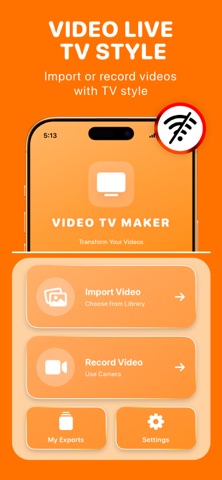
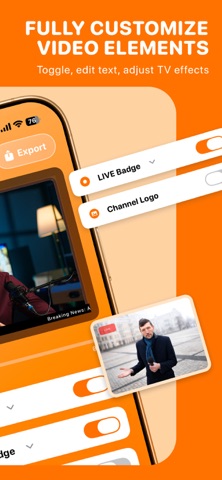
Let's turn your iPhone into a broadcast-ready camera with realistic TV overlays, frames, and live badges, all processed 100% offline. Turn any ordinary videos into realistic TV-style clips directly on your iPhone with on you camera. The app is built for users who want to recreate the look of live television broadcasts by adding familiar on-screen elements such as frames, lower-thirds, tickers, and LIVE badges. Everything runs fully offline and on-device, giving you complete control over your videos without uploading content or relying on external services. Main Features: - Import videos from your photo library or record new ones using the camera - Real-time preview of TV-style overlays applied directly on the video - Modular, toggle-based TV elements including frames, LIVE badge, channel logo, lower-third titles, scrolling ticker, and channel number - Customizable text, colors, positions, sizes, and basic TV-style visual effects - Simple editing workflow focused on enabling or disabling elements rather than complex timelines - Export finished videos in HD (720p or 1080p) directly to the Photos library - Local “My Exports” library to view, replay, share, delete, or re-edit previously exported videos - Fully offline processing with all video data stored and handled on the device We helps users quickly create TV-style video content without complex editing tools or online processing. By combining real-time previews, simple toggles, and offline video export, the app makes it easy to produce structured, broadcast-like clips for presentations, demos, or creative projects. Its clear focus on TV-style transformation, privacy-first design, and local export workflow gives it a defined, practical purpose beyond basic video editing utilities.
What's new · 1.2.0
Update to V1.2.0 to improve and prevent bugs on some style editing - Fixed bugs and errors appearing multiple styles & customization - Fixed minor error on some video features - Import video time is improved
Details