

Pocket Clear
Aravind Srinivas C V · Finance
Independent analytics for this App Store listing. AppTracker is not affiliated with Aravind Srinivas C V.
Chart standing · US
What changed · US
Listing changes AppTracker has observed for this app in this storefront — new versions, price moves, rating shifts, and store copy.
What's New in 2.15 • Arabic and Russian — Pocket Clear now speaks 10 languages; Arabic comes with a full right-to-left layout and Western digits; switch any time in Settings > Language • A calendar for your spending — switch All Transactions to Calendar and each day shows what you spent; tap a day to see its entries, and swipe between months • Reset Account — start over without deleting your account; pick what to clear, from transactions and budgets to custom categories, while your sign-in, Pro and settings stay • "+ New" category as you log — create a category or subcategory right from the Add screen, without losing the expense you're halfway through • Improved translations and small fixes throughout — including your average spend per day in Reports
Price & rating history · US
Reconstructed from the listing changes AppTracker has observed in this storefront. A field is charted once it has changed more than once, and each line starts at the value it moved from.
Average rating · ★ 4.87 now · 5 changes on record
Ratings breakdown · US
The star breakdown behind this app's rating in this storefront.
In-app purchases · US
What this app sells inside itself, grouped by kind and priced for this storefront.
Screenshots





About
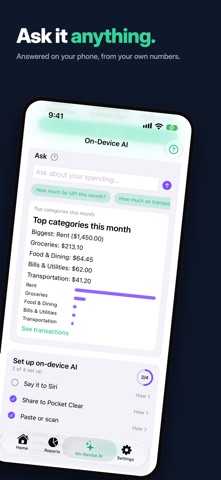
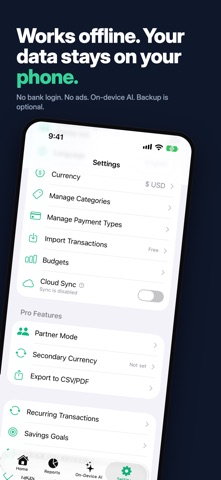
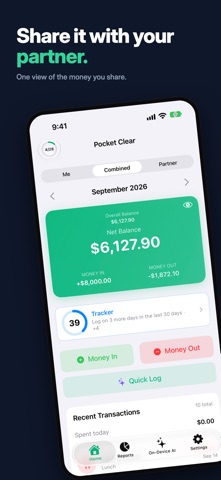
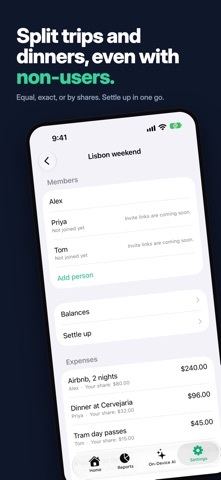
Pocket Clear is a simple, privacy-first expense tracker — now semi-automated, without linking your bank. Apple Pay taps and bank texts can log themselves, on-device AI turns a shared receipt into an entry, and you stay in control of every one. AUTOMATIC LOGGING — NO BANK LINKING On-Device AI (Beta — free for everyone until 31 December 2026) • Apple Pay taps log themselves — set up a Shortcuts automation once and every tap is added in the background • Bank texts log themselves too — debit and card-spend SMS become entries the moment they arrive • Share a bank message, receipt photo, or card email to Pocket Clear and it's logged for you • Quick Log on Home — paste, type, scan, or choose a photo — or tell Siri "Log an expense in Pocket Clear" • Ask — "How much on food this month?" — and get exact answers from your own transactions • Everything logged for you waits under Recent captures to check, edit, or undo • Read on your iPhone — nothing you share or ask is uploaded to Pocket Clear or any AI company; off until you switch it on SIMPLE & FAST • Add expenses in seconds with "Money In" and "Money Out" • Smart Suggestions turn a repeat expense into one tap • Custom categories with 95 searchable icons, plus subcategories • Searchable drop-down pickers for long category and payment-type lists • Split a transaction across categories, and search your whole history by note, amount, or payee • Dark mode, text size, decimal places, and 10+ languages BUILD THE HABIT • A daily reminder that learns the hour you usually log — and only nudges on days you haven't • Catch-up week — see the last seven days side by side and fill in the ones you missed • Road to 50 — rewards at 10, 25 and 50 entries, including 3 months of Pro you can request at 50 if you've never subscribed • Power score — one number for your money habit, with a nightly rank and what to do next • A projection of where your month will land • Today's tip — a short, illustrated walkthrough of one feature each day PRIVACY FIRST • Works completely offline — an account is optional • Your data stays on your device unless you turn on cloud backup • Anything you do back up is encrypted with AES-256 • No ads, no tracking, no data selling BUILT AROUND YOUR PAY CYCLE • Weekly, fortnightly, semi-monthly, monthly or yearly periods • Start your month on payday instead of the 1st • Carry a balance over from one period to the next REPORTS & INSIGHTS • Insights — this week's spending at a glance, every Sunday • Spending and money in by category, with percentages on the chart • Tap a payment type to see every transaction behind it • Monthly and yearly trends, and a running "Spent today" total • An optional Account balances card on Home for each payment type • Home Screen and Lock Screen widgets, day streaks and milestones PRO FEATURES • Pro Insights — what's creeping up, your repeat charges, and where to cut back • Cloud backup & sync across devices • Partner Mode — one shared view of your money with your significant other • Groups and Trips — split shared costs, and see what one trip actually cost • Receipt photos attached to any transaction • Pocket Clear on the web — read, sort and export on a full screen • Payees — track who you paid, not just what for • Per-category budgets with alerts and rollover • Savings goals and recurring transactions • Tags and inter-account transfers • Secondary currency and Travel Mode for spending abroad • Export transactions to CSV/PDF Pro is available monthly or yearly. PERFECT FOR • Couples managing shared expenses • Anyone who wants hands-off expense tracking without linking a bank • Expats and travellers tracking in multiple currencies • Anyone who values privacy and simplicity Terms of Use: https://www.apple.com/legal/internet-services/itunes/dev/stdeula/
What's new · 2.16
What's New in 2.15 • Arabic and Russian — Pocket Clear now speaks 10 languages; Arabic comes with a full right-to-left layout and Western digits; switch any time in Settings > Language • A calendar for your spending — switch All Transactions to Calendar and each day shows what you spent; tap a day to see its entries, and swipe between months • Reset Account — start over without deleting your account; pick what to clear, from transactions and budgets to custom categories, while your sign-in, Pro and settings stay • "+ New" category as you log — create a category or subcategory right from the Add screen, without losing the expense you're halfway through • Improved translations and small fixes throughout — including your average spend per day in Reports
Details