

Camera to Files
Chad Pickard · Photo & Video
Independent analytics for this App Store listing. AppTracker is not affiliated with Chad Pickard.
Chart standing · US
What changed · US
Listing changes AppTracker has observed for this app in this storefront — new versions, price moves, rating shifts, and store copy.
• Fixed camera starting on the wrong lens on some dual-camera iPhones • Improved camera preview framing to better match Apple's Camera app • General bug fixes and improvements
Price & rating history · US
Reconstructed from the listing changes AppTracker has observed in this storefront. A field is charted once it has changed more than once, and each line starts at the value it moved from.
Average rating · ★ 3.40 now · 2 changes on record
Screenshots




About
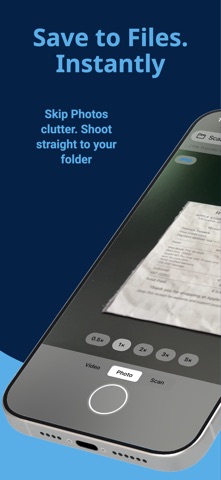
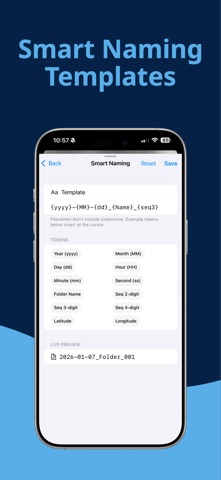
Stop saving everything to Photos. Shot2File saves directly to Files, iCloud Drive, and OneDrive. Choose a folder once, then capture photos, videos, and scans that land exactly where you want them — fast, clean, and organized. Built for a faster workflow: - Save directly to Files, iCloud Drive, or OneDrive - Smart Naming with 21 tokens — date, time, place, device, EXIF, sequence, and more - Optional Auto-Sort into Year / Month / Day folders - Photo, Video, and Scan in one simple camera - Quick Reveal in Files and easy sharing - Volume buttons as shutter (optional) Pro camera control Tap to focus and meter. Long-press to lock AE/AF and drag the reticle handle to bias exposure exactly where you want it. Lens chips are labeled (Ultra-Wide, Wide, Tele) so you always know which one is active. Self-timer (3s / 10s) and expanded grids — rule of thirds, square, golden spiral, and diagonals — for cleaner framing. Powerful scanning Create multi-page PDFs with color, grayscale, or black-and-white modes, plus DPI and margin controls. Pro unlocks on-device OCR with multi-language detection so the text inside scanned pages is searchable in Files, Preview, and Spotlight. Better capture control Choose photo format (JPEG/HEIC) and quality. Record video with stabilization. Pro unlocks up to 4K/60 video with full stabilization control. Smart Naming Build any filename pattern with tokens for date, time, weekday, place (reverse-geocoded city), device model, image dimensions, ISO, aperture, shutter speed, GPS, sequence numbers, and more. Live preview while you type. Bulk Rename (Pro) Rename existing photos, videos, and PDFs in any folder using your current template — with one-tap undo. OneDrive that just works Upload to OneDrive Personal or Business. If your network drops mid-upload, Shot2File queues the file and finishes it the moment connectivity returns. Made for frequent use Pin favorite folders for one-tap saving. Free includes 1 Favorite. Pro unlocks unlimited Favorites. Use Siri or the Action Button to launch straight into the camera or scanner — no menus, no app picker. Spotlight indexes each capture action, so you can search "take a photo" and shoot. Try Pro Get a 15-minute Pro preview. Additional Favorites require permanent Pro.
What's new · 2.2.2
• Fixed camera starting on the wrong lens on some dual-camera iPhones • Improved camera preview framing to better match Apple's Camera app • General bug fixes and improvements
Details