

Device mockup - ScreenFrame
Gaddafi Rusli · Photo & Video
Independent analytics for this App Store listing. AppTracker is not affiliated with Gaddafi Rusli.
Chart standing · US
What changed · US
Listing changes AppTracker has observed for this app in this storefront — new versions, price moves, rating shifts, and store copy.
New - Entry and exit animation presets. Animate your device into and out of the view. Works with screenshots too (will be exported as video). - 3:4 and 4:3 canvases: The in-feed shapes between tall and square. - iPhone Duo device: The foldable, with all three of its displays. - iPhone 18 Pro device: In Burgundy, Glacier and Black. - New device picker design: Making it easier to see all the options. Fixed - Fit and Fill content no longer clip your screenshot at the top of the screen.
In-app purchases · US
What this app sells inside itself, grouped by kind and priced for this storefront.
Screenshots




About
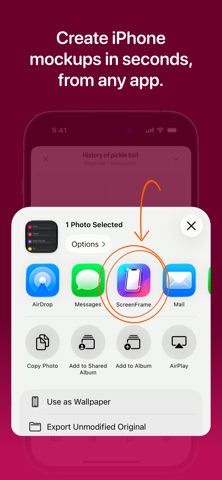
ScreenFrame turns iPhone screenshots and screen recordings into clean, professional mockups. Frame a screenshot or screen recording, animate the device into view, and export a high-quality image or video in seconds. FRAME ANY SCREENSHOT Import any iPhone screenshot and place it inside a realistic iPhone device frame. Adjust the screen with drag, pinch, Fit or Fill. Then set the background and a soft device shadow, pick your canvas size and export a polished mockup. No templates, no design skills needed. BRING SCREEN RECORDINGS TO LIFE Turn iPhone screen recordings into clean mockup videos with device frames. They're great for app demos, walkthroughs, product previews and launch posts. Videos export smoothly at 60fps. ENTRY AND EXIT ANIMATIONS Animate your device into view, out of it, or both: Fade, Rise, Slide, Scale or Pop. Even a single screenshot can export as a short video clip, ready for a social feed. REALISTIC DEVICE FRAMES Choose from a range of modern iPhone frames, including iPhone 18 Pro in Burgundy, Glacier and Black, and the foldable iPhone Duo with all three of its displays. Your current device is always one tap away in the editor header. MADE FOR SHARING Pick the canvas shape for where your mockup is going: 9:16 for Stories and Reels, 1:1, 3:4 and 4:3 for feeds, and 16:9 for websites and presentations. Every shape exports at the same high quality. ScreenFrame works with Photos and the iOS share sheet, so you can frame a screenshot or recording from anywhere on your iPhone. PRIVATE BY DESIGN Everything happens on your device. There are no accounts, no cloud processing and no tracking. Your screenshots and recordings never leave your phone. Simple on purpose: open a screenshot or screen recording, frame it, animate it if you like, export and share. Terms of Use: https://www.apple.com/legal/internet-services/itunes/dev/stdeula/ Privacy Policy: https://screenframe.fun/privacy
What's new · 1.2.0
New - Entry and exit animation presets. Animate your device into and out of the view. Works with screenshots too (will be exported as video). - 3:4 and 4:3 canvases: The in-feed shapes between tall and square. - iPhone Duo device: The foldable, with all three of its displays. - iPhone 18 Pro device: In Burgundy, Glacier and Black. - New device picker design: Making it easier to see all the options. Fixed - Fit and Fill content no longer clip your screenshot at the top of the screen.
Details