

Chapterize - podcast chapters
Matt Birchler · Utilities
Independent analytics for this App Store listing. AppTracker is not affiliated with Matt Birchler.
Chart standing · US
What changed · US
Listing changes AppTracker has observed for this app in this storefront — new versions, price moves, rating shifts, and store copy.
• iPhone Duo support • Improved labels on toolbar items • Chapters UI makes better use of space • General UI clean up • Full video exports have been removed, but video clips are still available
Ratings breakdown · US
The star breakdown behind this app's rating in this storefront.
In-app purchases · US
What this app sells inside itself, grouped by kind and priced for this storefront.
Screenshots



About
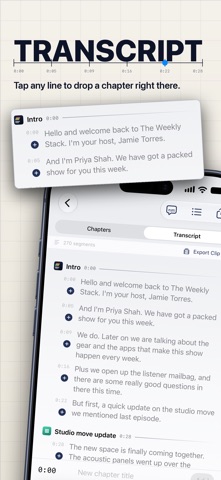
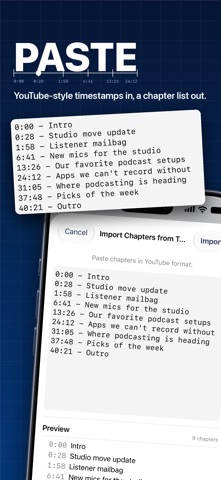
Chapterize is a complete post-production toolkit for podcasters. Add chapters, generate transcripts, export video clips, and keep an eye on your shows, all in one app that runs natively on iPhone, iPad, and Mac. CHAPTERS - Mark chapters as you listen, with a scrubbable waveform and one tap to drop a chapter at the playhead - Full chapter support: titles, artwork, and links - Import chapters from YouTube-style text, or from markers you set in Logic Pro and other DAWs - Copy your chapter list as text for YouTube or your show notes - Work on several episodes at once with tabs TRANSCRIPTS - Generate transcripts on device with Apple's Speech APIs. Your audio is never uploaded anywhere. - Have transcription start automatically as soon as a file finishes importing - Import and export SRT and VTT subtitle files - Tap any line to jump to it, search the whole transcript, and drag chapter markers to retime them SHOWS - Add your podcast by searching Apple Podcasts, or by pasting an RSS feed - See recent episodes, show notes, artwork, and your Apple Podcasts rating broken down by country - Copy episode links and embed codes, or download episode audio - Drop a new recording onto a show to start editing with the title and artwork already filled in VIDEO CLIPS - Export short transcript clips with karaoke-style captions, ready for social media FILES - Opens MP3, M4A, MP4, M4B, WAV, and AIFF - Always exports MP3 with chapters embedded, so your episode works in every podcast app PRICING - Free to try: 5 exports and 5 transcripts - One simple purchase unlocks everything. No subscription. System Requirements - iOS or iPadOS 26 or later Privacy policy https://birchtree.productions/apps/chapterpod/privacy.html
What's new · 2.3
• iPhone Duo support • Improved labels on toolbar items • Chapters UI makes better use of space • General UI clean up • Full video exports have been removed, but video clips are still available
Details