

Open Invite
Christian Tietze · Productivity
Independent analytics for this App Store listing. AppTracker is not affiliated with Christian Tietze.
Chart standing · US
What changed · US
Listing changes AppTracker has observed for this app in this storefront — new versions, price moves, rating shifts, and store copy.
Time zone differences are handled properly
Screenshots


About
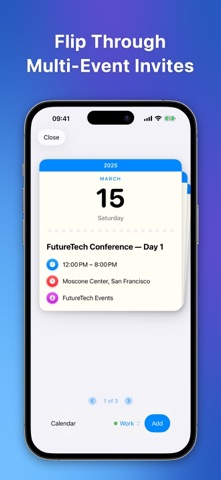
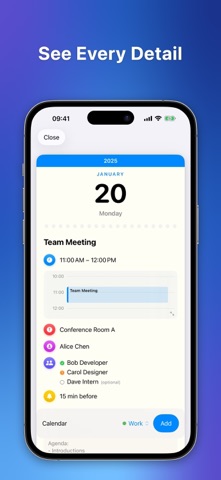
Welcome to Open Invite — the beautiful way to open .ics calendar files on iOS. • Tap to open calendar invitations from Mail, Safari, or Files • Preview events before adding with gorgeous invitation cards • Catch scheduling conflicts with visual timeline view • Choose which calendar to use for each event • Swipe through multi-event files as a card stack • Complete privacy — everything happens on-device Open Invite handles .ics files the way they should work — tap, preview, add. One second, not one minute. Stop forwarding calendar invites to yourself: Receive a meeting invitation in Mail, download an event from Safari, or find an .ics file in Files? Just tap it. Open Invite shows you a beautiful preview card with every detail — title, time, location, organizer, attendees, notes — so you can decide before it touches your calendar. SEE BEFORE YOU COMMIT Preview the full event as a beautiful invitation card. No more blind adds. No more calendar clutter from events you didn't mean to accept. CATCH CONFLICTS BEFORE THEY HAPPEN See a visual timeline of your day alongside the new event. Spot double-bookings before you commit. KEEP WORK AND LIFE SEPARATE Pick exactly which calendar to use. Client meetings go in Work, soccer games in Family. Just want speed? Basic access adds to your default calendar instantly. ONE TAP FROM ANYWHERE Works with Mail, Safari, Files, or any app that handles calendar files. Open Invite registers as a native file handler — no forwarding to yourself, no copy-pasting dates. MULTIPLE EVENTS? NO PROBLEM Some invites contain a full season schedule or conference agenda. Swipe through them like a card deck and add events one at a time. YOUR CALENDAR STAYS YOURS Everything happens on your iPhone. Zero cloud servers. Zero tracking. Zero accounts. Progressive calendar access means you choose what the app can see — write-only to add events, or full access for conflict detection and calendar selection.
What's new · 1.0.1
Time zone differences are handled properly
Details