

AfterShift: Sleep & Shift Work
Antti Aittamaa · Health & Fitness
Independent analytics for this App Store listing. AppTracker is not affiliated with Antti Aittamaa.
Chart standing · US
What changed · US
Listing changes AppTracker has observed for this app in this storefront — new versions, price moves, rating shifts, and store copy.
Your Home Screen already counts down to your next shift. Now it shows what the last ones cost you. NEW — See what nights really take Sleep Graph turns every night into a single square, shaded against your sleep target, with shift days marked. Your average sleep after day shifts sits right beside your average after nights — the gap you've always felt, finally in numbers. On iOS 27, a full-page widget maps your whole sleep year. NEW — Watch your body clock move Rhythm draws your sleep, naps and shifts, one day per row. See a run of nights drag your sleep around the clock — then watch it find its way back on your days off. NEW — Tonight, already planned Caffeine cutoff, wind-down, lights out, alarm, time to leave: tonight on one timeline, without opening the app. Put your week or whole month of shifts beside it, and Sleep Debt to show you, cycle by cycle, whether you're catching up. The Roster widget and tonight's plan are free. Sleep Graph, Rhythm and Sleep Debt come with Pro. Also: widgets designed for tinted and clear Home Screens, shift details that stay private on a locked iPhone if you choose, and imports that can no longer lose a shift or a nap when a save fails. Sleep isn't broken. The app finally fits the shifts.
Screenshots


About
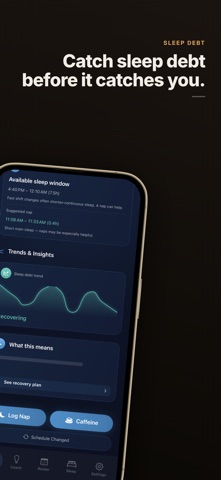
Most sleep apps assume you sleep at night. If you work shifts, that's the whole problem — they score you against a 9-to-5 clock you don't work, so the nap you took before a night shift looks like "failure" instead of recovery. AfterShift is built the other way around. It measures your sleep and recovery between shifts — shift-to-shift, not midnight-to-midnight — so the numbers finally match the life you actually live. GLANCEABLE — WITHOUT OPENING THE APP Your next shift lives on your Lock Screen and Home Screen. Widgets show the countdown to your shift, your recovery, and your plan for right now. A Live Activity counts you down to shift start — then rolls into your wind-down window — on the Lock Screen and in the Dynamic Island. Start an anchor nap and watch it tick down there too. All free. YOUR ROSTER, READ FOR YOU Connect your calendar and AfterShift detects your shifts automatically — no typing in three weeks of rota by hand. It even spots overtime and schedule changes. Five shift types are modelled: day, evening, night, on-call, and off. RECOVERY, TIMED TO WHEN YOU CLOCK OUT See how ready you are for your next shift, how your sleep debt is trending across cycles, and a clear recovery plan for the hours you actually have — not a generic "aim for 8 hours" you can't reach before a 7pm start. YES, THE NAP COUNTS Pre-shift naps, split sleep, and on-call rest are first-class here. AfterShift knows a 90-minute nap before nights is recovery, and scores it like one. REMINDERS TIMED TO YOUR SHIFT — FREE Wind-down, caffeine cut-off, and nap-window reminders fire relative to your next shift start, not the clock on the wall. All free. A COACH FOR NIGHTS, NOT MORNINGS 21 sleep techniques chosen for shift work — fall asleep faster after a late finish, reset on a turnaround, nap without the grogginess. Each one tells you when to use it and how long it takes. PRIVATE BY DESIGN Your data stays on your iPhone. No account. No cloud sync. No employer dashboard. Sleep is read from Apple Health (read-only), and on Pro, explanations are generated by on-device Apple Intelligence — your data is never sent to a server. AUTOMATIC SLEEP IMPORT Last night's sleep from Apple Health appears on its own — open the app in the morning and it's already there. EXPORT FOR YOUR DOCTOR OR OCCUPATIONAL HEALTH Generate a clean PDF or CSV recovery report to share with a GP, sleep clinic, or occupational health team. BUILT FOR • Nurses and rotating hospital staff • Paramedics and firefighters • Factory, logistics, and aviation ground crews • Hospitality and overnight staff • Anyone whose sleep window moves week to week FREE TO START Track your roster, import sleep, see your recovery score, add the widgets, and get shift-timed reminders — free. Upgrade to Premium for multi-calendar background sync, overtime tracking, and on-device AI explanations. One-time Lifetime option available, and Premium is shareable with your family. Available in 39 languages. Sleep isn't broken. The app finally fits the shifts. Terms of Use: https://www.apple.com/legal/internet-services/itunes/dev/stdeula/
What's new · 2.9.3
Your Home Screen already counts down to your next shift. Now it shows what the last ones cost you. NEW — See what nights really take Sleep Graph turns every night into a single square, shaded against your sleep target, with shift days marked. Your average sleep after day shifts sits right beside your average after nights — the gap you've always felt, finally in numbers. On iOS 27, a full-page widget maps your whole sleep year. NEW — Watch your body clock move Rhythm draws your sleep, naps and shifts, one day per row. See a run of nights drag your sleep around the clock — then watch it find its way back on your days off. NEW — Tonight, already planned Caffeine cutoff, wind-down, lights out, alarm, time to leave: tonight on one timeline, without opening the app. Put your week or whole month of shifts beside it, and Sleep Debt to show you, cycle by cycle, whether you're catching up. The Roster widget and tonight's plan are free. Sleep Graph, Rhythm and Sleep Debt come with Pro. Also: widgets designed for tinted and clear Home Screens, shift details that stay private on a locked iPhone if you choose, and imports that can no longer lose a shift or a nap when a save fails. Sleep isn't broken. The app finally fits the shifts.
Details