

Car Photo Checklist
就洪 邓 · Business
Independent analytics for this App Store listing. AppTracker is not affiliated with 就洪 邓.
Chart standing · US
What changed · US
Listing changes AppTracker has observed for this app in this storefront — new versions, price moves, rating shifts, and store copy.
Welcome to Car Photo Checklist 2.0—a more flexible way to prepare your car photos for a sale. • New: Seller Plus Lifetime. Unlock unlimited ZIP/PDF exports and reusable guides with a one-time purchase. No automatic renewal. • Choose the angles you need in a new visual grid. Save and share without completing every suggested shot. • Save selected images directly to Photos, with clear progress and completion messages. • Organize your photo set with a cover, ordering, notes, rotation and privacy masks. • Share individual photos, a numbered ZIP package or a PDF photo summary. • Follow clearer next-angle guidance, take another shot, or finish and return to My cars. • See your active purchase plan in Settings and continue your original task after upgrading. • Get started with a new step-by-step welcome guide. We have also improved export feedback, purchase handling and overall navigation. Thank you for helping us improve the app.
Ratings breakdown · US
The star breakdown behind this app's rating in this storefront.
Screenshots



About
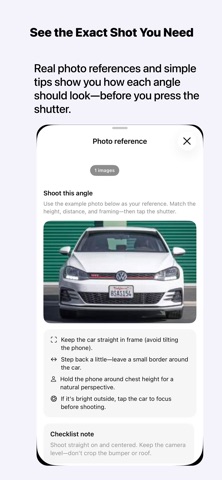
Get your car photos ready for a sale—without guessing which angles to take. Car Photo Checklist guides you through photographing your vehicle, organizing the shots you want, and sharing them with the person preparing your listing. Use it on iPhone or iPad, whether you are selling your own car or helping someone else sell theirs. KNOW WHAT TO PHOTOGRAPH Choose an everyday, detailed or custom guide. See suggested exterior, interior and detail angles before you start. Capture more than one photo for an angle, mark a shot for later, or mark it not applicable. You can save and share without completing the entire guide. BUILD A USEFUL PHOTO SET Take photos in the app or import existing images. Select the shots to include, choose a cover, arrange their order and add notes. Rotate photos, add manual privacy masks to output copies, and return to the same vehicle when more detail shots are needed. Original files stay unchanged. SAVE AND SHARE YOUR WAY Save selected photos to your iPhone or iPad Photos library, or share individual images. For an organized handoff, create a numbered ZIP package or a PDF photo summary. The PDF is for reviewing the set; individual images are still available for listing uploads. CONTINUE WITHOUT STARTING OVER Keep vehicles separate, revisit earlier projects and select newly added photos for a follow-up. Reusable guides and batch packages help with repeat workflows. START WITHOUT AN ACCOUNT Saving and sharing individual photos is free. Your first completed ZIP or PDF package share is free; cancelling the share does not use that allowance. Choose Seller Plus Lifetime for a one-time purchase with no expiration or automatic renewal, or Pro for a monthly subscription. Both unlock unlimited ZIP/PDF package exports, reusable guides and batch packages for multiple cars. Available plans and local prices are shown in the app before purchase. The photos you add to the app are stored on your device. Compatible output copies apply your edits and remove source metadata, including GPS. Sharing original files preserves their original metadata. The app does not publish marketplace listings or certify a vehicle's condition. Pro is an optional auto-renewing monthly subscription. Payment is charged to your Apple Account when confirmed. It renews automatically unless cancelled at least 24 hours before the current period ends. Manage or cancel it in your App Store account settings. Seller Plus Lifetime is a one-time purchase, not a subscription. Buying Lifetime does not cancel an existing Pro subscription; manage that subscription separately in your App Store account settings. Support: service@carphotochecklist.com Privacy: https://carphotochecklist.com/?modal=privacy Terms: https://www.apple.com/legal/internet-services/itunes/dev/stdeula/
What's new · 2.0
Welcome to Car Photo Checklist 2.0—a more flexible way to prepare your car photos for a sale. • New: Seller Plus Lifetime. Unlock unlimited ZIP/PDF exports and reusable guides with a one-time purchase. No automatic renewal. • Choose the angles you need in a new visual grid. Save and share without completing every suggested shot. • Save selected images directly to Photos, with clear progress and completion messages. • Organize your photo set with a cover, ordering, notes, rotation and privacy masks. • Share individual photos, a numbered ZIP package or a PDF photo summary. • Follow clearer next-angle guidance, take another shot, or finish and return to My cars. • See your active purchase plan in Settings and continue your original task after upgrading. • Get started with a new step-by-step welcome guide. We have also improved export feedback, purchase handling and overall navigation. Thank you for helping us improve the app.
Details