

Money Tracker - Every Dollar
faiza zulfiqar · Finance
Independent analytics for this App Store listing. AppTracker is not affiliated with faiza zulfiqar.
Chart standing · US
What changed · US
Listing changes AppTracker has observed for this app in this storefront — new versions, price moves, rating shifts, and store copy.
Cards — add the cards, accounts and cash you actually pay from, choose one when you log an entry, and see what is left on each. A credit card shows how much of its limit you have used. Monthly folders — keep a month's entries together and name the folder whatever you like. A rebuilt launch screen and introduction, where every step of the introduction answers to touch. Also in this version: • The free plan covers three entries. Premium lifts every limit. • The free version shows ads. Premium removes them. • Delete all your data at any time from More > Delete all my data. • AI features (receipt scanning, voice entry, the coach) now ask before anything is sent, and can be turned off in More > AI features. • The finance coach now answers from your own budgets, goals and spending. • A back button on every screen. • Fixes: the "saved" message clears itself, buttons no longer hide behind the keyboard, and an entry no longer repeats its own category.
Screenshots


About
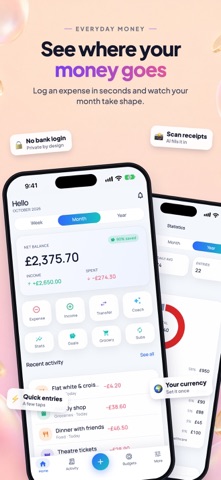
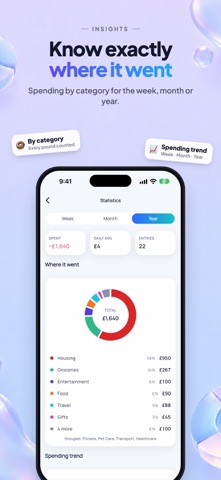
See where your money actually goes. Log an expense in seconds, set a budget you can stick to, and watch your savings goals move. NO SIGN-UP, NO BANK LOGIN No email, no password, no social login and nothing to connect. Open the app and start tracking straight away. TRACK SPENDING AND INCOME • Log an amount with a category, a payment method (cash, card, wallet, bank), a note and any date • Edit or delete anything you logged • Choose your currency once and the whole app follows it • Light and dark themes SCAN A RECEIPT INSTEAD OF TYPING Photograph a receipt and the total, the date, the shop and a category are filled in for you. You check every field before it saves, and a scan that cannot be read still keeps the photo. You can also hold the microphone and say what you spent instead of typing it. BUDGETS • A weekly or monthly limit per category • A ring showing how much of the limit the period has used • Tap through to the transactions behind any budget SAVINGS GOALS • Set a target, add to it whenever you like, and watch the percentage climb • Give a goal a deadline if it needs one SHOPPING LIST AND GROCERY BUDGET • Keep a list of what to buy and tick items off • Set a grocery budget and see what the list is costing you SUBSCRIPTION TRACKER • Record what renews, when it renews and what it costs • See the monthly total of everything you are paying for STATISTICS • Where the money went, by category • Your spending trend over time • Week, month and year views with a daily average RECEIPT ARCHIVE Every receipt photo you keep sits in one place. Receipt images are stored on your device, so they are not uploaded anywhere and removing the app removes them. FINANCE COACH Ask about your own numbers in plain language and get an answer based on what you have logged. EXPORT YOUR DATA Export every transaction as a CSV file at any time, from More › Export data. YOUR DATA Your transactions, budgets, goals and lists are stored in your own account on our cloud database. Receipt photos stay on your device. A receipt image, or the text of what you say, is sent to Google Gemini only at the moment you use the scan, voice or coach feature. We do not sell your data. PREMIUM The free version includes 3 entries (income or expense), 3 budgets, 1 savings goal, 3 tracked subscriptions and the last 30 days of statistics, and shows ads. Premium removes every limit and every ad. • Weekly — $6.99 per week • Yearly — $19.99 per year • Lifetime — $49.99 once, never renews Payment is charged to your Apple Account at confirmation of purchase. A subscription renews automatically at the same price unless you turn renewal off at least 24 hours before the current period ends. Manage or cancel it in Settings › Apple Account › Subscriptions. Prices shown are US prices; your own storefront price appears in the app. Restore Purchases is on the Premium screen and in More. Privacy Policy: https://sites.google.com/view/expensebudgettrackerprivacy Terms of Use (EULA): https://www.apple.com/legal/internet-services/itunes/dev/stdeula/
What's new · 2.1.0
Cards — add the cards, accounts and cash you actually pay from, choose one when you log an entry, and see what is left on each. A credit card shows how much of its limit you have used. Monthly folders — keep a month's entries together and name the folder whatever you like. A rebuilt launch screen and introduction, where every step of the introduction answers to touch. Also in this version: • The free plan covers three entries. Premium lifts every limit. • The free version shows ads. Premium removes them. • Delete all your data at any time from More > Delete all my data. • AI features (receipt scanning, voice entry, the coach) now ask before anything is sent, and can be turned off in More > AI features. • The finance coach now answers from your own budgets, goals and spending. • A back button on every screen. • Fixes: the "saved" message clears itself, buttons no longer hide behind the keyboard, and an entry no longer repeats its own category.
Details