

QMe Prompter
Decor Works LLC · Music
Independent analytics for this App Store listing. AppTracker is not affiliated with Decor Works LLC.
Chart standing · US
What changed · US
Listing changes AppTracker has observed for this app in this storefront — new versions, price moves, rating shifts, and store copy.
Stage window for a Mac: running QMe on a Mac with a second monitor? Open a song, tap Audience View, then Open stage window. Drag the window to the monitor and make it full screen. It shows the band the lyrics with chords (or the audience view) while your Mac keeps the controls. A TV, projector or display glasses connected in the middle of a song now show the current line right away.
Ratings breakdown · US
The star breakdown behind this app's rating in this storefront.
Screenshots





About
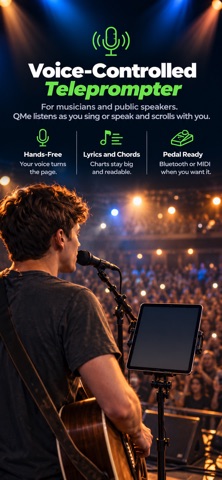
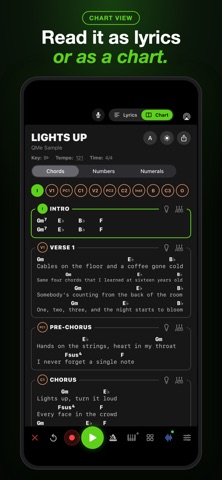
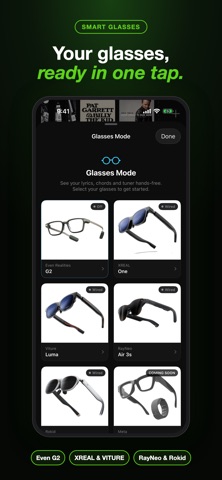
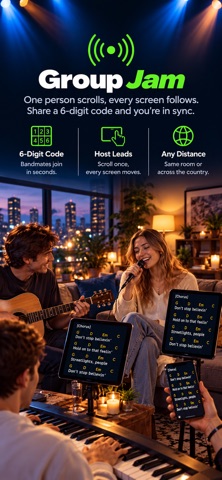
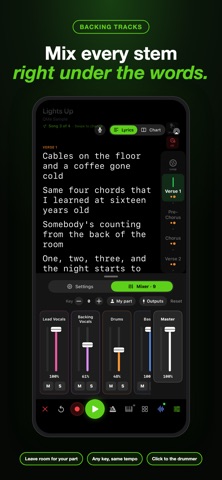
QMe Prompter is the live performance teleprompter built by a musician, for musicians. Lyrics and chord charts stay in front of you on stage, scrolling on their own, following your voice, or stepping along with a foot pedal, so you look at the room and play. Speaking instead of singing? Speeches, sermons and video scripts scroll the same way. FREE TO TRY: Open the app and play. No account and no card needed to start: 30 days of full access, then a free plan that keeps up to 3 songs. Create a free account whenever you want your songs on every device and the web console. NEW Chords from stems: Import a Suno song or your own stems and QMe writes the chords over the words, right where they change. Check them, fix any, or Undo. Your gear follows the song: Name your rigs and presets in My Gear. On the Chart, hold a section's rig button and change your rig, and QMe learns it. The light button gives that section its own lighting cue. Chart View: The whole song on one page, every section in its own box with the chords over the words. Nashville numbers or Roman numerals, a black or white page, extra-large type, and a PDF for the band. Stem Mixer: Every part of a Suno song on its own fader, with mute, solo, pan and key. Mix mid-song right from the prompter. HOW IT SCROLLS Voice Follow: QMe listens to you sing and scrolls the lyrics as you go. An Instrument Filter keeps it accurate in a loud room. Auto scroll: Lyrics roll at the song's tempo, saved per song. Foot pedal: A Bluetooth page turner or a MIDI board, with six actions even on a two-button pedal. LYRICS AND CHORDS Chord charts over lyrics, ChordPro import, transpose to any key with a capo calculator, and big readable text tuned for stage lighting. Smart import: Search AZLyrics inside QMe, grab a chord sheet from Ultimate Guitar as a PDF, or import your own PDFs and text files. Planning Center: Pull a service plan into QMe with every chart in the plan's key, in order. Web console: Edit your whole songbook on a computer at qmeprompter.com, synced to your iPhone and iPad. FOR THE ROOM Audience View: The words in front of the room, karaoke style, in your color, font and size. One line at a time with the next underneath, on a TV, a projector, everyone's phone, or an Apple TV over AirPlay. Livestreams: Add the stage link to OBS and your lyrics run along the bottom of your video, lighting up word by word. ON STAGE Smart glasses: Lyrics and chords on your lens. Even Realities G2 works wirelessly and keeps your setlist if the Wi-Fi drops. XREAL, Viture, RayNeo and Rokid connect with one USB-C cable. MIDI: Cues for your amp, pedals, keys, mixer and lights by song, section or line, called by name, or drive QMe from a MIDI board. Backing tracks and Apple Music: Play along with lyrics locked to the music. Tracks follow your account to every iPad, and AirPlay sends your sound to a speaker, HomePod, Apple TV or Mac. Group Jam: Sync lyrics and chords across the whole band, or between your own devices with no network. Apple Watch: Tempo, count-in and navigation from your wrist. Tuner and metronome: A chromatic tuner for guitar, bass and ukulele, a drum tuning suite, and a metronome with five click sounds. Notes: Performance notes on any song, and Apple Pencil markup. Recordings: Record audio or video while the words stay on your screen, and Voice Follow keeps running while you record. Set it once: Tempo, scroll speed, key and text size save to each song. Made for singers, guitarists, keyboard players, worship teams, cover bands, duos, solo acts, karaoke hosts, pastors, speakers, and anyone who performs. Built by a performing guitarist who needed this tool and could not find it anywhere else. Full manual: https://qmeprompter.com/manual Terms of Use (EULA): https://www.apple.com/legal/internet-services/itunes/dev/stdeula/
What's new · 1.49
Stage window for a Mac: running QMe on a Mac with a second monitor? Open a song, tap Audience View, then Open stage window. Drag the window to the monitor and make it full screen. It shows the band the lyrics with chords (or the audience view) while your Mac keeps the controls. A TV, projector or display glasses connected in the middle of a song now show the current line right away.
Details