

dotKiosk Full Screen Browser
FREE TOMORROW, UNIPESSOAL, LDA · Utilities
Independent analytics for this App Store listing. AppTracker is not affiliated with FREE TOMORROW, UNIPESSOAL, LDA.
Chart standing · US
What changed · US
Listing changes AppTracker has observed for this app in this storefront — new versions, price moves, rating shifts, and store copy.
The Admin Panel is hardened. Admin Access is proved against a single-use challenge instead of sending anything reusable, the PIN and its lockout are held by the device rather than the web layer, sessions expire, and a request is refused unless it names an address this Kiosk actually answers at. The Kiosk shows its version. The settings form on the device and the Admin Panel's Device Info both report the version and build number actually installed. Settings are more reliable. Keep Screen On works, the Kiosk lists the addresses it can really be reached at, and the Admin Panel no longer disappears for a few seconds when the device font size changes or the app returns from the background. Also in this release: security fixes throughout the Admin Panel's request handling, and stability improvements.
Screenshots


About
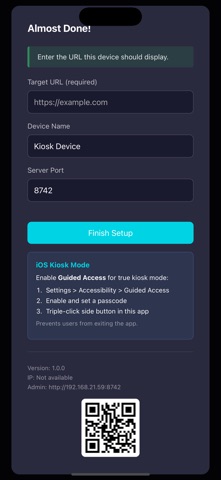
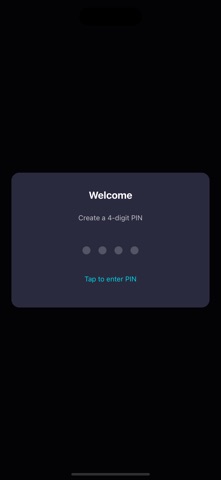
Turn any iPhone or iPad into a dedicated kiosk display. DotKiosk locks your device to a single webpage in true fullscreen — no status bar, no distractions. Got an old iPhone or iPad sitting in a drawer? Give it a second life as a dedicated display. No need for expensive kiosk hardware — repurpose what you already own. FEATURES • Fullscreen Display Hide the status bar and navigation for a clean, immersive presentation. Perfect for digital signage, point-of-sale displays, or information kiosks. • PIN-Protected Settings Secure your kiosk with a 4-6 digit PIN. Access settings by shaking the device. • Remote Administration Configure your kiosk from any device on the same network. Open the admin dashboard in a browser to change the URL, view device info, or adjust settings — no physical access required. • Universal App Works on both iPhone and iPad. Optimized for all screen sizes and orientations. REPURPOSE YOUR OLD DEVICES That old iPad collecting dust? Turn it into: • A kitchen recipe display • A home dashboard showing weather and calendar • A baby monitor viewer • A security camera feed • A smart home control panel Any device running iOS 13+ works perfectly — even models no longer receiving updates. USE CASES • Retail displays and digital signage • Restaurant menus and ordering systems • Museum and exhibit information • Reception desk check-in kiosks • Trade show and event displays • Waiting room entertainment GETTING STARTED 1. Launch DotKiosk and set your PIN 2. Enter the URL you want to display 3. The webpage loads in fullscreen 4. Access settings anytime by shaking the device 5. For remote config: check your device IP in settings, then visit that IP at port 8742 from another device TIP: Enable iOS Guided Access (Settings > Accessibility > Guided Access) for complete kiosk lockdown. This prevents users from exiting the app or accessing other device features. DotKiosk stores all data locally on your device. No accounts, no cloud, no tracking.
What's new · 1.2.1
The Admin Panel is hardened. Admin Access is proved against a single-use challenge instead of sending anything reusable, the PIN and its lockout are held by the device rather than the web layer, sessions expire, and a request is refused unless it names an address this Kiosk actually answers at. The Kiosk shows its version. The settings form on the device and the Admin Panel's Device Info both report the version and build number actually installed. Settings are more reliable. Keep Screen On works, the Kiosk lists the addresses it can really be reached at, and the Admin Panel no longer disappears for a few seconds when the device font size changes or the app returns from the background. Also in this release: security fixes throughout the Admin Panel's request handling, and stability improvements.
Details