

Sound Meter - Decibel dB
SEOKWON YANG · Utilities
Independent analytics for this App Store listing. AppTracker is not affiliated with SEOKWON YANG.
Chart standing · US
What changed · US
Listing changes AppTracker has observed for this app in this storefront — new versions, price moves, rating shifts, and store copy.
Sound Meter has a refreshed, easier-to-read measurement screen. • Native layouts for iPhone and iPad. • See current, minimum, average and maximum readings with a 60-second graph. • Pause, resume and reset measurements more easily. • Follow your device language automatically or save a preferred language. • Clearer microphone guidance and advertising privacy choices. Readings are phone-based estimates, not calibrated sound-level measurements.
In-app purchases · US
No in-app purchases.
Screenshots


About
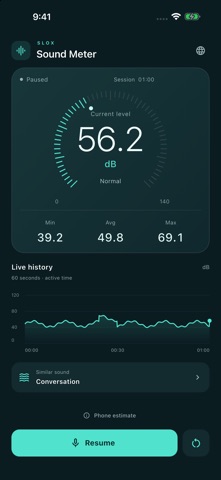
Get a clearer view of the sounds around you. Sound Meter uses your device’s microphone to estimate sound levels and show how they change. • View the current estimated level in dB. • Follow the last 60 seconds of active measurement on a live graph. • Check minimum, average and maximum readings for the whole session. • Pause, resume or reset a measurement. • Explore a guide with familiar sound examples. • Use English, Korean, Japanese, Simplified Chinese, Spanish, Portuguese, German or French. The app follows your device’s preferred supported language automatically. You can also save a language choice or return to Automatic at any time. If none of your device languages are supported, the app uses English. Tap Start and allow microphone access to begin. Measurement pauses when the app leaves the foreground. Microphone audio is processed on your device; the app does not save audio recordings or upload microphone audio. No account is required. Readings vary with your device and microphone and are estimates for general reference. The displayed average is the arithmetic mean of session readings, not an energy average (Leq). This is not a calibrated sound level meter. Use dedicated equipment for precise measurements or safety decisions. The app includes ads. Advertising consent and privacy choices are shown where required. Privacy: https://www.slox.co.kr/privacy/soundmeter Support: contact@slox.co.kr
What's new · 1.1.0
Sound Meter has a refreshed, easier-to-read measurement screen. • Native layouts for iPhone and iPad. • See current, minimum, average and maximum readings with a 60-second graph. • Pause, resume and reset measurements more easily. • Follow your device language automatically or save a preferred language. • Clearer microphone guidance and advertising privacy choices. Readings are phone-based estimates, not calibrated sound-level measurements.
Details