

PDF Maker - Convert & Scan
Igor Bidenko · Productivity
Independent analytics for this App Store listing. AppTracker is not affiliated with Igor Bidenko.
Chart standing · US
What changed · US
Listing changes AppTracker has observed for this app in this storefront — new versions, price moves, rating shifts, and store copy.
Ready for iOS 27 • PDF Maker takes on the new look of iOS 27, with the floating tab bar and refreshed controls throughout. All your PDFs in My Files • Keep documents in folders, star favourites, pick up recent files and search by name. Every file has its own menu to share, rename or move it, and any tool can take a file straight from My Files. Bring files in from anywhere • Tap Save to PDF Maker in the share sheet to keep PDFs and photos from Mail, Safari, Photos and other apps. Mark up and sign • Highlight, underline, draw, add shapes, arrows, text, check marks and dates, then sign with a signature you save once and reuse. Undo and redo at any time. Find anything • Search the text of any document and jump between results. Browse pages as thumbnails or open the table of contents. Lock and unlock PDFs • Add a password before you send a file, or remove one you no longer need. Inserting pages from a protected PDF now asks for its password. Smaller files, sharp text • Reduce Size compresses scanned pages and keeps text and drawings crisp. Reduced and flattened results are saved as a new copy, so your original stays untouched. Your work is safe • If the app closes unexpectedly, your unsaved changes are waiting when you return, and protected documents stay protected. If a file changes on another device, PDF Maker asks before replacing it. Now in 10 languages • English, German, French, Spanish, Italian, Brazilian Portuguese, Ukrainian, Japanese, Korean and Simplified Chinese. Easier for everyone • Better VoiceOver support, text that grows with your settings, clearer hints and stronger contrast in light and dark mode. Everything happens on your device. No account, no uploads.
Ratings breakdown · US
The star breakdown behind this app's rating in this storefront.
Screenshots



About
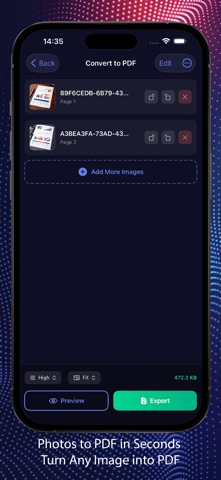
PDF Maker transforms your iPhone into a portable document studio. Whether you need to convert photos to PDF, merge contracts, compress large files, or scan receipts on the go - everything happens in seconds, right in your pocket. CONVERT PHOTOS TO PDF Turn any image into a professional PDF document. Select photos from your library, snap pictures with your camera, or import files. Adjust quality settings from draft to maximum resolution. Choose page formats including A4, Letter, Legal, or let the app fit pages to your images automatically. Perfect for digitizing old photographs, creating photo albums, or preparing image-based reports. DOCUMENT SCANNER Your phone camera becomes a powerful scanner. Capture documents, receipts, whiteboards, and handwritten notes with automatic edge detection. The built-in scanner recognizes document boundaries and optimizes contrast for crystal-clear results. No more hunting for a scanner - handle paperwork anywhere, anytime. MERGE MULTIPLE PDFs Combine separate PDF files into one organized document. Drag to reorder pages exactly how you want them. Great for assembling project documentation, combining invoices for expense reports, or creating comprehensive portfolios from multiple sources. COMPRESS & REDUCE SIZE Large PDF files slow everything down - email attachments bounce back, cloud storage fills up, sharing becomes frustrating. Our compression engine shrinks file sizes significantly while preserving readable quality. Send documents faster and save storage space without sacrificing clarity. FLATTEN PDF DOCUMENTS Working with forms that have fillable fields? Need to lock down annotations and comments? Flatten converts interactive elements into static content. This prevents further editing and ensures your document looks identical on every device and printer. ROTATE PAGES Fix upside-down scans or sideways photos instantly. Rotate individual pages or entire documents in 90-degree increments. Preview changes before saving. Simple controls make orientation corrections effortless. VIEW & EDIT Browse your PDFs with smooth scrolling and sharp rendering. Select specific pages to rotate, delete, or extract into new documents. Thumbnail view helps you navigate long files quickly. Edit tools give you control over document structure without needing desktop software. INTUITIVE DESIGN Dark interface reduces eye strain during extended use. Clean layout puts every tool within easy reach. Haptic feedback confirms your actions. The app responds quickly — no waiting around for operations to complete. PRIVACY FIRST Your documents stay on your device. No files get uploaded to external servers for processing. What you create remains yours alone. Built for everyone who handles documents regularly: students assembling research papers, professionals preparing client materials, small business owners organizing records, and families preserving memories. PDF Maker brings desktop-level PDF tools to your phone - lightweight, fast, and always available. Subscription Terms: Payment charged to iTunes Account. Auto-renews unless disabled 24 hours before period ends. Manage in Account Settings. https://www.apple.com/legal/internet-services/itunes/dev/stdeula/ Download now and discover how simple PDF work can be.
What's new · 3.0
Ready for iOS 27 • PDF Maker takes on the new look of iOS 27, with the floating tab bar and refreshed controls throughout. All your PDFs in My Files • Keep documents in folders, star favourites, pick up recent files and search by name. Every file has its own menu to share, rename or move it, and any tool can take a file straight from My Files. Bring files in from anywhere • Tap Save to PDF Maker in the share sheet to keep PDFs and photos from Mail, Safari, Photos and other apps. Mark up and sign • Highlight, underline, draw, add shapes, arrows, text, check marks and dates, then sign with a signature you save once and reuse. Undo and redo at any time. Find anything • Search the text of any document and jump between results. Browse pages as thumbnails or open the table of contents. Lock and unlock PDFs • Add a password before you send a file, or remove one you no longer need. Inserting pages from a protected PDF now asks for its password. Smaller files, sharp text • Reduce Size compresses scanned pages and keeps text and drawings crisp. Reduced and flattened results are saved as a new copy, so your original stays untouched. Your work is safe • If the app closes unexpectedly, your unsaved changes are waiting when you return, and protected documents stay protected. If a file changes on another device, PDF Maker asks before replacing it. Now in 10 languages • English, German, French, Spanish, Italian, Brazilian Portuguese, Ukrainian, Japanese, Korean and Simplified Chinese. Easier for everyone • Better VoiceOver support, text that grows with your settings, clearer hints and stronger contrast in light and dark mode. Everything happens on your device. No account, no uploads.
Details