

KanjiMate: Learn Japanese JLPT
Tuan Truong · Education
Independent analytics for this App Store listing. AppTracker is not affiliated with Tuan Truong.
Chart standing · US
What changed · US
Listing changes AppTracker has observed for this app in this storefront — new versions, price moves, rating shifts, and store copy.
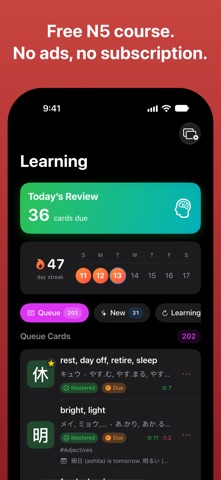
This update brings two-column layouts to wide screens, such as an iPad in landscape or the iPhone Duo's inner screen on its side, and adds a kanji grid to every level. • Two-column layouts on wide screens: Levels, Learning, Favorites, Search, Radicals, Tags and your groups show more at once, and a kanji's meaning and readings sit beside its radical, vocabulary and sentences. • Practice Writing and Stroke Animation use a larger canvas on iPad. On wide screens, Practice Writing keeps the character and your records on one side, and the canvas with its controls on the other. • Browse a level as a grid of kanji tiles: a new toolbar button switches between the list and the grid. A tile's color shows its card state, and a long press offers the same actions as the list. • In Stroke Order, long-press a kanji to open Stroke Animation, start Practice Writing, or add it to Favorites. • Buttons, cards and rows now highlight under a mouse, a trackpad, or a hovering Apple Pencil. • In Flashcard review, Show Answer now stays in one place under the card, where the grading buttons appear, instead of moving with the card's length. • Simpler headers on Levels, Favorites and Learning leave more room for your kanji, and the onboarding screens have new artwork. • Flashcard, Quiz and Draw reviews and the score sheet after Practice Writing now fit shorter windows, such as the iPhone Duo's inner screen on its side, so nothing is cut off. • Animated strokes now line up exactly with the gray reference character, and the marking on strokes to work on covers your ink completely. • Fixed the Hint control staying disabled after switching variants in Practice Writing, a first stroke that sometimes went undrawn in Draw review, and a crash when opening Settings from the sidebar on Mac.
In-app purchases · US
What this app sells inside itself, grouped by kind and priced for this storefront.
Screenshots



Keywords this app targets
Search terms AppTracker associates with this app — estimates, not search volume. ❝ = in the app's title; a highlighted number is its current position for that term.
Similar apps
Competitors and close alternatives, as estimated by AppTracker.
 GENKI Kanji for 3rd Ed.
The Japan Times Publishing, Ltd.
GENKI Kanji for 3rd Ed.
The Japan Times Publishing, Ltd.
 KanjiBox
Dave duVerle
KanjiBox
Dave duVerle
 AsahiKanji (Français)
Roger Meyer
AsahiKanji (Français)
Roger Meyer
 Remembering the Kanji
MIRAI INTERNASIONAL INDONESIA, PT
Remembering the Kanji
MIRAI INTERNASIONAL INDONESIA, PT
 JiShop Plus
JISHOP Software
JiShop Plus
JISHOP Software
 Japanese Dictionary - Easy
SACHINPRASAD DHUNGEL
Japanese Dictionary - Easy
SACHINPRASAD DHUNGEL
 JTDic
Pipat Shuleepongchad
JTDic
Pipat Shuleepongchad
 Kanji Learner's Dictionary
CJKI
Kanji Learner's Dictionary
CJKI
About
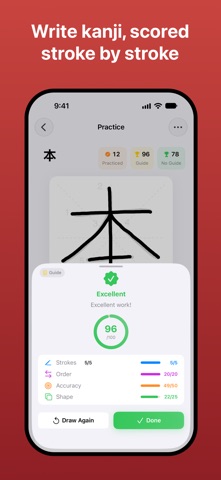
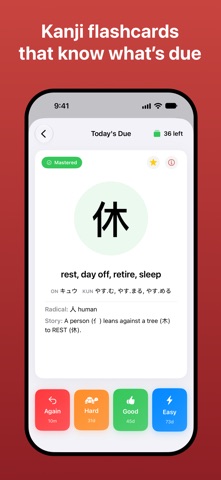
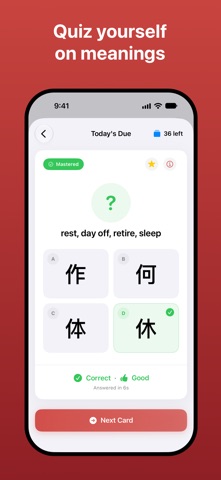
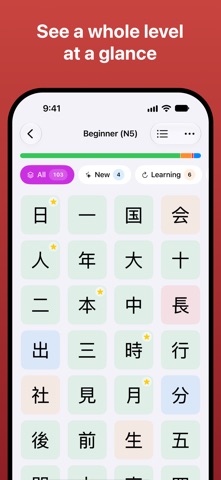
KanjiMate is a kanji dictionary and study companion for learners from N5 to N1. Browse all 2,230 kanji for free, including meanings, readings, vocabulary, example sentences, stroke order, components, and personal notes. The complete N5 study course is free. Premium unlocks N4–N1 review decks, custom study groups, and advanced reports. READ, WRITE AND REMEMBER ALL 2,230 KANJI ◆ Detailed entries for JLPT study Explore 2,230 kanji organized using commonly used JLPT level groupings from N5 to N1. Each entry brings meanings, on'yomi and kun'yomi readings, vocabulary, and example sentences together in one place. Browse each level as a list or as a grid of kanji tiles. ◆ Stroke order and handwriting feedback Watch each kanji drawn one stroke at a time. Step through it stroke by stroke, replay it, or trace it in the app. Practice writing directly on screen and receive feedback on stroke order, accuracy, and shape. ◆ Radicals, components, and mnemonics See how each kanji is built, open component details with a tap, and use mnemonic stories to remember its form. ◆ Fast search Find any kanji by character, meaning, or reading. ◆ Personal notes and favorites Add your own notes and mnemonic stories, bookmark useful entries, and build a reference that matches the way you learn. ◆ Free achievements Track your learning and handwriting milestones without Premium. ◆ Widgets, reminders, and iCloud sync See reviews due on your Home Screen, receive study reminders, and keep progress, review history, notes, and favorites in sync between iPhone and iPad through your iCloud account. COMPLETE N5 STUDY, FREE Study the full N5 course with no ads or daily limits: • Flashcard — recall meanings and readings. • Quiz — test recognition with multiple-choice questions. • Draw — write kanji on screen with stroke-by-stroke scoring. • FSRS scheduling — review each card at the right time. • Streaks and core statistics — follow your progress as you study. KANJIMATE PREMIUM Premium extends the study system from N4 through N1: ◆ Review all 2,230 kanji Add N4–N1 kanji to your study deck and use Flashcard, Quiz, and Draw modes with FSRS scheduling. ◆ Tags and custom study groups Tag kanji your way, combine tags into focused groups, and review exactly what you need. ◆ Advanced reports Explore progress charts, a yearly heatmap, a monthly calendar, and your complete study history. Your streak, key statistics, and the latest seven days remain free. Premium is a one-time lifetime purchase. No subscription. BUILT FOR IPHONE, IPAD AND IPHONE DUO A native app for iOS 26 and later. Wide screens, such as an iPad in landscape or the iPhone Duo's inner screen, get two-column layouts, and Practice Writing uses a larger canvas on iPad. Start your kanji journey today—one card at a time, KanjiMate takes you all the way to N1. Terms of Use (EULA): https://www.apple.com/legal/internet-services/itunes/dev/stdeula/ Privacy Policy: https://leafworkstudio.com/kanjimate/privacy
What's new · 1.3.0
This update brings two-column layouts to wide screens, such as an iPad in landscape or the iPhone Duo's inner screen on its side, and adds a kanji grid to every level. • Two-column layouts on wide screens: Levels, Learning, Favorites, Search, Radicals, Tags and your groups show more at once, and a kanji's meaning and readings sit beside its radical, vocabulary and sentences. • Practice Writing and Stroke Animation use a larger canvas on iPad. On wide screens, Practice Writing keeps the character and your records on one side, and the canvas with its controls on the other. • Browse a level as a grid of kanji tiles: a new toolbar button switches between the list and the grid. A tile's color shows its card state, and a long press offers the same actions as the list. • In Stroke Order, long-press a kanji to open Stroke Animation, start Practice Writing, or add it to Favorites. • Buttons, cards and rows now highlight under a mouse, a trackpad, or a hovering Apple Pencil. • In Flashcard review, Show Answer now stays in one place under the card, where the grading buttons appear, instead of moving with the card's length. • Simpler headers on Levels, Favorites and Learning leave more room for your kanji, and the onboarding screens have new artwork. • Flashcard, Quiz and Draw reviews and the score sheet after Practice Writing now fit shorter windows, such as the iPhone Duo's inner screen on its side, so nothing is cut off. • Animated strokes now line up exactly with the gray reference character, and the marking on strokes to work on covers your ink completely. • Fixed the Hint control staying disabled after switching variants in Practice Writing, a first stroke that sometimes went undrawn in Draw review, and a crash when opening Settings from the sidebar on Mac.
Details