

IconBundler: AI Icon Maker
Tyrian Horton · Graphics & Design
Independent analytics for this App Store listing. AppTracker is not affiliated with Tyrian Horton.
Chart standing · US
What changed · US
Listing changes AppTracker has observed for this app in this storefront — new versions, price moves, rating shifts, and store copy.
• Improved translations for the Library title, search, and filters. • The Settings rating link now opens IconBundler directly in the App Store.
Ratings breakdown · US
The star breakdown behind this app's rating in this storefront.
Screenshots



About
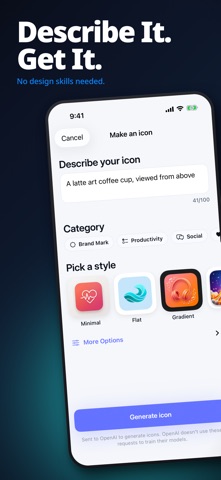
Describe your app icon and AI designs it — your first 3 designs are free, no account needed. FREE TO TRY: describe an icon and get 3 AI designs free (5 with a free account) — preview every design full-size before you pay anything. No ads, no sign-up required. IconBundler is a fast, no-design-skills way to a professional app icon or logo: describe your vision, pick a style, and AI does the rest. HOW IT WORKS 1. Describe your icon or logo in plain language 2. Pick a visual style that fits your brand 3. Review AI-generated options 4. Export in professional 1024x1024 resolution KEY FEATURES • Clean, Commercial-Ready Exports: when you're ready to export, unlock it once and keep every icon forever — every purchased export is watermark-free with full commercial rights • AI-Powered Generation: Turn simple text descriptions into beautiful, polished app icons and logos • Professional Quality: Export at 1024x1024 PNG resolution, perfectly sized for the App Store and web • Xcode Integration: Drag your icon into your Xcode AppIcon.appiconset — a 1024x1024 iOS catalog (light, dark, tinted) • Full Commercial Rights: Use your icons and logos in any project • Multiple Styles: Choose from a variety of artistic styles to match your brand identity • One-Time Purchase: Pay once for the export unlock and keep every icon forever — our recommended way to buy EXPORT FOR ANY PLATFORM IconBundler generates icons in the exact 1024x1024 format required by major platforms: - App Store marketing icon (1024x1024) - Web favicons and PWA icons - Social media profiles and branding assets OUTPUT YOUR ICON ANYWHERE Use your AI-generated icons and logos for: - App Store submissions - Discord server icons and Twitch channel logos - GitHub repository and organization icons - YouTube channel art and profile pictures - Slack icons, website favicons, pitch decks and marketing materials WHY ICONBUNDLER IconBundler generates professional-quality app icons and logos in seconds — and the recommended way to buy is a single one-time purchase, not a subscription. BUILT FOR CREATORS & DEVELOPERS We built IconBundler for anyone who needs professional icons and logos without the design struggle: - iOS and macOS app developers who need App Store-ready icons - Indie makers and solopreneurs launching their first app - Small businesses and startups needing a logo or brand identity - Content creators building their visual brand - Hackathon participants and rapid prototypers - Web developers who need favicons and graphic assets FREQUENTLY ASKED QUESTIONS Q: What resolution are the exported icons? A: All icons export at 1024x1024 pixels in PNG format — the exact size required by the App Store and most platforms. Q: Can I use icons commercially? A: Yes. Exported icons can be used commercially: in published apps, websites, and marketing materials. Q: Do I have to subscribe? A: No. The recommended way to buy IconBundler is a one-time purchase — pay once and export unlimited icons forever. Small credit packs are also available if you'd rather pay as you go. Q: Does it work with Xcode? A: Yes. Export your icon and drag it directly into your Xcode project's AppIcon.appiconset — a 1024x1024 iOS catalog with light, dark and tinted appearances. Q: How is this different from other design tools? A: IconBundler is purpose-built for app icons and logos. No templates to edit, no design tools to learn. Just describe what you want and AI generates it in seconds. Export unlock & credit packs never renew. An optional auto-renewing weekly plan (free trial) is offered — price shown in-app, charged to Apple Account, renews same price unless cancelled at least 24h before period end, forfeiting unused trial time. Manage in Apple Account settings. Download IconBundler today and create your first stunning app icon in seconds. Terms of Use (EULA): https://www.apple.com/legal/internet-services/itunes/dev/stdeula/
What's new · 2.30.4
• Improved translations for the Library title, search, and filters. • The Settings rating link now opens IconBundler directly in the App Store.
Details