

Mosaic: Blur & Censor Photo
Nikolai Rodionov · Photo & Video
Independent analytics for this App Store listing. AppTracker is not affiliated with Nikolai Rodionov.
Chart standing · US
What changed · US
Listing changes AppTracker has observed for this app in this storefront — new versions, price moves, rating shifts, and store copy.
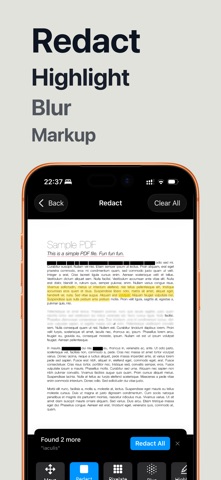
- Redact from any app: share a screenshot or photo, choose "Redact with Mosaic", black out details and save a clean copy. Your original stays unchanged. - Find & redact: enter names, emails or reference numbers once and black out every match across the whole document. Save your lists for the next file (Premium). - Find private info: Mosaic suggests emails, phone numbers and links on the page so you can review them and cover them in one step. - Batch face redaction: pick several photos, review the detected faces, add boxes for any that were missed, and save clean copies together. Free batches include up to 3 photos, Premium up to 20. - More reliable face detection, and every new feature is available in your language.
In-app purchases · US
What this app sells inside itself, grouped by kind and priced for this storefront.
Screenshots




About
Hide names, phone numbers, addresses and card details in screenshots and PDFs before you share them. Tap a word and it's gone. Everything is processed on your device, and nothing is ever uploaded. TAP A WORD TO HIDE IT - Text is detected automatically in every screenshot, photo and PDF - Tap any word to blur, pixelate or black it out - Drag across a line to hide several words at once - No more fiddly finger-painting over small text BLUR, PIXELATE OR BLACK OUT - Blur for a soft, clean look - Pixelate for the classic censored effect - Solid black bar for complete redaction - Highlight and underline to point things out SCREENSHOTS - Clean up chats, bank statements, receipts and emails before posting - Hide usernames, order numbers and email addresses - Blur faces in photos with one tap PDFS & SCANNED DOCUMENTS - Redact multi-page PDFs - Scan paper documents with your camera and redact them right away - Export at full quality PRIVATE BY DESIGN All processing happens on your device. Your screenshots and documents never leave your phone. GREAT FOR - Sharing chat screenshots without exposing names or numbers - Posting receipts, tickets and orders without personal details - Sending documents with account numbers and addresses removed - Bug reports and support tickets that show only what's needed - Journalists, HR and anyone handling confidential information Terms of Use (EULA): https://www.apple.com/legal/internet-services/itunes/dev/stdeula/
What's new · 1.4
- Redact from any app: share a screenshot or photo, choose "Redact with Mosaic", black out details and save a clean copy. Your original stays unchanged. - Find & redact: enter names, emails or reference numbers once and black out every match across the whole document. Save your lists for the next file (Premium). - Find private info: Mosaic suggests emails, phone numbers and links on the page so you can review them and cover them in one step. - Batch face redaction: pick several photos, review the detected faces, add boxes for any that were missed, and save clean copies together. Free batches include up to 3 photos, Premium up to 20. - More reliable face detection, and every new feature is available in your language.
Details