

My Hero Patient Portal
Hero EMR LLC · Medical
Independent analytics for this App Store listing. AppTracker is not affiliated with Hero EMR LLC.
Chart standing · US
What changed · US
Listing changes AppTracker has observed for this app in this storefront — new versions, price moves, rating shifts, and store copy.
For clinicians: a fuller inbox Patient conversations fold and expand like on the web, with Hero reply drafts, urgent flags, attachments and a call button. You can mark items unread, forward them and work through voicemail. Pharmacy renewal requests can be answered with the renewal safety check, and a request someone else already answered says who answered it. If Hero can't confirm an answer reached the pharmacy, the request shows Not sent, with Send again. Results show every lab value, with Results Hero to tell the patient once. New Co-sign and Refills folders let you co-sign notes and decide portal refill requests from your phone. Lab, note and imaging pages show the patient's name and date of birth, and forms past their due date are marked Overdue. For patients Each visit opens its own summary. You can share a lab result, imaging report or note. Visit cards show where to go, with directions and Add to calendar. If your care team monitors a reading, you can type it in yourself. Records opened for one family member stay with that person when you switch, and Help & Support shows your practice's phone number. Invited patients confirm their date of birth before signing up, links that can no longer be used say so clearly, and if your practice still needs your date of birth on file you can call them from the app. For everyone The side menu now reaches the bottom of the screen, so every item and Sign Out is easy to reach. Signing in with Google no longer closes before you can choose an account. Plus fixes for scheduling, registration, letters, sign-in, messages, small screens and large text.
Ratings breakdown · US
The star breakdown behind this app's rating in this storefront.
Screenshots



About
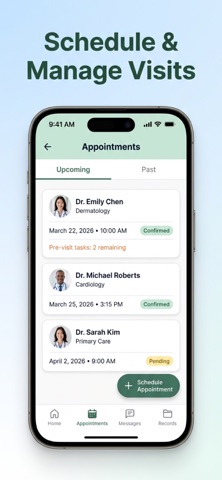
My Hero is a secure patient portal for patients of participating healthcare practices. Depending on your practice, use the app to view appointments, exchange secure messages with your care team, review health records, manage billing information, upload requested documents, and keep account settings current. Bluetooth blood pressure device support is intended for patients in the United States using compatible FDA-cleared blood pressure monitors. Use connected medical devices only as directed by the device manufacturer and your clinician. My Hero does not diagnose, treat, or replace professional medical judgment. Seek a doctor's advice in addition to using this app and before making any medical decisions. For emergencies, call 911 or your local emergency number.
What's new · 1.0.27
For clinicians: a fuller inbox Patient conversations fold and expand like on the web, with Hero reply drafts, urgent flags, attachments and a call button. You can mark items unread, forward them and work through voicemail. Pharmacy renewal requests can be answered with the renewal safety check, and a request someone else already answered says who answered it. If Hero can't confirm an answer reached the pharmacy, the request shows Not sent, with Send again. Results show every lab value, with Results Hero to tell the patient once. New Co-sign and Refills folders let you co-sign notes and decide portal refill requests from your phone. Lab, note and imaging pages show the patient's name and date of birth, and forms past their due date are marked Overdue. For patients Each visit opens its own summary. You can share a lab result, imaging report or note. Visit cards show where to go, with directions and Add to calendar. If your care team monitors a reading, you can type it in yourself. Records opened for one family member stay with that person when you switch, and Help & Support shows your practice's phone number. Invited patients confirm their date of birth before signing up, links that can no longer be used say so clearly, and if your practice still needs your date of birth on file you can call them from the app. For everyone The side menu now reaches the bottom of the screen, so every item and Sign Out is easy to reach. Signing in with Google no longer closes before you can choose an account. Plus fixes for scheduling, registration, letters, sign-in, messages, small screens and large text.
Details