

OndaHear: Hearing Amplifier
TomdApps LLC · Medical
Independent analytics for this App Store listing. AppTracker is not affiliated with TomdApps LLC.
Chart standing · US
What changed · US
Listing changes AppTracker has observed for this app in this storefront — new versions, price moves, rating shifts, and store copy.
Live captions now work in all 19 languages the app supports, and OndaHear downloads the speech model it needs automatically, right on your iPhone. Nothing you hear or say is uploaded. Translation keeps up with long talks and lectures, and translations into Chinese, Japanese and Korean now come through as whole, natural sentences. Conversation mode is more reliable with earbuds, and spoken replies now play correctly on the latest iOS. The caption box stays a fixed size and keeps the newest words in view, on iPhone and iPad. Plus fixes for iPad Translation and earbud detection, and works great with bone conduction headphones.
Ratings breakdown · US
The star breakdown behind this app's rating in this storefront.
In-app purchases · US
What this app sells inside itself, grouped by kind and priced for this storefront.
Screenshots



Similar apps
Competitors and close alternatives, as estimated by AppTracker.
 Hearing Aid Max for AirPods
Kadir Kad
Hearing Aid Max for AirPods
Kadir Kad
 Hearing Aid Ear Booster Loud
GOWALK - FZCO
Hearing Aid Ear Booster Loud
GOWALK - FZCO
 LISTENING DEVICE - HEARING AID
Application Development 21
LISTENING DEVICE - HEARING AID
Application Development 21
 Hearing Aid Sound Amplifier
Inverse.AI
Hearing Aid Sound Amplifier
Inverse.AI
 Hears - Hearing Aid: Amplifier
Abdulloh Bahromjonov
Hears - Hearing Aid: Amplifier
Abdulloh Bahromjonov
 Hearly - Hearing Aid App
Hasan Capraz
Hearly - Hearing Aid App
Hasan Capraz
 Hearing Helper - Voice Boost
Tamer Umut KELTEK
Hearing Helper - Voice Boost
Tamer Umut KELTEK
 Hearing Buddy - Speech To Text
Krager Labs LLC
Hearing Buddy - Speech To Text
Krager Labs LLC
About
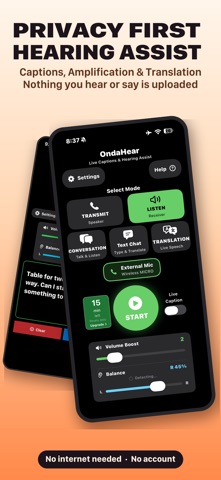
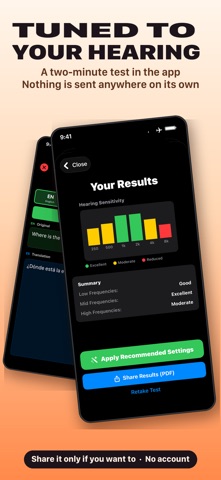
OndaHear is a hearing assistant that runs inside your iPhone. Hear the person you came to hear, read what you miss, and keep the conversation afterwards. Nothing you say is uploaded. Listen mode amplifies the voices around you in real time with live captions on screen. Lift soft voices, hold back background noise, and read what is being said as it happens. Live translation works across 19 languages. Speak in one and read or hear it in yours straight away. It all happens on the phone, and it keeps working offline once a language is downloaded. Conversation mode pairs two phones so each person speaks their own language and reads the other side translated live. Text chat writes your message and speaks it aloud on the other phone, already translated, for the times when speaking is not an option. The built-in hearing test is a six frequency audiogram. It gives you a hearing profile, and the app shapes the sound to your own results rather than simply turning everything up. On Apple Watch you can read captions on your wrist and start, stop or boost from there without reaching for your phone. An external microphone is the biggest single upgrade. Captions are only as good as the audio reaching them, so clip a small wireless mic on the person you are talking to, or set one beside the television, and keep the phone with you. Voices arrive clean instead of competing with the room. The Hardware Guide inside the app lists microphones tested with OndaHear. Privacy is not a setting here, it is how the app is built. Speech recognition, translation and audio processing all run on your iPhone using Apple's on-device frameworks, and the app works in airplane mode. No audio is recorded, transmitted or stored on a server. There are no analytics, no ads and no tracking. There is no account to create, and saved transcripts stay on your device. For sound you can adjust compression, a noise gate and voice enhancement, a three band equalizer, automatic gain control, a de-esser and a limiter, and you can save your own presets. You get 15 minutes a day free, every day, with no account and no card. A subscription removes the daily limit and adds the hearing test, custom hearing profiles, the six band equalizer, unlimited transcripts, PDF export and the premium voice processing modes. The price for your country is shown in the App Store before you commit to anything. Earbuds, wired headphones or hearing aids that take sound from your phone are strongly recommended, as they stop the microphone picking up its own output. USB-C and wireless microphones are supported. OndaHear does Listen, Transmit, Conversation, Translation and Text Chat, with live captions, sound amplification, the Hearing Test, an equalizer, Apple Watch and captions in AR glasses. It is not a medical hearing aid. Visit OndaHear.com for the full guide and what's new. Terms of Use: https://ondahear.com/terms.html
What's new · 2.2.12
Live captions now work in all 19 languages the app supports, and OndaHear downloads the speech model it needs automatically, right on your iPhone. Nothing you hear or say is uploaded. Translation keeps up with long talks and lectures, and translations into Chinese, Japanese and Korean now come through as whole, natural sentences. Conversation mode is more reliable with earbuds, and spoken replies now play correctly on the latest iOS. The caption box stays a fixed size and keeps the newest words in view, on iPhone and iPad. Plus fixes for iPad Translation and earbud detection, and works great with bone conduction headphones.
Details