

OneScribe - Document Scanner
Casa Vargas LLC · Productivity
Independent analytics for this App Store listing. AppTracker is not affiliated with Casa Vargas LLC.
Chart standing · US
What changed · US
Listing changes AppTracker has observed for this app in this storefront — new versions, price moves, rating shifts, and store copy.
OneScribe 2.1 • OneScribe now speaks Spanish, French, German, Japanese, Simplified Chinese and Brazilian Portuguese. Answers, summaries and Siri follow your iPhone's language. • Recipes export as a Recipe Card in three styles, a 4×6 or 3×5 index card, a grocery list, or a Recipe Book bound from a whole folder. Change the servings and every quantity follows. • A scan gets a document type only when the page proves it. Anything uncertain is marked, with a one-tap suggestion, and a type you set yourself is never overwritten. • Amounts show the document's own currency, not your iPhone's. • Tax forms and medical documents extract more reliably. • Deep Review moved into the toolbar on iPhone. On iPad it no longer appears on devices that cannot run it. • Exporting several documents on iPad asks for Face ID when a locked document is among them. • More screens hold up at the largest text sizes and with VoiceOver: the paywall, the iPad sidebar, the first run and the document view. • Fixes for two Voice Mode crashes, including one on older iPads. • Plus smaller fixes throughout.
Ratings breakdown · US
The star breakdown behind this app's rating in this storefront.
Screenshots





About
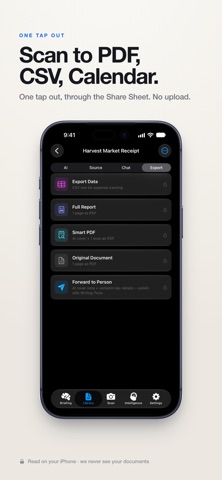
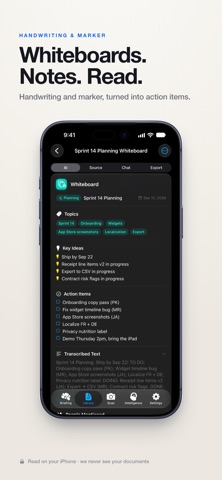
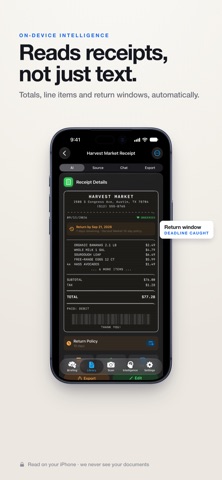
Your documents have stories. Now you can hear them. OneScribe turns every receipt, contract, ID, and letter you scan into something you can actually use — read, understood, searched, and exported. All of it happens on your iPhone. NEW — TALK TO YOUR DOCUMENTS Ask a question out loud and hear the answer back. Voice conversation runs entirely on your device: on-device speech recognition, on-device AI, on-device speech synthesis. Ask "when does this warranty run out?" while you're still holding the box. WHAT IT ACTUALLY DOES Scan with the camera or import from Files. OneScribe reads the page, works out what it is, and builds a Data Card designed for that specific document. Receipt? Every line item, tax, tip, and total. Contract? Deadlines, renewal windows, and the clauses worth a second look. Prescription? Dosage, refills, and the prescriber. Boarding pass, W-2, wine label, lab result, lease, vehicle title — 83 Data Cards across 70+ document types. Not a wall of OCR text. Structured information you can search, sort, and act on. PRIVACY IS THE ARCHITECTURE, NOT A SETTING Every other scanner uploads your documents to understand them. Your tax returns, your medical records, your contracts — sitting on somebody else's hardware. OneScribe runs its AI on your iPhone through Apple Foundation Models. There's no account to create. We never see your documents. Your library syncs across your devices through your own iCloud — to you, never to us. BUILT FOR HOW YOU ACTUALLY WORK • Ask your whole library questions in plain English • Chat with any document in any of 7 personas, from Just the Facts to Deep Dive • A daily briefing that surfaces what needs attention before you go looking • Proactive alerts before warranties lapse, returns close, and documents expire • 19 smart export modes — Calendar, Contacts, PDF, CSV, tax package, expense report, property binder • 14 Siri shortcuts, so you can ask without opening the app • Natural-language search across everything you have ever scanned MADE FOR THIS iPHONE iOS 26 exclusive. Liquid Glass throughout. Scan something. Then ask it a question.
What's new · 2.1.0
OneScribe 2.1 • OneScribe now speaks Spanish, French, German, Japanese, Simplified Chinese and Brazilian Portuguese. Answers, summaries and Siri follow your iPhone's language. • Recipes export as a Recipe Card in three styles, a 4×6 or 3×5 index card, a grocery list, or a Recipe Book bound from a whole folder. Change the servings and every quantity follows. • A scan gets a document type only when the page proves it. Anything uncertain is marked, with a one-tap suggestion, and a type you set yourself is never overwritten. • Amounts show the document's own currency, not your iPhone's. • Tax forms and medical documents extract more reliably. • Deep Review moved into the toolbar on iPhone. On iPad it no longer appears on devices that cannot run it. • Exporting several documents on iPad asks for Face ID when a locked document is among them. • More screens hold up at the largest text sizes and with VoiceOver: the paywall, the iPad sidebar, the first run and the document view. • Fixes for two Voice Mode crashes, including one on older iPads. • Plus smaller fixes throughout.
Details