

Apertura - Pro Cam
Michael Davis · Photo & Video
Independent analytics for this App Store listing. AppTracker is not affiliated with Michael Davis.
Chart standing · US
What changed · US
Listing changes AppTracker has observed for this app in this storefront — new versions, price moves, rating shifts, and store copy.
• Camera Control button support on iPhone 16 and later • Shoot from the Lock Screen and launch from Control Center • Rebuilt AEB bracketing: faster, more consistent, and works in Manual mode • Smoother camera switching and a faster, lighter photo viewer • The editor opens large photos faster and sliders stay responsive on 48MP shots • Rating and feedback links fixed • Many fixes for black viewfinder, stuck captures and memory use in burst and timelapse
Ratings breakdown · US
The star breakdown behind this app's rating in this storefront.
In-app purchases · US
No in-app purchases.
Screenshots





About
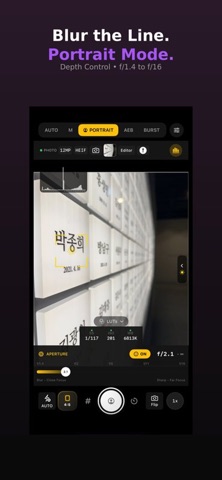
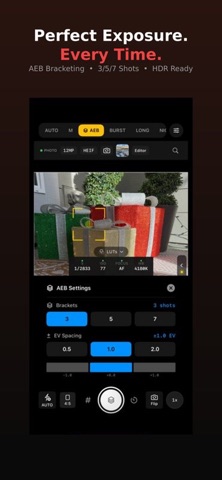
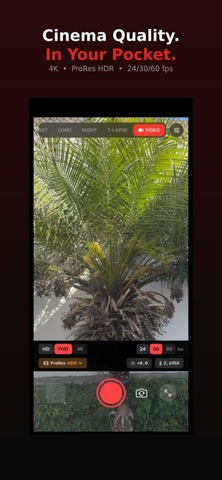
Apertura is a pro camera and editor in one app. Shoot with full manual control, pick from more than 40 looks live in the viewfinder, then finish your photo in a built-in editor with curves, HSL and masks. CAPTURE • Auto, Manual, Portrait, AEB bracketing, Burst, Focus Stack, Long Exposure, Night and Timelapse modes • Manual shutter, ISO, focus and white balance with a magnified focus assist • 12, 24 and 48MP capture in HEIF, JPEG, RAW and ProRAW • Live histogram, zebras, focus peaking, grids and spirit level • 4K video up to 60 fps with ProRes and manual exposure • 40+ looks across Cinema, Film Stock, B&W and Creative, plus import of your own .cube LUTs EDIT • Light, Curve, Color, HSL and Grading controls with a live histogram • Masks, healing, effects, detail and crop • One-tap Auto presets, hold-to-compare and split view • Edits are saved per photo and export at full resolution EXPLORE • Photo Spots maps nearby locations with sunrise, golden hour and sunset times ON YOUR IPHONE • Camera Control button support on iPhone 16 and later • Launch straight from the Lock Screen and Control Center • Volume and Action button capture Your photos stay on your device. No account required.
What's new · 1.8
• Camera Control button support on iPhone 16 and later • Shoot from the Lock Screen and launch from Control Center • Rebuilt AEB bracketing: faster, more consistent, and works in Manual mode • Smoother camera switching and a faster, lighter photo viewer • The editor opens large photos faster and sliders stay responsive on 48MP shots • Rating and feedback links fixed • Many fixes for black viewfinder, stuck captures and memory use in burst and timelapse
Details