

Audio Extractor from Video
StudyBridge LLC · Utilities
Independent analytics for this App Store listing. AppTracker is not affiliated with StudyBridge LLC.
Chart standing · US
In-app purchases · US
No in-app purchases.
Screenshots


About
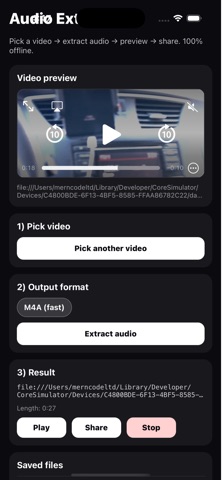
Audio Extractor – Video to M4A Audio Extractor lets you quickly extract audio from any video stored on your device — completely offline. No uploads, no servers, and no internet connection required. Choose a video, extract its audio in high-quality M4A format, preview the result, rename files, and share them anywhere. Perfect for saving voice tracks, music clips, interviews, lectures, or any audio you need from a video. Features • Extract audio from local videos • High-quality M4A output (fast & compatible) • Works 100% offline — your files stay private • Preview audio with built-in player • Rename extracted audio files • View audio duration • Manage saved files in one place • Share audio via Files, AirDrop, WhatsApp, Drive, and more Why Audio Extractor? • No internet required • No uploads or tracking • Clean, simple interface • Fast processing using native system APIs • Designed for privacy and reliability Use cases • Save music from videos • Extract voice notes or speeches • Convert lectures to audio • Reuse audio for editing or sharing Audio Extractor is a lightweight utility built for speed, privacy, and simplicity.
Details