

TrancyKeyboard - 中英输入法
善康 梁 · Education
Independent analytics for this App Store listing. AppTracker is not affiliated with 善康 梁.
Chart standing · US
What changed · US
Listing changes AppTracker has observed for this app in this storefront — new versions, price moves, rating shifts, and store copy.
Optimize the background use of the offline large model, and restore the previously deleted function of querying expressions and symbols.
Price & rating history · US
Reconstructed from the listing changes AppTracker has observed in this storefront. A field is charted once it has changed more than once, and each line starts at the value it moved from.
Average rating · ★ 4.00 now · 3 changes on record
Ratings breakdown · US
The star breakdown behind this app's rating in this storefront.
Screenshots



About
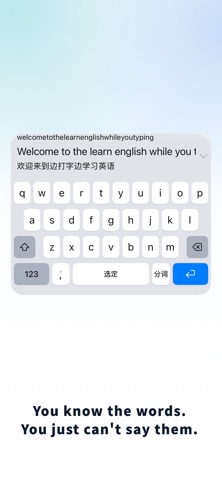
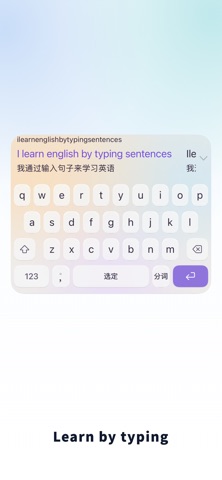
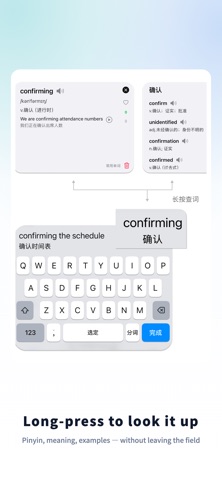
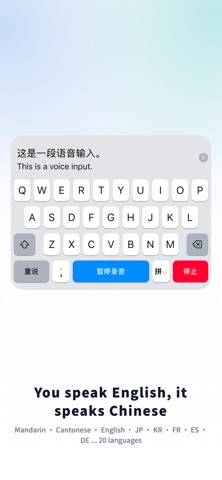
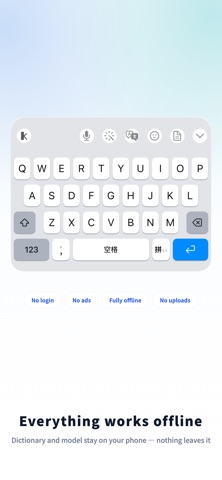
Make everyday typing part of your language practice. Chinese English Keyboard brings bilingual meanings, translation, and vocabulary review into your daily messages and notes. Type Chinese to explore English expressions, or type English and check the Chinese meaning. Choose the original text or its translation when inserting a candidate. PRACTICE IN BOTH LANGUAGES Learning English? Use Chinese meanings to check your words and phrases as you write. Can't recall an English word? Try its Chinese Pinyin, such as pingguo for apple. Advanced English spelling correction can suggest usually when you type uselly. Learning Chinese? Type with Pinyin, compare Chinese and English candidates, and listen to supported pronunciation. Long-press candidates for definitions or examples. Use AI translation, grammar correction, and rewriting to explore another way to express your thoughts. Some advanced features require an in-app purchase. REVIEW WORDS YOU ACTUALLY USE With word history enabled, selected words and phrases become personal learning material. Review meanings and examples, listen to words and sentences, mark familiarity, and set study plans or review reminders. Pro adds extended vocabulary management and iCloud sync. FREE BUBBLE KEYBOARD Explore a different way to enter Pinyin: hold an initial, slide to a final, and pause to choose a tone. For example, L + iang forms liang. Release to enter the syllable, or use tap selection instead. Visible Pinyin combinations and pronunciation feedback help you connect spelling with sound. Bubble Keyboard is free; optional in-app purchases are available elsewhere in the app. CHOOSE YOUR INPUT STYLE Use Pinyin, Shuangpin, 9-key Pinyin, Stroke, Wubi 86, Cangjie, or Quick Cangjie. Switch between Simplified and Traditional Chinese and import personal word lists. The 26-key layout supports mixed Chinese-English input. On the 9-key layout, switch to the English keyboard to type English. Choose bilingual candidates on separate rows or side by side, or use full-sentence translation. Customize common phrases, keyboard height, colors, and candidate display. SPEAK AND LISTEN Use voice input in supported languages, including English, Mandarin, Cantonese, and Japanese. Compare the source text with its translation and listen in your selected output language. On iOS, start the recording service in the main app before using voice input from the keyboard. Availability depends on your system and selected engine. NO ADS. NO SIGN-UP. Local dictionaries work on your device. Offline speech synthesis and on-device AI are available with compatible hardware, software, and downloaded resources. If you enable iCloud, relevant records sync through iCloud. If you choose an online API, relevant text or audio is sent to your configured provider and provider charges may apply. Some features require Full Access. See the in-app explanation and privacy policy for details. FREE TO START Basic typing, Bubble Keyboard, mixed input, English dictionary lookup, and basic colors are free. Try up to 10 translations or rewrites per day. Pro adds advanced English correction and completion, extended vocabulary tools, themes, and sync. See the in-app purchase screen for current benefits, subscription or one-time purchase options, and local pricing. Third-party API fees are separate. After installing, add the keyboard in Settings > General > Keyboard, then switch to it with the globe key. Terms of Use: https://www.apple.com/legal/internet-services/itunes/dev/stdeula/ Privacy Policy: https://app.shankindness.top/inputmethod_privacy_ios.html
What's new · 7.7.82
Optimize the background use of the offline large model, and restore the previously deleted function of querying expressions and symbols.
Details