
Chart standing · US
What changed · US
Listing changes AppTracker has observed for this app in this storefront — new versions, price moves, rating shifts, and store copy.
Version 2.0 is our biggest update yet. WRITE YOUR FRONT AND BACK MATTER PROPERLY Your introduction and final thoughts are now full chapters with the complete editor behind them, instead of a small text box. Move through your book in reading order, from the introduction, through every chapter, to your closing words. PRINT-READY PUBLISHING Export a complete Amazon KDP package: a print-ready interior, your cover, and a full wraparound cover in one step. Nine page sizes, including all the common KDP trim sizes. FIVE BOOK STYLES Choose Standard, Classic, Modern, Structured or Workbook. Classic adds serif type and drop caps for fiction and memoir; Workbook turns lists into checkboxes and prompts for journals and courses. A CLEANER EDITOR Redesigned chapter list, a status bar with live word count and reading time, and quicker navigation between sections. Right-to-left languages including Arabic and Hebrew are now properly supported. TRANSLATE AND REMIX Translate a finished book into 58 languages, or expand one book into a series of two to four volumes. BETTER COVERS New Print tab for back cover and spine, AI cover generation with your own creative direction, and your generated covers are now saved to your gallery automatically. MORE RELIABLE Rebuilt on the latest iOS foundations for a faster, steadier app. Improved syncing so long books stay safe when you write across your iPhone and the web app. Plus a new in-app Help Centre. Thanks for writing with Inkfluence. Tell us what to build next at hello@inkfluenceai.com
Price & rating history · US
Reconstructed from the listing changes AppTracker has observed in this storefront, so each line starts at the first change on record.
Average rating
Ratings breakdown · US
The star breakdown behind this app's rating in this storefront.
Screenshots



About
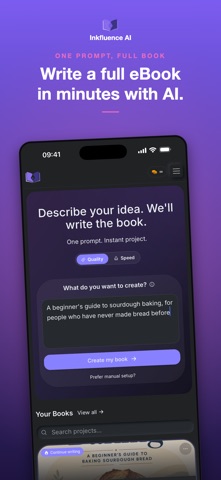
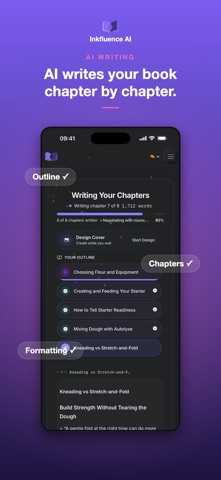
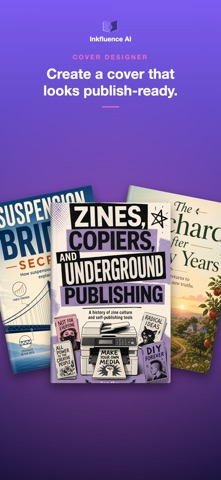
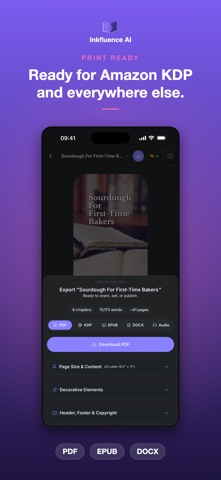
Inkfluence is an AI ebook maker that creates ebooks, PDFs, EPUBs, and audiobooks in minutes. Start with one idea and Inkfluence writes the chapters and prepares everything ready for export. Create lead magnets, guides, workbooks, fiction books and more. No setup. No formatting. No writing from scratch. What creators use Inkfluence for: • Lead magnets and email opt-ins • Course workbooks and companion guides • Client onboarding PDFs • Non-fiction ebooks and short books • Audiobooks for podcasts and online courses AI Book Writer Describe what you want to create and Inkfluence writes the book for you. Chapters are structured, clear, and ready to publish. The AI understands context, keeps track of your ideas, and turns a single prompt into a complete project. Use Inkfluence to create ebooks, workbooks, guides, fiction, non-fiction, documentation, and digital products - without starting from a blank page. Export and Publish Anywhere Export your finished work in the formats people actually use. Create PDF, EPUB, DOCX, or audio files ready for Amazon Kindle, Apple Books, Gumroad, or your own website. Inkfluence includes a built-in cover designer so you can create clean, professional ebook covers without hiring a designer or using extra tools. Audiobook Generator Turn your writing into high-quality audio using realistic AI voices. Generate narration chapter by chapter and download MP3 files ready for audiobooks, podcasts, or online courses. Templates for Faster Creation Start with professionally structured templates for lead magnets, how-to guides, workbooks, case studies, course companions, recipes, fiction, and more. Templates help you move from idea to finished draft faster while still letting you customise the content. Built for Creators Inkfluence is used by coaches, teachers, authors, content creators, bloggers, YouTubers, and entrepreneurs who need fast, reliable writing tools. It’s ideal for digital product sellers, KDP publishers, small business owners, and anyone building authority with written content. Powerful Writing Tools Inkfluence includes a rich text editor with auto-save, AI rewrite and expansion tools, reusable content snippets, progress tracking, and cloud sync across devices. Free to Start, Upgrade When Ready Start free with 5 chapters to try Inkfluence. Upgrade when you’re ready to export, remove limits, and publish your work. Paid plans unlock unlimited writing, advanced export options, priority processing, and full audiobook tools. Finish and Publish Faster Inkfluence AI is an all in one ebook, PDF, and audiobook creator. Create your first chapter today and finish something worth sharing. Support: https://inkfluenceai.com/help Contact: hello@inkfluenceai.com Terms of Use (EULA): https://www.apple.com/legal/internet-services/itunes/dev/stdeula/
What's new · 2.0.0
Version 2.0 is our biggest update yet. WRITE YOUR FRONT AND BACK MATTER PROPERLY Your introduction and final thoughts are now full chapters with the complete editor behind them, instead of a small text box. Move through your book in reading order, from the introduction, through every chapter, to your closing words. PRINT-READY PUBLISHING Export a complete Amazon KDP package: a print-ready interior, your cover, and a full wraparound cover in one step. Nine page sizes, including all the common KDP trim sizes. FIVE BOOK STYLES Choose Standard, Classic, Modern, Structured or Workbook. Classic adds serif type and drop caps for fiction and memoir; Workbook turns lists into checkboxes and prompts for journals and courses. A CLEANER EDITOR Redesigned chapter list, a status bar with live word count and reading time, and quicker navigation between sections. Right-to-left languages including Arabic and Hebrew are now properly supported. TRANSLATE AND REMIX Translate a finished book into 58 languages, or expand one book into a series of two to four volumes. BETTER COVERS New Print tab for back cover and spine, AI cover generation with your own creative direction, and your generated covers are now saved to your gallery automatically. MORE RELIABLE Rebuilt on the latest iOS foundations for a faster, steadier app. Improved syncing so long books stay safe when you write across your iPhone and the web app. Plus a new in-app Help Centre. Thanks for writing with Inkfluence. Tell us what to build next at hello@inkfluenceai.com
Details