

Paintrix: Digital Art App
Harry Teel · Graphics & Design
Independent analytics for this App Store listing. AppTracker is not affiliated with Harry Teel.
Chart standing · US
What changed · US
Listing changes AppTracker has observed for this app in this storefront — new versions, price moves, rating shifts, and store copy.
Check out our new Manga brush set, featuring expressive ink pens, screentones, hatching, and stippling. Updated canvas presets: New Manga / Comic sizes and ready-made panel layouts help you get straight to drawing. Rebuilt oil painting rendering engine: crisp bristle detail, more natural paint blending, and adjustable impasto. The new Bristles brush lets you add texture and gently smear existing paint without adding color. Plus, sharper brush previews, smoother performance, and fixes for shape correction and layer duplication.
Price & rating history · US
Reconstructed from the listing changes AppTracker has observed in this storefront. A field is charted once it has changed more than once, and each line starts at the value it moved from.
Average rating · ★ 4.60 now · 6 changes on record
Screenshots




About
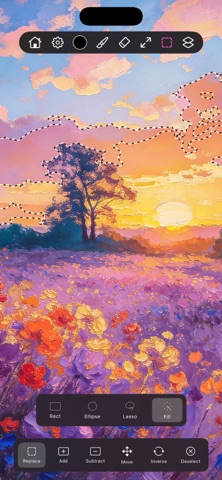
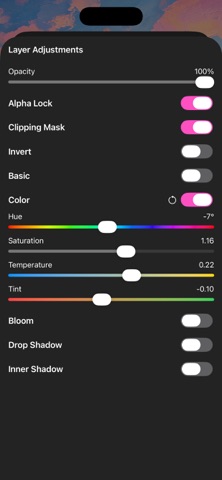
Paint like you're in a real studio, on the iPad or iPhone you already own. Paintrix Studio is a full digital painting app with 60 brushes, unlimited layers, gradients, paintable materials and live drawing with a friend. Every tool is free to use. Everything runs on the GPU through Apple's Metal, so brushes, filters and effects stay smooth even on big canvases. BRUSHES THAT FEEL LIKE PAINT • 60 brushes in nine families: Oil Paints, Manga, Watercolor, Pencils, Charcoals, Pens, Spraypaint, Basic and Water Brushes • Oil brushes leave raised impasto and bristle grooves, and blend into the paint already on the canvas • Apple Pencil pressure, tilt and hover, plus squeeze to undo on Apple Pencil Pro LAYERS YOU CAN KEEP CHANGING • Unlimited layers with clipping masks and alpha lock • Live, always-editable adjustments: brightness, contrast, hue, saturation, vibrance, temperature, bloom and shadows COLOR, GRADIENTS AND MATERIALS • Build palettes by hand or generate one from any photo • Import .swatches palette files with every color intact • Linear, radial and angular gradients that follow your brush • 14 materials, including gold, marble, mahogany and halftone, that paint real texture and shading DRAW TOGETHER, LIVE Invite a friend with a six-character code or a link and paint on the same canvas at the same time. You see their cursor and strokes as they happen, layers sync between you, and you both keep a copy when you're done. No accounts needed. TOOLS FOR EVERY STYLE • Mirror mode with vertical, horizontal, quadrant and radial symmetry • Quick Shapes: hold at the end of a stroke to snap it into a clean shape • Smudge, Pinch, Bubble and Liquid Mode to push paint around • Magic selection, lasso and shape selections, plus a clone stamp • Visual history panel to jump back to any step SHARE YOUR PROCESS • A timelapse records every painting automatically. Export it as a video in a tap • Export PNG or JPEG at any PPI • Back up full layered projects to iCloud Drive ONE APP, BOTH DEVICES Paintrix Studio runs on iPad and iPhone with the same features. The layout adapts to each screen, and one subscription covers every device on your Apple Account. FREE TO START Download free and use every brush, layer, tool and export with no limits. Paintrix Pro, an optional monthly subscription, unlocks one thing: reopening projects you saved earlier. Payment is charged to your Apple Account. The subscription renews automatically unless you cancel at least 24 hours before the end of the current period. Manage or cancel it any time in your Apple Account settings. Guides in 12 languages: paintrix.studio/documentation Privacy Policy: https://paintrix.studio/privacy.html Terms of Use: https://paintrix.studio/terms.html
What's new · 4.5
Check out our new Manga brush set, featuring expressive ink pens, screentones, hatching, and stippling. Updated canvas presets: New Manga / Comic sizes and ready-made panel layouts help you get straight to drawing. Rebuilt oil painting rendering engine: crisp bristle detail, more natural paint blending, and adjustable impasto. The new Bristles brush lets you add texture and gently smear existing paint without adding color. Plus, sharper brush previews, smoother performance, and fixes for shape correction and layer duplication.
Details