

Word Clock Pro: Widget
Vasic Stefan · Utilities
Independent analytics for this App Store listing. AppTracker is not affiliated with Vasic Stefan.
Chart standing · US
What changed · US
Listing changes AppTracker has observed for this app in this storefront — new versions, price moves, rating shifts, and store copy.
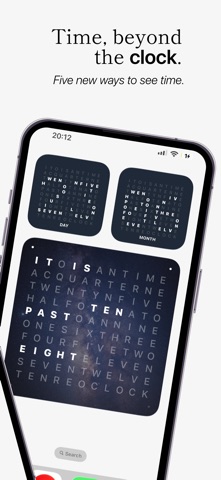
Word Clock Pro 5.0 introduces more ways to visualize time and personalize your clock: • New day, week, month, year progress, and countdown widgets • Image backgrounds for widgets • More control over minute indicators, including position, color, opacity, size, and new shapes • Ambient Mode can now keep the screen awake, so your clock remains visible without auto-locking • Performance improvements and bug fixes • Corrected French word-clock phrase order
In-app purchases · US
No in-app purchases.
Screenshots




Keywords this app targets
Search terms AppTracker associates with this app — estimates, not search volume. ❝ = in the app's title; a highlighted number is its current position for that term.
Similar apps
Competitors and close alternatives, as estimated by AppTracker.
 WordClock Widget - Text Clock
Tobias Weissert
4 shared topics · 2 shared title words
WordClock Widget - Text Clock
Tobias Weissert
4 shared topics · 2 shared title words
 A Word Clock
Raymund Vorwerk
3 shared title words
A Word Clock
Raymund Vorwerk
3 shared title words
 Flip Clock Pro - time widgets
翠玲 施
3 shared title words
Flip Clock Pro - time widgets
翠玲 施
3 shared title words
 FaceClock Pro - Analogue Clock
iReka Soft
FaceClock Pro - Analogue Clock
iReka Soft
 Binary Clock Widget by MrSilaz
Ralf Freit
2 shared title words
Binary Clock Widget by MrSilaz
Ralf Freit
2 shared title words
 Bauhaus Clock - Analog Watch
Atilla Taskiran
1 shared title word
Bauhaus Clock - Analog Watch
Atilla Taskiran
1 shared title word
 ClockZ Pro
Makoto Katsumata
1 shared title word
ClockZ Pro
Makoto Katsumata
1 shared title word
 Timesewn
Adventure Apps, LLC
1 shared topic
Timesewn
Adventure Apps, LLC
1 shared topic
About
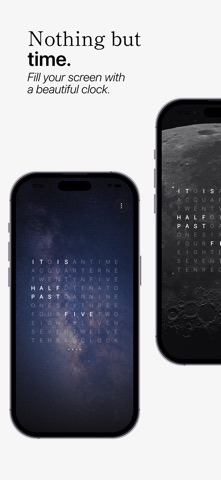
Turn time into typography with Word Clock Pro—a customizable word clock, home screen widget, desk clock, and ambient display for your Apple devices. Instead of ordinary digits, Word Clock Pro expresses the time in words. Create a minimalist clock that matches your home screen, desk, nightstand, Mac, Apple Watch, or Apple TV. WORD CLOCK WIDGETS Add elegant word clock widgets to your iPhone, iPad, or Mac. Choose from small and large layouts, customize their appearance, and use your own images as widget backgrounds. PROGRESS & COUNTDOWN WIDGETS Visualize more than the current time with dedicated widgets for: • Day progress • Week progress • Month progress • Year progress • Custom countdowns Create countdowns for birthdays, holidays, events, deadlines, and other important dates. DESIGN YOUR OWN CLOCK Build unlimited themes with complete control over: • Background and letter colors • Image backgrounds • Fonts and typography • Inactive-letter opacity • Minute indicator position • Indicator color, opacity, size, and shape • One-minute or classic five-minute precision Start with 15 professionally designed presets or create a completely original look with live previews. DESK & AMBIENT CLOCK Turn your iPhone or iPad into a calm bedside, desk, or kiosk display. Ambient Mode can keep the screen awake, allowing your word clock to remain visible without automatic locking. SIX CLOCK LANGUAGES Display time in: • English • German • Dutch • French • Spanish • Italian ACROSS THE APPLE ECOSYSTEM • iPhone and iPad Home screen widgets, StandBy support, countdowns, progress widgets, and fullscreen clock modes. • Mac A native macOS app, desktop widgets, and a dedicated word clock screensaver. • Apple Watch A glanceable word clock with customizable themes. • Apple TV A large-format ambient word clock designed for viewing across the room. ICLOUD SYNC Keep your custom themes and settings synchronized across supported Apple devices. ONE-TIME PURCHASE Buy Word Clock Pro once and use it across iPhone, iPad, Mac, Apple Watch, and Apple TV. No subscriptions. No in-app purchases.
What's new · 5.0.2
Word Clock Pro 5.0 introduces more ways to visualize time and personalize your clock: • New day, week, month, year progress, and countdown widgets • Image backgrounds for widgets • More control over minute indicators, including position, color, opacity, size, and new shapes • Ambient Mode can now keep the screen awake, so your clock remains visible without auto-locking • Performance improvements and bug fixes • Corrected French word-clock phrase order
Details